Before you write a single word of content, a solid, data-driven strategy is what separates successful WordPress SEO from a shot in the dark. It’s all about figuring out what your audience is actually searching for, digging into their intent, and then mapping those keywords to specific pages. This way, every piece of content has a clear, defined purpose.
Building Your WordPress Keyword Strategy
A powerful keyword strategy is the bedrock of any serious WordPress SEO effort. This isn't just about grabbing a few high-volume search terms. It's about deeply understanding the questions, problems, and needs of your target audience. Without this blueprint, you're just creating content and hoping the right people stumble upon it.
A well-researched strategy ensures your content directly answers what people are asking Google, and that's exactly what the algorithm is designed to reward. This process goes way beyond plugging a topic into a keyword tool. It demands a real dive into user psychology and a sharp eye on what your competitors are doing. The goal is to build a comprehensive keyword map that guides every blog post, service page, and product description you create.
Decoding User Search Intent
First things first: you have to get inside your searcher's head and understand why they're searching. Search intent usually boils down to a few key categories, and nailing this is crucial.
- Informational Intent: The user wants to learn something. Think queries starting with "how to," "what is," or "why." For a local bakery with a WordPress site, a classic example is "how to make sourdough starter."
- Navigational Intent: The user is trying to get to a specific website. A search like "Sight AI blog" is a dead giveaway. They already know where they want to go.
- Commercial Intent: The user is in research mode, comparing options before they buy. Keywords like "best seo plugins for wordpress" or "yoast vs rank math" fit perfectly here.
- Transactional Intent: The user has their wallet out and is ready to act. These searches include trigger words like "buy," "discount," or "sale." A prime example is "buy generatepress theme."
Once you know the intent, you know what kind of content to create. Informational keywords are perfect for blog posts. Commercial and transactional keywords, on the other hand, belong on your product or service pages where you can close the deal.
Uncovering Valuable Long-Tail Keywords
Chasing big, flashy "head" terms like "WordPress SEO" is tempting, but they are brutally competitive. The real gold is often found in long-tail keywords—those longer, more specific search phrases that get straight to the point.
Instead of just "WordPress SEO," a much smarter long-tail keyword would be "how to optimize images for wordpress seo."
Sure, these keywords have lower search volume, but they convert like crazy. Why? Because the user behind that search has a very specific need and is much further down the path to making a decision. You can uncover these gems just by looking at Google's "People Also Ask" section or by lurking in forums like Reddit and Quora to see the exact language your audience uses.
This simple hierarchy shows how a winning strategy flows from understanding your audience to building out your content.
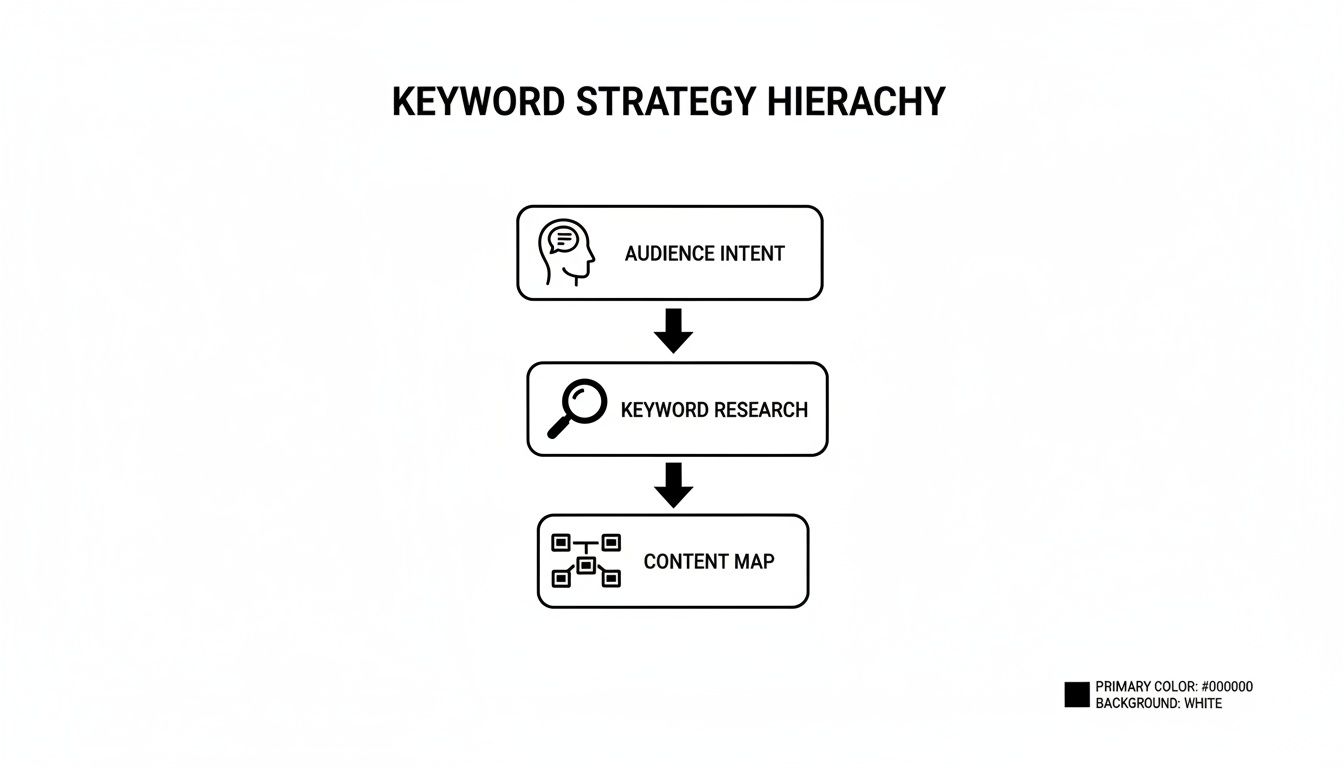
As you can see, everything starts with user intent. That informs your keyword research, which then dictates the entire structure of your site's content map.
Key Takeaway: A winning WordPress keyword strategy isn’t about chasing the highest search volume. It’s about methodically building a content ecosystem that solves your audience's problems at every single stage of their journey.
A truly effective SEO keyword strategy is a living process—a constant cycle of research, implementation, and analysis. Putting in this foundational work is what separates websites that get a steady stream of qualified traffic from those that fade into obscurity.
Turning Keywords Into High-Ranking Content
Having a brilliant list of keywords is just the start. The real work—and where the magic happens—is turning that raw data into content that actually ranks. The goal isn't just to make search engines happy; it's to create pages and posts in WordPress that solve a real problem for a real person. This is less about keyword stuffing and way more about building genuine topical authority.
When you create a piece of content that completely nails a user's query, you're doing more than just optimizing for one term. You're building a comprehensive resource that deserves to be at the top. That's the core of modern SEO in WordPress: marrying smart data with genuine value.
Structuring Content Around a Primary Keyword
Every single article or page you create needs a laser-focused purpose, and that purpose is anchored by one primary keyword. Think of this as the "focus keyword" you'd plug into a plugin like Yoast or Rank Math. It's the North Star for that specific piece of content, guiding everything from your title and headings to the very first paragraph.
For instance, if your primary keyword is "best lightweight wordpress themes," the entire point of your article is to review, compare, and recommend those themes. Every other related term you use should support that central mission, not pull focus from it.
Key Takeaway: Think of your primary keyword as the title of a book. The rest of your content—your headings, paragraphs, and images—are the chapters that explore that single, focused topic from every angle.
This singular focus is a huge signal to Google. It tells them exactly what your page is about, making it much easier to rank for the query you're targeting. If you try to cram too many different primary keywords onto one page, you’ll just dilute its power and end up confusing everyone, including search engines.
Weaving in a Cluster of Related Terms
To prove you're an expert on a topic, you need to go deep. That means supporting your primary keyword with a whole cluster of secondary, related terms. These are the long-tail variations, synonyms, and contextual keywords (sometimes called LSI keywords) that show you're covering the subject from all sides.
Let's say your primary keyword is "how to speed up wordpress." Your related keyword cluster might look something like this:
- Optimizing images for WordPress
- Best caching plugins for speed
- Choosing fast WordPress hosting
- Minimizing CSS and JavaScript
- What is TTFB in WordPress
By naturally working these phrases into your subheadings and body copy, you create a much more complete and helpful resource. This approach anticipates and answers the follow-up questions a user might have. To see this in action, check out our in-depth guide on how to write SEO-friendly blog posts.
Writing for People First and Search Engines Second
The fastest way to fail at content is to write for bots. Clunky, keyword-stuffed text doesn't just make for a terrible reading experience; it's also a losing strategy for ranking long-term. Google's algorithms are incredibly sophisticated now and can easily spot natural language. The secret is to just write like a human.
Instead of trying to force a keyword into a sentence where it feels awkward, think about how you'd explain the topic to a friend over coffee. Use your keywords where they make sense and add clarity.
Poor, Forced Keyword Use: "For your keywords seo wordpress needs, you need a keywords seo wordpress strategy that uses the best keywords seo wordpress tools."
Natural, Effective Keyword Use: "Developing a strong strategy for keywords SEO in WordPress starts with understanding your audience and using the right tools to uncover what they search for."
The second example isn't just easier to read—it's also better for SEO. Search engines reward content that keeps people on the page, engaged, and satisfied. Metrics like time on page and low bounce rates are powerful signals. At the end of the day, creating genuinely helpful content is the most sustainable way to the top of the search results.
Configuring WordPress SEO Plugins for Success

Think of your SEO plugin as the command center for all your on-page efforts. It’s the bridge between your keyword strategy and the technical signals Google needs to understand what your content is about. Simply installing it isn't enough; diving into the settings is what separates a basic site from a finely-tuned, high-performing one.
Plugins have been a total game-changer for keywords SEO in WordPress. It’s no secret that WordPress powers a huge chunk of the internet—43.3% of all websites, to be exact. Of those, over 30% rely on tools like Yoast SEO or Rank Math to get their keyword strategy dialed in. With 72% of users reporting noticeable SEO improvements after installation, mastering your plugin is a must.
Setting Your Focus Keyword
Every single page or post needs a primary target. In both Yoast and Rank Math, this is where you declare it, usually in a field labeled "Focus keyphrase" or "Focus Keyword." Let's be clear: just typing your keyword here won't magically make you rank. What it does do is activate the plugin's built-in analysis engine.
This is where the magic happens. The plugin uses that keyword as a benchmark to give you real-time feedback on critical on-page elements:
- Keyword in SEO Title: Is your target phrase in the main title that shows up in search results?
- Keyword in Meta Description: Did you include it in the little summary text under the title?
- Keyword in URL: Is the keyword present in the page’s slug?
- Keyword in Introduction: Have you used the keyword within the first paragraph or so?
- Keyword in Headings: Does your keyword appear in any of your H2 or H3 subheadings?
This instant feedback loop is your first line of defense against common mistakes. It's like having a pre-flight checklist for your on-page SEO. If you're still deciding on a plugin, you can check out our guide on the best SEO software for WordPress to compare the top contenders.
Crafting Click-Worthy Titles and Meta Descriptions
The plugin interface is where you'll write the two most important pieces of copy for winning clicks: the SEO title and the meta description. This is your digital billboard. It's your one shot to convince someone scrolling through Google that your page has the answers they're looking for.
SEO plugins give you a live preview of how your snippet will look, complete with handy progress bars to keep you from writing something that gets cut off. A great SEO title is short (aim for around 60 characters), includes your primary keyword, and sparks a little curiosity.
Pro Tip: Your meta description doesn't directly influence rankings, but it has a huge impact on your click-through rate (CTR). Treat it like ad copy. Weave your keyword in naturally, highlight the core benefit of your content, and add a soft call to action like "Find out how" or "Discover the best options."
This preview feature alone is invaluable for polishing how your keywords SEO WordPress content is presented to potential readers.
To help you get the most out of your plugin, here’s a quick-reference table for the most important settings related to keyword optimization in both Yoast and Rank Math.
Key SEO Plugin Settings for Keyword Optimization
| Setting | What It Does | Best Practice |
|---|---|---|
| Focus Keyphrase/Keyword | Sets the primary keyword for the page to activate the SEO analysis. | Use your single, most important target keyword for that specific page. |
| SEO Title | The clickable headline that appears in search engine results pages (SERPs). | Include your focus keyword, keep it under 60 characters, and make it compelling. |
| Meta Description | The summary text displayed below the SEO title in search results. | Include the keyword naturally, write persuasive copy, and stay under 160 characters. |
| Slug (URL) | The part of the URL that identifies the specific page. | Make it short, descriptive, and include your primary keyword. |
| Cornerstone Content | A feature (in Yoast) to identify your most important, foundational articles. | Toggle this on for your most comprehensive and valuable pages to get stricter analysis. |
These settings form the foundation of your on-page SEO. Getting them right for every piece of content you publish is a simple but powerful habit to build.
Interpreting the SEO Analysis Score
Both Yoast and Rank Math use a simple traffic light system (green, orange, red) to score your optimization efforts. It's so tempting to get obsessed with hitting "all green" on every single check, but that's a rookie mistake.
Think of these scores as guidelines, not gospel.
The plugin provides specific, actionable feedback you can use to improve your content's structure and keyword focus, but you are the final judge. A green light for "keyphrase density" is great, but if you had to twist your sentences into knots to get there, you've already lost. Unnatural writing kills user experience and can even get you flagged by Google.
The most important thing is creating a great piece of content that helps the reader. If it's comprehensive, easy to follow, and satisfies what the user was searching for, you've won the real battle. Use the plugin's suggestions to polish your work, not to blindly dictate it.
Once you've got your keyword-focused content and a solid SEO plugin locked in, you’ve built a great foundation. Now, it's time to dive into the details that separate the good WordPress sites from the great ones.
These are the advanced on-page SEO tactics that many people either forget or just don't know about. Mastering these elements is what turns a simple collection of articles into a tightly woven, authoritative resource that search engines love.
Crafting Clean and SEO-Friendly URLs
Your page’s URL—often called the "slug" in WordPress—is one of the first things Google looks at. It’s a small detail, but it packs a punch as a ranking signal.
By default, WordPress sometimes creates a URL by just using the entire title of your post. This can get long, clunky, and isn't ideal. For instance, a post titled "The Top 10 Best SEO Plugins for WordPress in 2024" might end up with a slug like /the-top-10-best-seo-plugins-for-wordpress-in-2024/.
That’s a mouthful. A much cleaner and more effective URL would be something short and sweet, like /best-wordpress-seo-plugins/.
Here’s how to nail your URLs every time:
- Keep them short and direct. Cut out filler words like "a," "the," "and," or "in."
- Always include your primary keyword. The slug is prime real estate for it.
- Use hyphens to separate words. This is the universal standard for search engines.
You can easily edit this right in the WordPress editor. Before you publish, just look for the "Permalink" or "URL" setting in the sidebar and tweak it.
Structuring Headings for Clarity and Keywords
Headings (like H1, H2, H3) do more than just make your text look pretty. They create a logical outline for your content, which search engines use to understand the structure and main topics of your page.
Your page title automatically becomes your H1 tag. Think of it as the title of your book—it's the most important heading, and you should only have one.
From there, your main subtopics should be wrapped in H2 tags, like chapter titles. Any sub-points under those get H3 tags. This creates a clear hierarchy that's easy for both readers and Google to follow. We actually break this down in much more detail in our guide to using H tags for SEO.
Sprinkling your primary and secondary keywords naturally into these headings is a powerful way to send strong signals to Google about what your page is all about.
Optimizing Image Alt Text
Search engines are smart, but they can't actually see images. They rely on something called alternative text (alt text) to understand what an image depicts.
Writing good alt text is non-negotiable for two big reasons:
- It makes your site accessible to visually impaired users who rely on screen readers.
- It helps your images show up in Google Images, which can be a surprisingly good source of traffic.
When you upload an image to the WordPress Media Library, you’ll see a field specifically for "Alt Text." Never, ever leave this blank.
Pro Tip: Your alt text should be a simple, descriptive sentence. If you can include your target keyword without it sounding forced, go for it. Instead of "WordPress dashboard," a much better alt text would be, "Screenshot of the WordPress dashboard showing the Yoast SEO plugin analysis."
Weaving a Strategic Internal Linking Web
Internal linking—the practice of linking from one page on your site to another—is one of the most powerful and criminally underutilized SEO tactics out there.
A smart internal linking strategy accomplishes three critical things:
- Spreads Authority: It passes "link equity" or "SEO juice" from your strong pages (like your homepage) to other important pages.
- Improves Discovery: It creates clear pathways for search engine crawlers to find and index every page on your site.
- Boosts User Experience: It guides your visitors to other relevant content, keeping them on your site longer and reducing bounce rates.
As you write new content, always be on the lookout for opportunities to link back to your older, relevant posts. Use descriptive anchor text (the clickable text itself) that clearly tells users and search engines what the destination page is about. For example, linking with "learn more about WordPress keyword research" is infinitely better than a generic "click here."
Implementing Schema Markup for Rich Results
Schema markup (also known as structured data) is a special vocabulary of code you can add to your site to give search engines a much deeper understanding of your content.
Don't let the word "code" scare you. SEO plugins like Yoast and Rank Math make adding schema incredibly simple—in fact, they handle most of it automatically.
With schema, you can explicitly tell Google that a specific page is an article, a recipe, a product review, or an FAQ page. When you do this, Google might reward you with rich snippets in the search results. These are the eye-catching listings with star ratings, images, or dropdown FAQ sections that really stand out. While they don't directly impact your ranking position, they can seriously boost your click-through rate.
How to Track and Improve Your Keyword Rankings

Let's be clear: great SEO isn't a "set it and forget it" kind of deal. It's a living, breathing process. You publish, you analyze what happens, and then you refine your strategy based on real-world data. After your content goes live, tracking its performance is the only way you’ll ever know what’s actually working and where to double down.
This feedback loop is the secret sauce for long-term, sustainable organic growth. It's time to move past just hitting "publish" and start making data-driven decisions that systematically boost your visibility and bring more of the right kind of traffic to your WordPress site.
Using Google Search Console and Analytics
Your journey starts with two free, non-negotiable tools from Google: Google Search Console (GSC) and Google Analytics (GA). If you're serious about SEO, getting these integrated with your WordPress site is job number one.
Think of it this way: Google Analytics tells you what people do after they land on your site—which pages they visit, how long they stick around. But Google Search Console is your window into how you perform on Google itself. It reveals the exact search queries people are using to find you, your average rank for those terms, and how many of them actually click through.
This is where you'll be spending most of your time digging into your keywords SEO WordPress performance. To see which keywords are sending traffic to a specific page, just head to the "Performance" report in GSC, filter by that page’s URL, and then flip over to the "Queries" tab. It’s that simple.
Identifying Striking Distance Keywords
One of the highest-impact activities you can do in GSC is hunt for "striking distance" keywords. These are the golden nuggets—the terms where you're already ranking on the second page of Google, usually somewhere in positions 11 through 20.
Why are these so important? Because they represent your lowest-hanging fruit. Google already sees your content as relevant enough to be in the game; it just needs a little nudge to get onto that all-important first page.
Key Takeaway: A small push that moves a keyword from position 12 to position 8 can have a far bigger impact on traffic than trying to claw your way from position 4 to 3. Focus your energy here for the quickest wins.
To find these opportunities, pop into your GSC "Performance" report and set a filter for "Position" to show keywords with an average ranking greater than 10. Look for relevant terms that have a decent number of impressions. Those are your prime targets for a content refresh.
Performing a Simple Content Audit
Over time, it's easy for a WordPress site to get bloated with posts. A content audit is simply the process of reviewing your existing pages to see what’s working and what's collecting dust. This helps you find underperforming content that needs to be updated, combined with other posts, or even pruned.
A regular audit keeps your site lean, mean, and focused, ensuring Google's crawl budget is spent on your very best content.
Here’s a straightforward process to get you started:
- Find the Underperformers: Use GSC and Google Analytics to identify pages with low traffic, poor rankings, or weak engagement metrics over the last 6 to 12 months.
- Analyze the Content: For each page on your list, ask yourself: Is this content thin? Is it outdated? Is it still relevant to my audience? Be honest.
- Decide on an Action Plan: Based on your analysis, you have three main options. You can Refresh it with new information and better optimization, Consolidate it by merging it into a more comprehensive article, or Delete it and redirect the URL if it's truly obsolete.
WordPress powers a staggering 43.3% of all websites, so tapping into its full potential is crucial. SEO-optimized WordPress sites can pull in three times more organic traffic, and smart use of keywords and plugins for things like schema can increase search visibility by as much as 30%. Discover more insights about WordPress usage stats on magecomp.com.
For a much deeper dive into monitoring your results, you can also check out our complete guide on how to track SEO rankings effectively.
Common Questions About WordPress Keyword SEO
Even with a solid game plan, you're bound to run into some specific questions when you start digging into WordPress keyword SEO. Getting those nagging little details right is what separates a strategy that looks good on paper from one that actually works.
Let's clear the air and tackle some of the most common questions I hear. This will help you bridge that gap between theory and what you actually do inside your WordPress dashboard.
How Many Keywords Should I Target Per Page?
This is a classic, and the answer is all about focus. For any single page or blog post, you should have one primary keyword. Think of this as your north star—the single phrase that perfectly sums up what the page is about.
But you don't stop there. You'll want to support that primary keyword with a small, tight-knit group of secondary terms. A good rule of thumb is to sprinkle in 3-5 closely related long-tail keywords or semantic variations. For example, if your main target is "WordPress website speed," your secondary keywords might be things like "how to optimize images in WordPress" and "best caching plugin for performance."
Modern SEO is all about topical relevance, not just hammering one keyword over and over. Your real goal is to create a comprehensive resource that completely covers a subject. Using related terms helps you do that naturally, signaling to Google that you're an expert on the topic.
What Is the Difference Between a Tag and a Keyword?
It's incredibly easy to get these two mixed up, but they have completely different jobs. Simply put, keywords are for search engines, and tags are for your website's visitors.
- Keywords are the search terms you've researched and want a page to rank for in Google. They are a core part of your external SEO strategy, designed to pull in new visitors from search results.
- Tags are an internal organizational tool built into WordPress. They help you group related posts together on your own site, which makes it easier for users to navigate and discover more of your content.
While you might use a keyword as a tag sometimes, their primary purposes are worlds apart. Use broad categories for your main content pillars (like "SEO") and then get more specific with tags for the nitty-gritty subjects within those topics (like "internal linking" or "schema markup").
Can I Use More Than One SEO Plugin?
You can, but you absolutely should not. Running multiple all-in-one SEO plugins like Yoast SEO and Rank Math at the same time is a recipe for technical chaos. These plugins are built to control the same critical SEO elements on your site.
When you have two of them active, they start fighting. This can lead to serious conflicts, like spitting out duplicate meta tags or generating competing sitemaps. These technical errors are confusing for search engines and can seriously tank your SEO performance. The best practice is to choose one primary SEO plugin and let it handle all the heavy lifting.
How Long Does It Take to See SEO Results?
Patience isn't just a virtue in SEO; it's a requirement. If you're working with a brand-new website, it can easily take 6 months or even longer to build up enough authority to see any meaningful organic traffic from your keyword efforts. Google is naturally a bit skeptical of new domains.
For a more established WordPress site, the timeline can be much shorter. If you optimize an existing page for a new keyword, you might see ranking improvements in just a few weeks as Google re-crawls and re-evaluates it. Ultimately, how fast you see results depends on a mix of factors like your site's overall authority, how competitive your keywords are, and the quality of your content.
Ready to turn AI-driven insights into a powerful content strategy? Sight AI is the visibility platform that helps you get discovered across AI and search. We monitor how AI models talk about your brand, surface high-value content gaps, and generate SEO-optimized articles to help you publish consistently and rank faster. Learn how to drive measurable growth at https://www.trysight.ai.