If you want to track your SEO rankings, you can't just throw a bunch of keywords into a tool and hope for the best. The whole process starts with a strategic list of keywords, establishing a clear performance baseline, and then consistently watching for position changes with a dedicated rank tracker.
This isn't just about data collection; it’s a constant cycle of measuring what's happening, analyzing why it's happening, and acting on those insights to fine-tune your content and technical SEO.
Building Your Rank Tracking Foundation
Before you even think about dashboards and tracking tools, you need to lay the groundwork. Effective rank tracking isn’t about chasing vanity metrics; it’s about creating a strategic framework that connects your SEO efforts directly to business goals. The data you get is only as good as the foundation you build for it.
Of course, before diving in, it helps to have a solid grasp of what search engine optimization (SEO) is all about. This basic knowledge makes sure your tracking aligns with the bigger picture, making your analysis way more powerful.
The first step is to get real about your keywords. Sure, a term like "what is marketing" has massive search volume, but for a B2B SaaS company selling a niche project management tool, it’s useless. It’s a vanity metric that will never drive conversions. Your foundation has to be built on keywords that signal genuine customer intent.
Identifying Keywords That Matter
At the heart of it all is a well-researched keyword list. I like to think of it as a diversified portfolio for your content—you need a mix of different query types to succeed.
- Commercial Intent Keywords: These are your money-makers, plain and simple. Think phrases like "best accounting software for small business" or "emergency plumber near me." These signal a user is ready to buy, so a rank increase here directly impacts the bottom line.
- Informational Long-Tail Keywords: Here you'll find queries like "how to create a content calendar in excel." These attract people looking for answers, not products—at least not yet. Ranking for these builds authority and captures an audience at the top of the funnel, many of whom will eventually become customers.
- Branded Keywords: Tracking your own brand name (and its common misspellings) is absolutely non-negotiable. If you see a sudden drop in branded rankings, it could be a red flag for serious technical problems or even a reputation management issue that needs your immediate attention.
For example, an e-commerce store selling running shoes shouldn't just track "running shoes." That's too broad. They need to get specific with high-intent phrases like "best trail running shoes for flat feet." This balanced approach ensures you’re meeting potential customers at every stage of their journey.
Establishing Your Baseline Performance
Once your initial keyword list is ready, you need a starting point. You can't measure growth if you don't know where you began. This is where Google Search Console (GSC) becomes your best friend—and it’s completely free.
GSC gives you the raw, unfiltered truth about how your site is performing in Google Search right now. It shows you clicks, impressions, and, most importantly, the average position for keywords you already rank for.
Use this to establish your "Day Zero" metrics. I always recommend documenting the average position for your top 20 commercial keywords before kicking off any new optimization campaign.
A common mistake I see is people starting to track, seeing low rankings, and immediately panicking. Your initial data isn't a report card; it's a map. It shows you where you are so you can plot a course to where you want to go.
This baseline is everything. If you find your new SaaS blog is already hanging out on page two for "collaboration tools for remote teams," your goal is to push it to page one. But if it's not ranking at all, the first goal is much simpler: just get indexed and crack the top 100.
For a deeper dive into this initial phase, it's worth learning more about https://www.trysight.ai/blog/what-is-rank-tracking to understand why it’s so critical. Setting realistic, data-backed goals from the get-go keeps your team focused and turns rank tracking from a passive chore into an active, strategic weapon.
Selecting the Right SEO Tracking Tools
Now that you have your strategic keywords locked in, it's time to choose the right tools for the job. The market is packed with options, from Google's own powerful (and free) platform to sophisticated paid suites that can feel overwhelming.
Your goal isn't to find a single "best" tool. It's about building a small, effective 'tech stack' that fits your budget while giving you the exact data you need. Getting this right is everything—without a solid toolkit, you're flying blind, unable to tell the difference between a minor dip and a major performance crisis that needs all hands on deck.
Starting With the Essentials: Google Search Console
Before you even think about pulling out a credit card, your first and most important stop is always Google Search Console (GSC). This is your direct line to Google. It provides invaluable, firsthand data on how your site performs in search results, making it the undisputed source of truth for your organic performance.
GSC's superpower is its historical data. It holds onto performance metrics for up to 16 months, letting you analyze long-term trends and diagnose problems with a level of accuracy you can't get anywhere else. You can see your average position, total clicks, impressions, and click-through rates for specific keywords over a huge time frame.
This historical context is a game-changer. I’ve seen firsthand how using past data from GSC to diagnose traffic drops can boost recovery rates by 45%. One analysis of over 10 million domains found that 52% of performance declines were tied to SERP layout changes, like AI Overviews pushing organic results down by an average of three positions.
GSC data helps you connect the dots. You can literally see your average position for a key term plummet from 5.8 to 11.2 right after a competitor launches a massive backlink campaign. It’s insights like these that turn data into action.
Graduating to Paid Third-Party Platforms
While GSC is non-negotiable, it does have its limits. It reports on average positions and the data isn't real-time, which can be a real problem when you need to act fast. This is exactly where paid platforms like Semrush, SE Ranking, or Ahrefs come into their own.
These tools are built for precision and speed. Their main advantages are huge:
- Daily Rank Tracking: Get exact, daily updates on your keyword positions. No more waiting—spot changes and react the same day.
- Competitive Analysis: Easily monitor how your competitors are ranking for the same keywords, giving you a clear map of the battlefield.
- SERP Feature Monitoring: See if you own valuable SERP real estate like featured snippets, "People Also Ask" boxes, or video carousels—visibility that GSC doesn't detail clearly.
- Localized Tracking: Drill down to the city or even zip code level. This is an absolute must-have for any local business.
A paid tool can fire off an alert telling you a competitor just stole your featured snippet for a high-value keyword. That's an insight GSC might not surface for days, giving you a critical head start to fight back and reclaim that spot.
The real power comes from using GSC and a paid tool together. GSC tells you what Google sees, and a paid tool tells you what your customers see in real-time, across different locations and devices. This dual perspective provides a complete picture of your SEO health.
Advanced and Custom Tracking Solutions
For large enterprises or agencies with complex reporting needs, an off-the-shelf tool might not cut it. This is where custom solutions built with APIs (Application Programming Interfaces) come into play. Many of the big players, including Semrush and Ahrefs, offer API access to their massive ranking databases.
With an API, you can pull raw ranking data directly into your own systems. This opens the door to building completely custom dashboards in platforms like Google Looker Studio or Microsoft Power BI. You can merge ranking data with sales figures, lead data, or other business KPIs to finally measure the true ROI of your SEO efforts. It requires some development resources, but the flexibility is unmatched.
To help you sort through the options, we've put together a simple comparison table.
Comparison of SEO Rank Tracking Tools and Methods
This table compares the primary methods for tracking SEO rankings—Google Search Console, third-party platforms, and custom APIs—across essential features to help you choose the right solution for your needs.
| Feature | Google Search Console | Third-Party Tools (e.g., Semrush, SE Ranking) | Custom API Solutions |
|---|---|---|---|
| Cost | Free | Paid (Subscription-based) | High (Requires development resources) |
| Data Source | Direct from Google | Proprietary crawlers | Proprietary crawlers via API |
| Update Frequency | Delayed (24-48 hours) | Daily or on-demand | On-demand |
| Position Data | Average position | Exact daily position | Exact daily position |
| Competitor Tracking | Not available | Core feature | Possible with custom development |
| SERP Feature Data | Limited | Comprehensive | Comprehensive |
| Localization | Country-level | Granular (City/ZIP Code) | Granular (City/ZIP Code) |
| Historical Data | Up to 16 months | As long as subscribed | As long as data is stored |
| Customization | Limited | High | Fully customizable |
Ultimately, the best choice depends entirely on your team's size, budget, and specific goals. For a deeper dive into the pros and cons of individual platforms, be sure to check out our guide on the best SERP tracking tools available today. It provides a detailed comparison to help you make an informed decision.
Configuring Tracking for Local, Mobile, and Global Markets
If you're only tracking your SEO rankings at a generic, national level, you’re flying blind. I've seen it countless times: a company celebrates a #3 ranking, not realizing that position is a ghost in the cities that actually drive their revenue.
True visibility isn’t a single number. It’s a mosaic of different performances based on where and how your audience searches. A keyword might be killing it in New York but languishing on page five in Los Angeles. Closing that gap is where the real opportunities are. To get a clear picture, you have to ditch the default settings and configure your tools to mirror the real-world environments of your customers.
Mastering Local SEO Rank Tracking
For any business with a physical footprint or a defined service area, local rank tracking is non-negotiable. Ranking for "emergency plumber" across the entire United States is a vanity metric; ranking for "emergency plumber in Austin, TX" is what makes the phone ring.
Modern SEO tools give you incredible precision here, so use it. Don't just settle for the country or state. You need to dial it in.
- Go City-Level: Set up distinct tracking campaigns for each major metro area you serve. A law firm with offices in Dallas and Houston should be monitoring keyword performance in both cities as if they were separate businesses.
- Get Hyper-Local with ZIP Codes: If you're running a pizzeria or a contracting business, tracking by ZIP code gives you the most accurate view of your visibility in the neighborhoods that matter most.
A huge piece of this puzzle is understanding how to rank higher on Google Maps. Your rank tracker needs to monitor your spot in the Local Pack, not just the traditional blue links. That’s where local customers are making their decisions. If this is new territory, start by digging into the nuances of localized keyword research to build a solid foundation.
Segmenting Mobile vs. Desktop Performance
The idea that mobile and desktop search are the same thing is a relic of the past. With Google's mobile-first indexing, the SERP on a smartphone can look dramatically different from the one on a laptop. If you aren't tracking them separately, you're missing at least half the story.
Imagine an e-commerce site ranking #2 on desktop for "buy handmade leather bags" but dropping to #11 on mobile. That’s a massive revenue leak, especially when you consider how many people shop from their phones.
Your rank tracking setup must have separate projects or segments for mobile and desktop devices. This is the only way you'll spot device-specific problems—like a page that’s sluggish on mobile or has a clunky UX—that are killing your mobile rankings.
By keeping an eye on both, you can spot these performance gaps and prioritize the fixes that will have the biggest impact. The goal is a consistent, high-ranking experience, no matter the screen size.
Expanding Your Reach with Global Tracking
When you operate internationally, the complexity skyrockets. Just tracking keywords on google.com is completely misleading if your real audience is in the UK or Canada. Every country has its own search index, its own SERP features, and its own set of competitors.
To do this right, your global tracking needs to be granular.
- Monitor Country-Specific Domains: You have to set up tracking for each target market's search engine, like
google.co.ukfor the UK,google.cafor Canada, orgoogle.defor Germany. - Track in the Local Language: Keywords need to be tracked in the native language of each region. A direct translation almost never captures local slang or true search intent.
- Analyze Regional Competitors: Your biggest competitor in the US might be a total non-entity in Australia. Global tracking is how you identify and benchmark against your actual regional rivals.
This methodical approach ensures your data reflects reality. It turns your rank tracker from a simple reporting tool into a precision instrument for making strategic moves in the markets that count.
Analyzing SERP Features Beyond Blue Links
The days of obsessing over a simple #1 ranking are long gone. Don't get me wrong, hitting that top organic spot is still a huge win, but it's no longer a guarantee for the most clicks or even the most visibility. Today's search results are a dynamic, crowded space filled with all sorts of elements that fight for a user's attention.
Modern rank tracking means looking at the whole picture. It's about keeping tabs on your presence in featured snippets, "People Also Ask" (PAA) boxes, image packs, and now, even the new AI-generated summaries. These features often push the #1 organic result down the page, creating what many of us call "position zero."
If you ignore them, you're missing a massive piece of the puzzle. A competitor might be sitting at #5 organically but also own the featured snippet for that query. Guess who's grabbing a huge chunk of the traffic before users even scroll down to your beautifully crafted, top-ranked page? They are.
Why SERP Features Are the New Battleground
Simply put, SERP features answer questions faster. They give users what they need directly on the results page, and that efficiency is why Google loves them so much. Owning one of these features can send your click-through rate (CTR) through the roof and instantly establish your brand as an authority on a topic.
Think about a search like "how to fix a leaky faucet." A user is far more likely to click on a featured snippet showing a clean, step-by-step list than a standard blue link, even if your link is ranked higher. Tracking these features isn't just a "nice-to-have"; it's essential for real competitive intelligence.
Here are the key SERP features you absolutely must be monitoring:
- Featured Snippets: The classic answer boxes at the top of the SERP. They're prime real estate for any "how-to" or informational search.
- People Also Ask (PAA): Those accordion-style boxes with related questions. Nabbing a spot here is great for visibility and gives you incredible insight into what else your audience is wondering about.
- Video Carousels: If you're creating video content, tracking whether your videos show up here is just as important as tracking your blog posts. For many topics, Google now prioritizes video right on the main results page.
- Image Packs: Absolutely critical for e-commerce and any visually-driven query. These can drive a ton of valuable traffic directly from Google Images.
- AI Overviews: This is the newest frontier. While you can't "rank" for these in a traditional sense, having your content cited in an AI-generated summary is a powerful new form of visibility.
To get a better handle on finding and winning these spots, check out our deep dive on how to find SERP feature opportunities.
Interpreting Rank Volatility and SERP Flux
Once you start tracking these features, you'll notice something quickly: rankings are rarely static. The SERP is in a constant state of flux, with small position shifts happening daily. The trick is learning to tell the difference between normal, everyday "ranking noise" and a significant event that needs your attention.
Not every drop from position #3 to #4 is a five-alarm fire. That's just part of the game.
The real challenge in modern rank tracking isn't just seeing a number change; it's understanding the context behind that change. A drop of two positions might be insignificant noise, but losing a featured snippet to a competitor is a major strategic loss that requires immediate action.
To make sense of these shifts, you need a system. When you see a big change—good or bad—you need to run through a series of diagnostic questions.
A Framework for Analyzing Ranking Changes
Instead of panicking, use a simple framework to figure out what's really going on. This turns your rank tracker from a simple report card into a powerful strategic tool.
- Was there a Google Algorithm Update? First thing's first: check industry news sites and SEO forums. If everyone is talking about an update, your change is likely part of a much bigger shift.
- Did a New SERP Feature Appear? Sometimes, Google just changes the layout. They might add a big video carousel or an expanded PAA box that pushes all the organic results down. Your "drop" might not be a loss of rank at all, but a result of a reshuffled page.
- Which Competitors Moved? Look at the pages that moved up as yours moved down. Did they just publish a massive new guide? Did they overhaul an old article? Did they get a bunch of new backlinks? This analysis will often tell you exactly what you need to do to fight back.
- Is the Change Isolated? Did just one page drop, or did an entire cluster of pages on the same topic fall? A single-page problem often points to an on-page issue. A cluster-wide drop could signal a bigger problem with your site's topical authority.
By moving beyond simple position numbers and analyzing the entire SERP landscape, you transform rank tracking from a passive activity into a proactive competitive analysis machine. This deeper understanding is what separates the good SEOs from the great ones.
Turning Ranking Data Into an Actionable Strategy
Collecting data is the easy part. Honestly, anyone can set up a tool to spit out numbers. The real work—and where the value is—is turning those charts and percentages into a concrete plan of attack.
Your rank tracking report shouldn't be a static document you glance at once a month. It should be the direct catalyst for your next content update, technical fix, or strategic pivot. This is the moment your tracking efforts start generating a real return.
The whole point of this analysis is to bridge the gap between seeing a ranking change and understanding the "why" behind it. A sudden drop for a cluster of keywords isn’t just a problem to file away in a report; it's a signal. It’s an invitation to investigate, diagnose, and act with precision instead of just guessing.
Without this final step, all your data collection is just a sophisticated form of record-keeping.
Creating an Actionable Reporting Workflow
For data to be useful, it needs to be accessible and easy to digest for everyone involved—from your in-the-weeds SEO team to the stakeholders who just want the bottom line. Let's be real: manual reporting is a soul-crushing time-sink that almost always leads to inconsistent data. Automating this process is non-negotiable for building an efficient, action-oriented system.
Tools like Semrush and Ahrefs have solid reporting features that let you schedule and send out customized dashboards. But if you need to get more granular, connecting your rank tracker's API to a platform like Google Looker Studio is the way to go. You can pull in data from Google Analytics and Search Console to create a single, unified view of performance that tells the whole story.
A good automated report should always include:
- Top-Level KPIs: A quick overview of visibility scores, average position for key segments, and estimated traffic. This is your 30,000-foot view.
- Significant Movers: A list of keywords with the biggest positive and negative changes. This immediately shows you what’s working and what’s broken.
- SERP Feature Ownership: A snapshot of your presence in featured snippets, "People Also Ask" boxes, and other key SERP real estate.
- Competitor Snapshot: A quick look at your visibility score against your top three rivals.
This setup ensures your team spends their time analyzing data, not just compiling it.
A Diagnostic Checklist for Ranking Drops
When you see a significant, negative shift in your rankings, the absolute worst thing you can do is panic. The best thing is to follow a systematic diagnostic process. This checklist will help you move from confusion to clarity.
The flowchart below breaks down a simple decision tree for diagnosing any major ranking change.
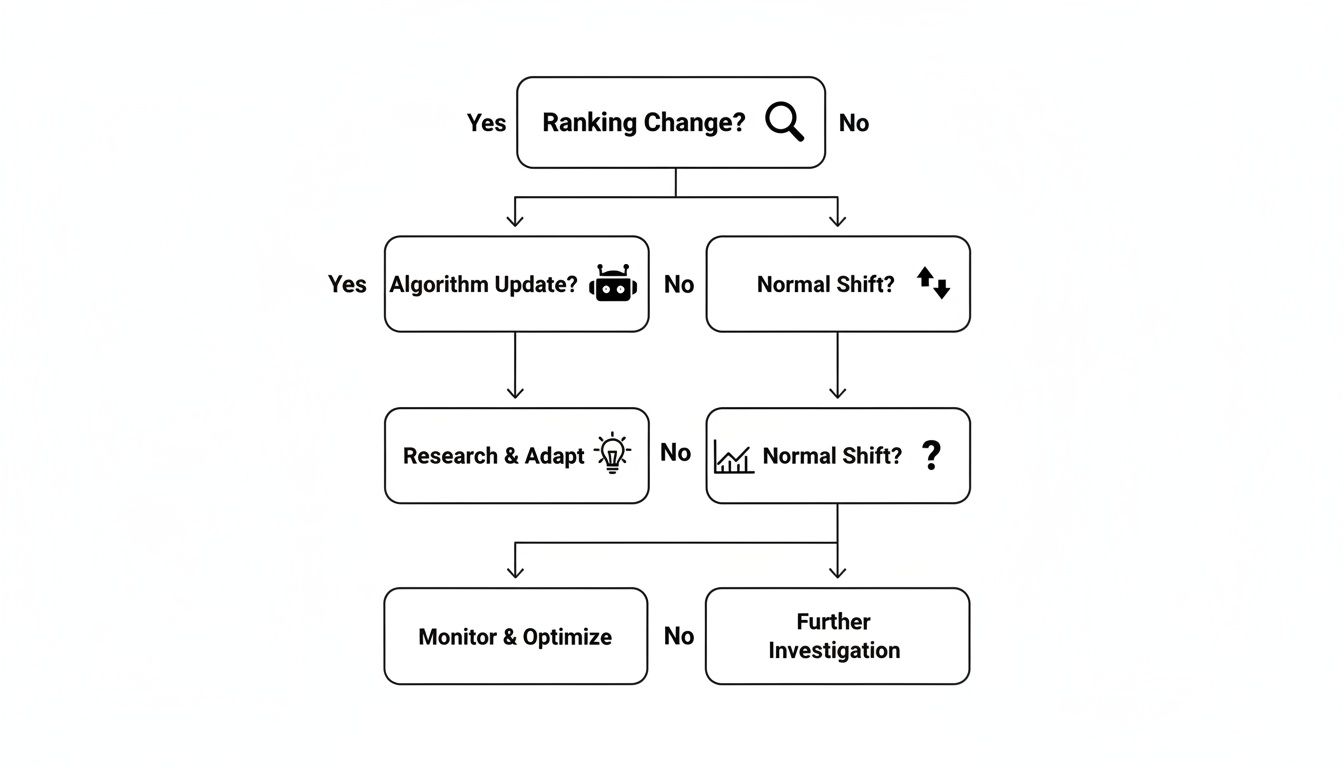
This flow helps you quickly figure out if a drop is part of a broad algorithm update or something more specific to your site, which then guides your next steps.
Don't just react to the drop itself—react to the opportunity it reveals. A competitor outranking you is a free roadmap. They’re showing you what Google is rewarding right now. Your job is to reverse-engineer their success.
Here's where to start digging:
- Check for Technical Issues First: Before you start blaming content or competitors, rule out self-inflicted wounds. Pop into Google Search Console and check for manual actions, security issues, or new crawl errors. I've seen a simple
noindextag accidentally pushed live during a site update wipe out rankings overnight. It happens more than you think. - Analyze the Winners: Pinpoint the competitors who moved up as you moved down. Get forensic. Scrutinize their pages. Did they add new sections? Update their content with fresh data or examples? Is their user experience noticeably better? This is your primary source of intel.
- Review the SERP Landscape: Did Google just introduce a new SERP feature, like a massive AI Overview or an expanded image pack? Your page might have been pushed down not because it lost rank, but because the entire layout of the results page changed, pushing organic results further down.
- Pinpoint Content Gaps: Compare your content head-to-head with the new top-ranking pages. Use a content analysis tool to see what subtopics they cover that you don’t. This often reveals glaring content gaps you need to fill to get back in the game.
This disciplined approach ensures you’re actually fixing the right problem.
Fueling Your Content and Technical SEO Pipeline
The insights you pull from your rank tracker should flow directly into your project management tools, whether that's Jira, Asana, or a simple spreadsheet. Your diagnostic work is what populates your SEO to-do list for the next sprint or quarter.
This creates a powerful, self-sustaining loop.
For example, if you notice competitors consistently owning the "People Also Ask" boxes for your target keywords, the action item is clear: restructure your content with an FAQ section that directly answers those questions.
Or, if a whole category of keywords tanks after a site speed-focused algorithm update, the action item is to prioritize Core Web Vitals optimization with your development team. You can dive deeper in our full guide on turning your SEO ranking data into a strategic asset.
Rank tracking became a true game-changer when tools started archiving historical data. Studies show that 68% of traffic drops correlate directly with algorithm updates. Sites that ignore these historical trends can lose up to 40% of their top-10 rankings within 90 days. By diving into historical data, you can overlay metrics and see exactly what changed, turning rank tracking into a predictive tool rather than a reactive one.
This process ensures your rank tracking efforts directly fuel your content and technical SEO work, leading to measurable, meaningful improvements.
Common Questions About SEO Rank Tracking
Even with a perfect playbook, you're going to have questions once you start tracking your SEO rankings. It's just part of the process. Getting straight answers helps you cut through the noise, trust your data, and make decisions with more confidence. Let's tackle the questions we hear all the time.
How Often Should I Check My SEO Rankings?
This is a classic "it depends" situation, but I can give you some solid guidelines.
For your absolute money-makers—the high-intent keywords that are directly tied to revenue—you'll want to keep a close eye on them. Checking daily or at least weekly is a good rhythm. This frequency lets you react fast if a competitor makes a big move or a Google algorithm update shakes things up.
For the rest of your keyword list, the broader terms you're targeting, checking in weekly or bi-weekly is plenty. The real trick is to avoid getting bogged down by tiny, meaningless daily jumps and drops. You're looking for the long-term trends over weeks and months. That's where the strategic gold is hidden.
Why Are My Rankings Different from an Incognito Search?
Ah, the "my tracker says one thing, but incognito says another" puzzle. It’s a common point of confusion. Even when you fire up an incognito window, your search results are still personalized. Factors like your physical location (based on your IP address) and even which of Google's data centers happens to field your query can change what you see.
Your own manual searches will never be a truly objective source of truth.
This is exactly why professional SEO tools are so valuable. They pull depersonalized, objective data by running queries from consistent, specific locations (like a server in Chicago, Illinois). This gives you a stable baseline and a much more accurate picture of how you're really ranking in a target market.
What Is a Good Average Position to Aim For?
There's no magic number here. A "good" position is completely relative to your site's age, your industry, and your overall goals. Your target should evolve as your website matures.
- For a new website: Honestly? Just breaking into the top 20 for a few competitive keywords is a huge win. That should be your first major milestone.
- For an established site: The goalposts move. You should be aiming to consistently hold a top 3-5 position for your most important commercial keywords. This is the prime real estate where the vast majority of clicks happen.
Ultimately, the goal isn't hitting a static number. It's about achieving consistent, measurable improvement for the keyword groups that matter most to your business.
My Rankings Dropped Suddenly. What Should I Do First?
Seeing a sudden drop is jarring, but don't panic. The worst thing you can do is start making random changes. You need a systematic approach. Before you touch a single line of content, run through this quick diagnostic checklist:
- Pinpoint the scope. Is it just one page? A cluster of related keywords? Or has your entire site taken a hit?
- Check Google Search Console. First stop, always. Look for manual actions or security alerts. They're rare, but they are emergencies that need your immediate attention.
- Look for algorithm updates. Hop over to major SEO news sites or see what the chatter is on social media. Did Google just roll out an update?
- Analyze the SERPs. Who took your spot? Look at the competitors that have moved up. What are they doing differently with their content or on-page optimization?
Following a process like this helps you find the root cause before you act, which means your response will actually be effective.
Ready to turn AI and search visibility into a powerful growth engine? Sight AI monitors how AI models like ChatGPT talk about your brand and uses those insights to automatically create expert-level SEO content that ranks. Stop guessing and start growing at https://www.trysight.ai.