H tags are essentially the chapter titles and subheadings for your webpage. They give both search engines and your readers a clear, organized structure to follow. For SEO, their main job is to create a logical hierarchy that helps Google understand what your content is about and how different ideas relate to each other, which is a big factor in how your page ranks.
What Are H Tags and Why They Matter for SEO
Imagine trying to read a book with no chapters or table of contents. You'd be staring at a frustrating wall of text, making it nearly impossible to find what you need or even grasp the main points. That’s exactly what a webpage without H tags looks like to your audience and to search engine crawlers.
H tags, or heading tags, are the HTML elements that define the headings on your page, ranging from <h1> down to <h6>. They serve two distinct but equally important audiences.
Guiding Search Engines Through Your Content
For a search engine like Google, H tags are the road signs that lay out an outline of your content. Think of the <h1> tag as the title of the book—it declares the single most important topic of the entire page. Then you have <h2> tags, which are like the chapter titles, breaking down the main sections.
Any tags after that (<h3>, <h4>, and so on) act as subheadings within those chapters, adding more layers of detail and organization. This clean, nested structure is what lets crawlers quickly figure out the topical relevance and hierarchy of your information.
A logical heading structure is a fundamental part of on-page technical SEO. It helps search engines parse your content efficiently, which can impact everything from your ability to rank for your main keywords to your chances of landing in rich results like featured snippets.
Enhancing User Experience and Accessibility
For the humans visiting your site, headings are a lifesaver. They break down long articles into scannable, digestible chunks. Let's be honest, most users don't read every single word; they scan for the specific information that answers their question. Well-crafted headings are a visual guide, letting them jump right to the sections that matter most. This keeps people engaged and lowers bounce rates.
This visual guide shows a simple but effective heading structure.
The logical flow from H1 to H2 to H3 makes the content easy to follow for everyone. This structure is also absolutely critical for accessibility. Users who rely on screen readers use headings to navigate a page and understand its layout.
Headings provide an outline of the content, allowing screen reader users to quickly jump to a section of interest, much like a sighted user would scan the page for a visually distinct heading. Without headings, users would have to listen to the entire page from top to bottom.
To give you a quick reference, here's how to think about each heading tag's role.
The Role of Each Heading Tag
| Heading Tag | Primary Purpose | Best Practice Example |
|---|---|---|
<h1> |
Page Title | The main title of your article or page (e.g., "The Ultimate Guide to H Tags") |
<h2> |
Major Section | A main topic within the article (e.g., "Why H Tags Matter for SEO") |
<h3> |
Sub-section | A specific point within an H2 section (e.g., "Enhancing User Experience") |
<h4> |
Sub-sub-section | A supporting detail for an H3 point (e.g., "Headings and Screen Readers") |
<h5> |
Minor Point | For even more granular organization, often used in complex guides or lists |
<h6> |
Very Minor Point | The lowest level of heading, rarely used but available for deep outlines |
Getting H tags right is foundational to a strong content strategy. It's directly tied to broader concepts like semantic SEO, where the goal is to create content that’s crystal clear in its meaning and context. When you use headings properly, you ensure your content is understood by both algorithms and people—and that’s the real key to sustainable visibility.
Mastering the Rules of Heading Tag Hierarchy
Think of your content's heading structure like the blueprint for a house. You wouldn't design a front door that opens directly into a fourth-floor bedroom, skipping every floor in between. It’s confusing, illogical, and frankly, a terrible design. The same exact principle applies to how you structure your articles with H tags.
The core rule is simple, but it’s non-negotiable: follow a descending, sequential order. Every page needs to start with a single <h1>, which is then followed by <h2> tags for the main sections. If a section under an <h2> needs to be broken down further, you bring in an <h3>. You never, ever jump straight from an <h1> to an <h3> or <h4>.
This isn't just a friendly suggestion for style points; it’s a fundamental requirement for both search engine crawlers and assistive technologies like screen readers.
Why Skipping Heading Levels Breaks SEO and Accessibility
When you skip a heading level, you create a structural gap. For a search engine trying to understand your page, this is like finding a chapter missing from a book's table of contents. It throws a wrench in the crawler's ability to map out the relationships between your content, making it much harder to figure out which ideas are main topics and which are just supporting points. A clean H1 → H2 → H3 sequence sends a crystal-clear signal about how your content is organized.
For people who use screen readers, this is even more critical. They depend on the heading hierarchy to navigate a page, often using shortcuts to jump between different <h2> or <h3> sections to find what they need quickly. If the structure is broken, their navigation tool becomes unreliable, leading to a frustrating and inaccessible experience. Getting the hierarchy right is a cornerstone of creating well-structured content that works for everyone.
This diagram perfectly illustrates the proper top-down structure you should be aiming for.
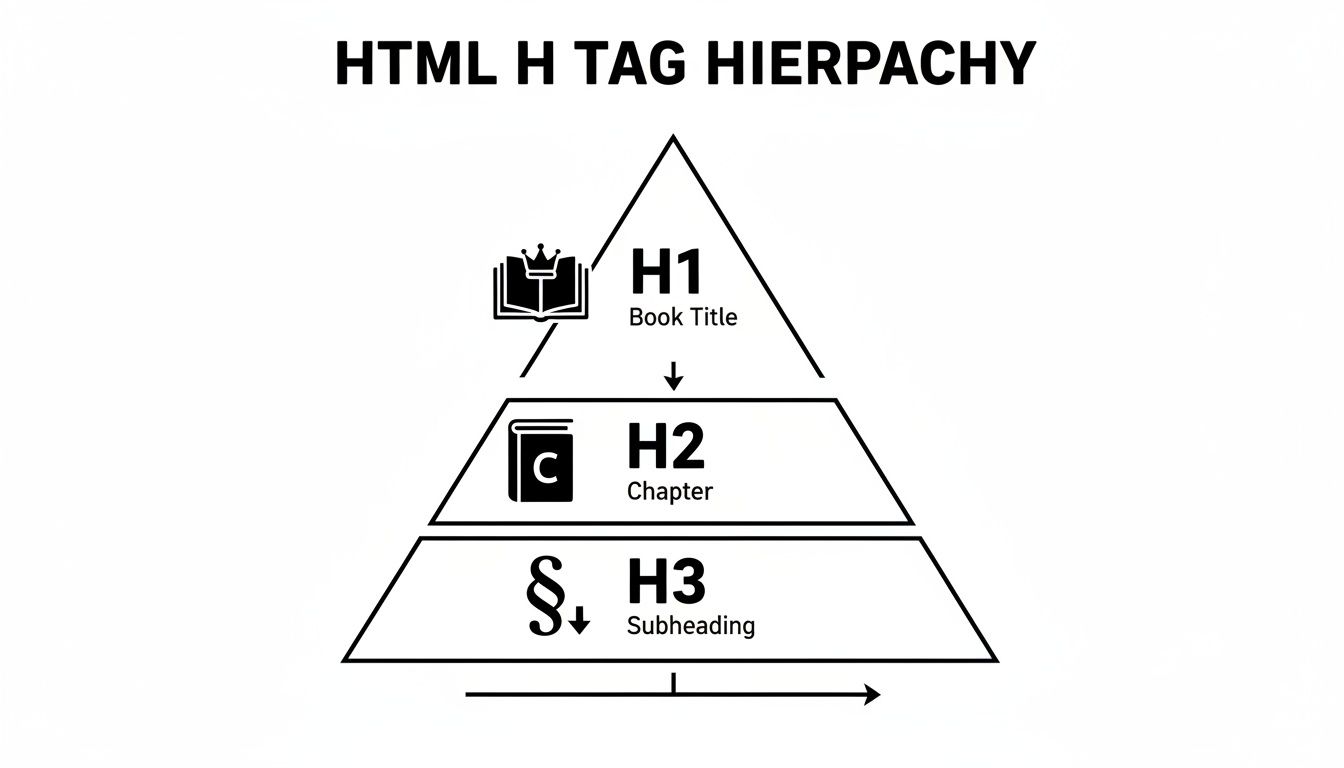
As you can see, the H1 is the book's main title. The H2s are the primary chapters, and the H3s are the sub-points within those chapters. It all flows together in a clear and logical outline.
A Real-World Example of Perfect Hierarchy
Let's break down the heading structure for a hypothetical blog post on "Healthy Dog Food" to see this in action. A well-organized article would follow a blueprint just like this:
<h1>The Ultimate Guide to Healthy Dog Food</h1>
<h2>Understanding Your Dog's Nutritional Needs</h2>
<h3>Proteins: The Building Blocks</h3>
<h3>Fats and Carbohydrates for Energy</h3>
<h2>Comparing Different Types of Dog Food</h2>
<h3>Dry Food (Kibble): Pros and Cons</h3>
<h3>Wet Food: Canned Options</h3>
<h3>Raw Food Diets</h3>
<h2>How to Read a Dog Food Label</h2>
<h3>Decoding the Ingredient List</h3>
<h3>Guaranteed Analysis Explained</h3>
This example shows a perfect top-down hierarchy. Each H2 introduces a major topic related to the H1. Then, the H3s logically break down the concepts from their parent H2, creating a seamless flow for both human readers and search engine crawlers.
This kind of logical structure isn't just about organizing text—it's about crafting a clear story. A well-defined hierarchy makes your content easier to read, keeps people on the page longer, and gives search engines the contextual clues they need to rank you accurately. Getting this right is a simple but incredibly powerful way to improve your h tags seo performance.
To wrap it up, just remember these three unbreakable rules for your heading hierarchy:
- One H1 Only: Every single page gets exactly one
<h1>tag that sums up the main topic. No more, no less. - Never Skip Levels: Always descend in order. An
<h3>has to live under an<h2>, and an<h4>must be nested under an<h3>. - Structure, Not Style: Use headings to create a logical outline, not just to make your font bigger. That’s what CSS is for.
How to Write SEO-Optimized Heading Tags

Okay, so you've mapped out your heading structure. Now for the fun part: actually writing them. An effective heading has to pull double duty. It needs to be compelling enough to grab a human reader’s attention while also being descriptive enough for a search engine to instantly understand its context.
This is where the real skill comes in—balancing a great user experience with smart keyword optimization. The goal is to craft headings that act like clear signposts for your readers, promising value and accurately reflecting the content that follows. This not only builds trust with your audience but also sends powerful relevance signals to search algorithms.
Weave Keywords in Naturally
Your headings are prime real estate for your target keywords, but you have to use them wisely. Forget the old-school practice of keyword stuffing, where you awkwardly cram keywords into every available heading. That approach creates a terrible reading experience and is a fast track to getting penalized by search engines.
The real key is to integrate your primary and secondary keywords where they feel completely natural.
- Your H1 Tag: This is your page's headline and the single most important heading. It should almost always feature your primary keyword, as it’s the strongest signal you can send about your page's main topic.
- Your H2 Tags: Use these to introduce the major sections of your article. They are the perfect place to work in secondary keywords or natural variations of your primary keyword, helping search engines grasp the full breadth of your content.
- Your H3 Tags and Below: These are fantastic for targeting long-tail keywords or framing your headings as common questions your audience is actively searching for.
The H1 tag, in particular, carries a ton of weight. In fact, if Google can't find a proper title tag on a page, it defaults to using the H1 tag as a substitute about 50.76% of the time to figure out what the page is all about.
Focus on User Intent and Clarity
If you remember only one thing, make it this: write your headings for people first. A visitor should be able to scan your H2s and H3s and get an immediate, accurate snapshot of what your article covers. If your headings are vague or misleading, you'll just frustrate people and send them bouncing right back to the search results.
Put yourself in their shoes. What do they want to accomplish? Are they looking for a definition, a step-by-step guide, or a product comparison? Your headings need to speak directly to that intent.
A well-written heading answers a question or solves a problem for the reader. It sets an expectation and then makes a promise that the following content will deliver on that expectation, which is the cornerstone of effective content.
This is why it's so helpful to align your heading strategy with broader landing page design best practices. You're creating a cohesive and effective user journey from the moment they land on the page.
Good vs. Bad Heading Examples
Let’s get practical. It's amazing how a few small tweaks can make a massive difference. Imagine we're writing a blog post with the primary keyword "cold brew coffee."
Bad Heading Examples (Vague and Unhelpful):
<h2>More Information</h2>(Tells the reader absolutely nothing.)<h2>Coffee Beans</h2>(Way too broad. Lacks any real context.)<h2>Cold Brew Coffee, Best Coffee, How to Make Coffee</h2>(A classic keyword-stuffed mess.)<h2>Our Thoughts</h2>(Focuses on you, not the user's needs.)
Good Heading Examples (Clear and Keyword-Rich):
<h2>What Is Cold Brew Coffee?</h2>(Directly answers a common beginner question.)<h2>Choosing the Best Beans for Cold Brew</h2>(Specific, helpful, and naturally uses a secondary keyword.)<h2>How to Make Cold Brew Coffee at Home</h2>(Action-oriented and targets a valuable long-tail keyword.)<h2>Common Cold Brew Mistakes to Avoid</h2>(Addresses a real user pain point.)
These examples show how you can create headings that are both descriptive for users and perfectly optimized for search engines. You can dive deeper into this in our guide on how to write SEO-friendly blog posts. When you prioritize clarity and user value, you create headings that naturally boost your SEO performance.
Fixing Common H Tag SEO Mistakes
Even when you know the rules, it's incredibly easy for heading tag mistakes to slip through the cracks, especially on larger websites. These common errors can quietly sabotage your SEO by sending confusing signals to search engines and creating a frustrating experience for users. The good news? They're usually simple to find and fix.
This troubleshooting guide will walk you through the most frequent H tag pitfalls. We'll cover why they're a problem and, more importantly, how you can correct them. By learning to spot these issues, you can turn potential ranking weaknesses into structural strengths, giving your content a much clearer path to visibility.
Mistake 1 The Missing or Multiple H1 Tag
The single most critical heading on any page is the <h1>. It's the definitive title, the strongest signal you can send about the page's core topic. Unfortunately, it's also where the most common errors pop up. Far too many pages either lack an <h1> entirely or—just as bad—have more than one.
The scale of this problem across the web is staggering. Research shows that a huge chunk of websites either have multiple H1 tags (51.3%) or are missing them completely (59.5%). This creates a massive competitive advantage for anyone who gets this one simple thing right.
The Fix: Every single indexable page on your site must have exactly one
<h1>tag. It should contain your main keyword and accurately summarize what the page is about. Use a site crawler or a browser extension to quickly find pages that are missing an H1 or have duplicates, then get into your content or theme templates to fix them.
This screenshot from Ahrefs' Site Audit tool shows just how easy it is to flag pages with multiple H1s.
Tools like this make it a breeze to pinpoint exactly which pages need your attention, turning a potentially huge audit into a manageable task.
Mistake 2 Using Headings for Visual Styling
Another mistake I see all the time is people using heading tags—like an <h3> or <h4>—just to make text bigger or bolder. It might seem harmless, but it's a fundamental misunderstanding of what H tags are for. Headings are for semantic structure, not for looks.
When you use an H2 just because you like its font size, you're telling search engines that this text is a major section of your article. This dilutes the importance of your actual subheadings and creates a jumbled, illogical outline for both web crawlers and screen readers.
- What to Do: If you need to style text, always use CSS classes.
- What Not to Do: Never pick a heading level based on how it looks.
By keeping structure (HTML) and style (CSS) separate, you maintain a clean, logical hierarchy that pays off for both SEO and accessibility. This is a core principle you'll find in all great SEO copywriting best practices.
Mistake 3 Creating a Broken or Illogical Hierarchy
The last common pitfall is breaking the heading hierarchy. This happens when you skip levels, jumping from an <h1> straight to an <h3>, or when you put an <h2> underneath an <h3>. Think of it like an outline where a sub-point is floating around without a main point to belong to. It just doesn't make sense.
This creates a jarring experience for people using screen readers, who rely on that heading structure to navigate the page. It also makes it much harder for search engines to map out the relationships between your content sections, which can stop them from fully understanding your page's context and depth.
To fix this, you just need to follow a sequential, top-down order.
- Start with your single
<h1>. - Use
<h2>tags for the main sections. - Nest
<h3>tags under your<h2>s to dig into sub-points. - Only use an
<h4>if it's logically nested inside an<h3>section.
Regularly checking your pages for these common mistakes is a simple yet powerful way to sharpen your on-page h tags seo and make sure your content is truly structured for success.
How to Audit H Tags Across Your Website

Now that we’ve covered the ground rules, it’s time to get your hands dirty. Auditing your website's heading tags is like a health check for your content's skeleton—you need to find the fractures and misalignments that are holding you back.
This isn’t a one-and-done task. The goal is to build a repeatable process that turns what feels like a massive chore into a routine part of your SEO maintenance. Let’s walk through how to do it right.
Start with a Comprehensive Site Crawl
You can't fix what you can't see. Trying to check every single page for heading errors by hand is a recipe for disaster, which is why your first step is always to run a full site crawl.
Tools like Semrush, Ahrefs, or Screaming Frog are your best friends here. They’ll navigate your site just like a search engine bot, pulling data from every accessible page and compiling it into one place. This gives you a complete inventory of every URL and its H1s, H2s, H3s, and so on—the raw data you need for a proper audit.
Think of an SEO crawler as a building inspector for your website. It systematically checks every room (page) and reports back on any structural flaws (heading errors), giving you a detailed punch list to work from.
Once the crawl is done, you'll have a spreadsheet or dashboard ready for analysis. This is where the real work begins.
Analyze Your Data for Common Errors
With your crawl data in hand, it’s time to put on your detective hat. The next move is to sift through all that information and hunt for the most common—and most damaging—h tags seo mistakes.
You’re basically looking for red flags that scream "structural problem." Your analysis should zero in on these key issues:
- Missing H1 Tags: Filter your list to find any page that doesn't have an H1. Every important page needs one. No exceptions.
- Multiple H1 Tags: Now, find pages with more than one H1. This is a classic mistake that can dilute your page’s focus and confuse search engines.
- Skipped Heading Levels: Look for breaks in the chain. An H1 followed directly by an H3 is a clear sign that the structure is out of order.
- Poorly Written Headings: Scan your H1s and H2s. Are they generic and unhelpful, like "Introduction" or "Conclusion"? Headings need to be descriptive to do their job.
This process is a lot like doing an internal linking audit; you’re searching for systemic problems that, once fixed, can lift your site’s performance across the board.
Use Browser Extensions for Spot Checks
A full site crawl gives you the 30,000-foot view, but sometimes you need to get up close. This is where browser extensions are incredibly handy for quick spot-checks on individual pages.
Tools like the "Web Developer" toolbar for Chrome or "SEO Meta in 1 Click" let you see a page's heading structure with a single click. It's the perfect way to double-check your fixes on a high-priority page or quickly diagnose why a specific URL isn't performing well. You get an instant visual map of the heading hierarchy.
To make this process even clearer, here’s a checklist you can follow every time you perform an audit.
H Tag Audit Checklist
Use this step-by-step checklist to guide your audit. It breaks down the process into manageable checks, ensuring you cover all the essential bases from your main title down to the logical flow of your subheadings.
| Check Item | What to Look For | Tool/Method |
|---|---|---|
| Single H1 Presence | Does every important page have exactly one H1 tag? | SEO Crawler (e.g., Screaming Frog, Semrush) |
| H1 Relevance | Does the H1 accurately describe the page content and target the primary keyword? | Manual Review / Browser Extension |
| No Skipped Levels | Is the hierarchy logical (H1 -> H2 -> H3)? Are there any jumps like H2 to H4? | SEO Crawler / Browser Extension |
| Descriptive Headings | Are H2s and H3s clear, concise, and helpful for users scanning the page? | Manual Review |
| Keyword Usage | Are secondary keywords and related terms used naturally in subheadings (H2, H3)? | Manual Review / Content Editor |
| Consistent Formatting | Is the visual styling for each heading level consistent across the site? | Manual Site Inspection |
By combining a site-wide crawl with this checklist and targeted spot checks, you build a solid system for your audits. This approach ensures no errors slip through the cracks, keeping your on-page structure clean, logical, and perfectly tuned for long-term SEO success.
Commonly Asked Questions About H Tags and SEO
Even after you get the hang of heading tags, a few specific questions always seem to pop up. These are the little details that can make or break an effective h tags seo strategy. This section is designed to give you direct, clear answers to the most common questions we hear, clearing up any lingering confusion.
Think of it as your go-to cheat sheet. We’ll tackle everything from the never-ending "multiple H1s" debate to the critical difference between using headings for page structure versus just making text look pretty. The goal is to give you the confidence to not only use headings correctly but also to explain why it matters.
How Many H1 Tags Should a Page Have for Optimal SEO?
For the best possible SEO, a page should have exactly one H1 tag. Period.
Think of the H1 as the title on the cover of a book. Having more than one just creates confusion for search engines and dilutes your page's focus. While it's true that modern HTML5 won't "break" your site if you use multiple H1s, the overwhelming consensus among SEO pros is that a single H1 sends the clearest, strongest signal about your page's main topic. It’s the undisputed best practice for clarity and performance.
Can I Use the Same H2 Tags on Multiple Pages?
You technically can, but it's a really poor SEO practice that you should try to avoid. Your heading tags, especially your H2s, need to be specific to the unique content on each individual page. They’re there to outline the distinct subtopics that a particular page offers the reader.
If you find yourself using the same H2s across multiple pages, it’s a red flag. It might signal to search engines that your content is repetitive or thin. This can even lead to messy problems like keyword cannibalization, where your own pages start competing against each other in the search results.
Key Takeaway: Always write unique, descriptive headings that accurately reflect the distinct subtopics and value of each individual page. This helps both people and search engines understand what makes every piece of your content different and worthwhile.
Does the Order of H2 and H3 Tags Really Matter?
Yes, the order is absolutely critical. It’s not just an SEO thing; it's also a huge deal for accessibility. You have to follow a logical, descending hierarchy. An H3 tag must always fall under an H2 tag, just like a sub-point in an outline has to belong to a main point.
Skipping levels—like jumping from an H1 straight to an H3—shatters this logical flow. This creates two big problems:
- For SEO: Search engines depend on this nested structure to understand how your content sections relate to one another. A broken hierarchy makes it much harder for them to map out your page's context.
- For Accessibility: People using screen readers rely on a clean heading order to navigate the page. They use keyboard shortcuts to jump between heading levels, and a broken structure makes the page confusing and frustrating to use.
A clean, logical H1 → H2 → H3 order is a non-negotiable part of a well-structured webpage.
Is It Bad to Use H Tags for Styling Text?
Yes, this is a common mistake that can seriously damage your SEO. Using H tags just to make text look bigger or bolder completely misses the point. Headings are meant to provide semantic structure, not visual flair. Their job is to create a logical outline in the code that browsers, search engines, and screen readers can understand.
When you use an H2 tag simply because you want bigger text, you’re sending all the wrong signals. You're effectively telling Google that a random sentence is a major section of your article. This muddies their understanding of your page and waters down the importance of your actual subheadings.
If you want to change how a piece of text looks—its size, weight, or color—that's what CSS is for. Keeping your HTML (structure) and your CSS (style) separate is a fundamental best practice for both web development and SEO.
Ready to turn these insights into action? Sight AI empowers you to create perfectly structured, SEO-optimized content at scale. Our platform helps you identify high-value content gaps and then uses specialized AI agents to generate 2,500–4,500 word articles with on-page best practices, like proper heading hierarchies, built right in. Discover how Sight AI can accelerate your content strategy today.