
Finding broken links on your website isn't just a technical chore; it's essential for protecting your user experience, building trust, and maintaining your hard-won SEO performance. This means rolling up your sleeves and using tools like Google Search Console, powerful site crawlers like Screaming Frog, or automated checkers to hunt down those dreaded 404 errors and squash them for good. Let them fester, and you risk losing traffic, frustrating your audience, and even getting dinged by search engines.
The Hidden Costs Of Ignoring Broken Links

It’s tempting to write off a broken link as a minor glitch, but the damage these errors cause over time is far more significant than most people think. Every 404 error is a dead end for both your visitors and the search engine bots crawling your site. It creates a jarring experience that slowly erodes your site's credibility and authority.
Put yourself in your user's shoes for a second. They click a link expecting to find a great product or a helpful piece of information, but instead, they hit a "Page Not Found" wall. That's pure friction. It shatters their journey, chips away at their trust, and usually sends them straight back to Google to find a competitor who has their act together.
The Impact on User Experience and Brand Perception
A site riddled with broken links just feels neglected. It sends a subconscious signal that you're not on top of things, making visitors question the quality and accuracy of everything else on your site.
This poor experience has real, measurable consequences:
- Sky-High Bounce Rates: When users hit a dead end, they leave. That signals to search engines that your page didn't deliver, which can hurt your rankings.
- Tanking Conversion Rates: A broken link in a critical spot—like your checkout flow or on a "Request a Demo" button—is a direct roadblock to revenue.
- Damaged Brand Credibility: First impressions are everything. A smooth, working website builds trust. A buggy one creates immediate doubt and frustration.
And this problem is more common than you'd think. A recent study from the Pew Research Center revealed that a staggering 23% of all news webpages have at least one broken link. Government sites aren't much better, coming in at 21%. If even the big players are struggling, it’s a clear sign that this requires constant attention.
The Silent SEO Damage
Beyond frustrating your users, broken links are quietly sabotaging your SEO. Search engine crawlers navigate the web by following links to discover and index your content. When they keep running into 404s, it causes a cascade of problems.
A broken link stops the flow of "link equity" or "link juice" dead in its tracks. If an external site links to a page on your site that is now a 404, you lose all the SEO value from that valuable backlink.
This wasted authority is just the start. When left unchecked, broken links slowly chip away at key SEO metrics, which can seriously harm your search visibility. It’s vital to get a grip on this, starting with understanding what is domain authority and why it matters for your Google ranking.
Worse yet, every 404 error eats up a tiny piece of your crawl budget. Dive into our guide on what is crawl budget to see why this matters. In short, you're making Google waste its limited time crawling dead pages instead of indexing your fresh, valuable content.
Your Essential Toolkit For Hunting Down Broken Links
Just like any good craft, finding broken links requires the right set of tools. The best choice really depends on what you're working with—the size of your site, your budget, and how deep you need to dig. The good news? You can get started without spending a dime.
Your first stop should be the tools you likely already use. Most SEOs and site owners can kick off their hunt right inside Google's own ecosystem. It's the perfect starting point for spotting issues that Google itself has already tripped over.
Start With Google Search Console
Google Search Console (GSC) is an invaluable, and completely free, resource for finding broken links. Since Google's main job is to crawl your pages, it keeps a pretty detailed log of any roadblocks it hits. When it stumbles upon a URL that returns a 404 error, it reports it directly to you.
To find these errors, just head over to the Pages report under the 'Indexing' section in your GSC dashboard. Look for the "Not found (404)" category. Clicking on this will give you a list of every single URL on your site that Google tried to crawl but couldn't find. This list is pure gold because it’s a direct report from the search engine itself.
What makes this report so powerful is that it often uncovers broken URLs that are still getting internal links from other pages on your site. Even more critically, it can show you pages with valuable backlinks from other websites that are now pointing to a dead end. While GSC is fantastic for finding these issues, it's a reactive tool—it only shows you what Google has already found. For a more proactive approach, you'll want a dedicated site crawler.
Power Up With Dedicated Website Crawlers
When you really need to do a comprehensive health check on your site, nothing beats a dedicated website crawler. These powerful apps act like your own personal search engine bot, methodically crawling every link on your website to map its structure and flag technical problems. For a deeper look at this process, our guide on conducting a website crawl test is a great place to start.
Two of the most respected names in the game are Screaming Frog and Sitebulb, and they each have their own strengths.
- Screaming Frog SEO Spider: Often considered the industry standard, Screaming Frog is a beast of a desktop app that gives you an immense amount of data. It crawls your site and spits out a detailed list of every URL, its status code, and where it's linked from. Its free version lets you crawl up to 500 URLs, making it perfect for smaller sites or just getting your feet wet.
- Sitebulb: This tool has similar crawling chops but truly shines with its data visualization. Sitebulb generates easy-to-digest reports and prioritizes issues with clear, helpful explanations, which is a lifesaver when you need to share findings with team members or clients who aren't deep in the technical weeds.
Running a full crawl gives you a complete picture of all response codes, including 404s (Not Found), 5xx server errors, and even incorrect redirects (like 302s that really should be 301s). This level of detail is absolutely essential for a thorough audit.
Quick Checks With Browser Extensions
Sometimes you don't need a full-site audit. You just need to quickly check the links on a single page. This is where browser extensions are your best friend. Tools like Check My Links for Google Chrome are incredibly efficient for these kinds of spot-checks.
With a single click, these extensions scan the page you're on and color-code all the links: green for good, red for broken. It's the perfect move for a quick quality check before hitting "publish" on a new blog post or for validating a resource page packed with dozens of external links.
Professional tools take this kind of visualization to the next level. For example, this screenshot from an Ahrefs Site Audit report shows how they display link health across an entire website.
A dashboard like this instantly shows you the scale of the problem, helping you grasp what you're up against right away.
Choosing The Right Tool For The Job
Picking the right tool really comes down to balancing depth, frequency, and resources. Not everyone needs a pricey, enterprise-level solution, but relying solely on manual checks just isn't scalable for most sites.
Your strategy for finding broken links should match the complexity of your website. A simple blog might only need a quarterly check with a free tool, while a large e-commerce site requires continuous, automated monitoring to protect revenue and user experience.
To help you decide, here's a quick comparison of the most popular tools for finding broken links.
Comparison Of Broken Link Checking Tools
This table breaks down the best tools based on what they cost, what they're best for, and how much technical know-how you need to use them effectively.
| Tool | Type | Cost | Best For | Key Feature |
|---|---|---|---|---|
| Google Search Console | Web-based | Free | Initial diagnosis and monitoring Google's view | Shows 404s found by Googlebot. |
| Screaming Frog | Desktop Crawler | Freemium | Deep technical audits and large sites | Granular data and extensive configuration. |
| Sitebulb | Desktop Crawler | Paid | Visual reporting and client communication | Prioritized recommendations and charts. |
| Check My Links | Browser Extension | Free | Quick spot-checks on individual pages | Instant on-page link validation. |
By combining these tools, you can create a layered defense against broken links. Use GSC for your ongoing, baseline monitoring. Run a deep crawl with Screaming Frog or Sitebulb quarterly to catch systemic issues. And lean on browser extensions for your day-to-day quality control. This multi-tool approach is the best way to make sure no broken link slips through the cracks.
A Repeatable Workflow For Finding And Fixing Broken Links
Having the right tools is only half the battle. The other half is using them systematically. If your approach to finding broken links is reactive and chaotic, you'll quickly get overwhelmed. What you need is a repeatable process that turns a messy chore into a manageable, strategic task.
This workflow isn't about aimlessly clicking through reports. It’s a clear, four-part cycle: Crawl, Verify, Prioritize, and Fix. Following this method helps you tackle link rot efficiently, making sure your efforts are focused on the issues that actually matter to your users and SEO.
The process flows from a quick spot-check to a deep scan, and finally, into a habit of continuous monitoring.
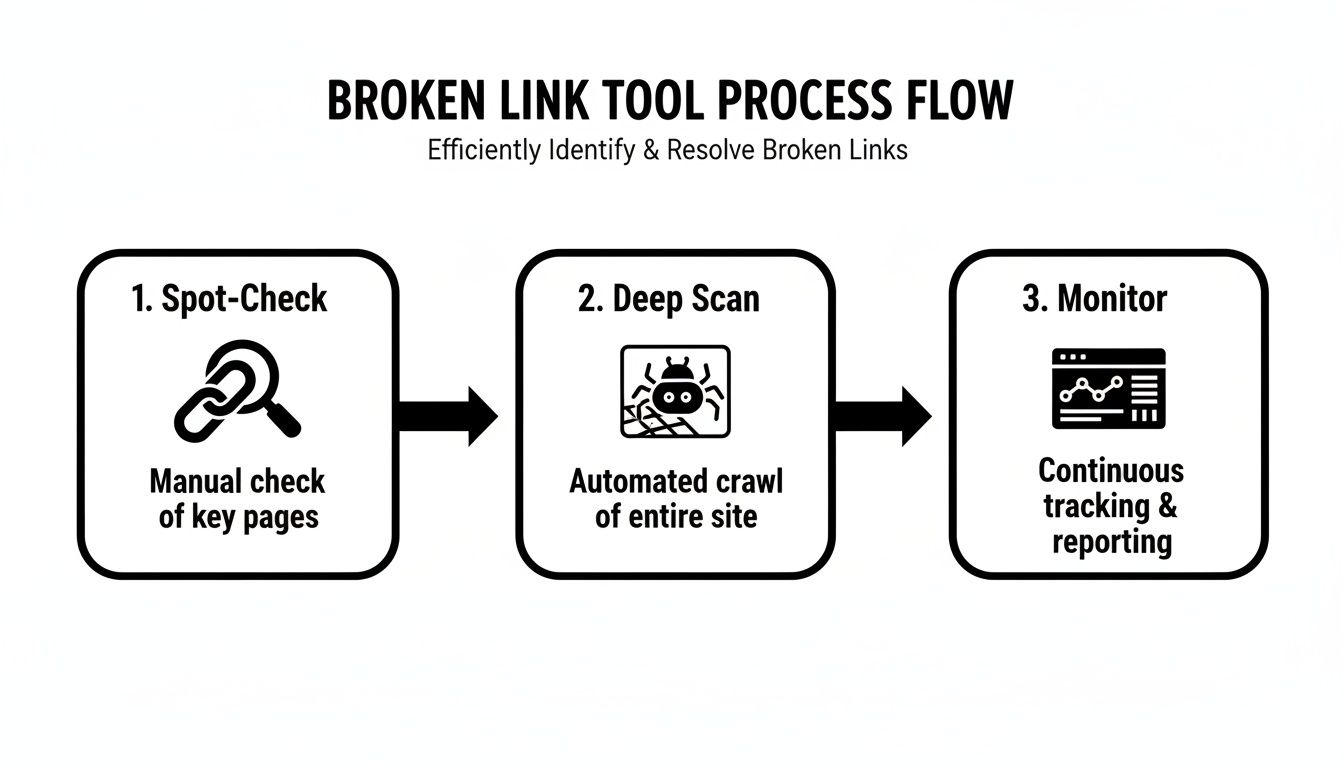
This turns link maintenance from a one-off headache into a sustainable part of your site management strategy.
Run A Full Site Crawl And Export Your List
First things first, you need a complete picture. Fire up a tool like Screaming Frog or Sitebulb and kick off a comprehensive crawl of your entire website. Let it run its course. The goal here is to get a master list of every URL that returns a 404 Not Found status code.
Once the crawl finishes, head over to the Response Codes tab and filter for "Client Error (4xx)." This isolates every broken link the crawler found. Now, export this list—along with the "Inlinks" or "Source" pages where these broken links live—into a spreadsheet. This sheet is now your command center.
Verify That Links Are Truly Broken
Hold on before you start fixing things. You need to do a quick verification. Technology isn't infallible; sometimes a crawler flags a link as broken because of a temporary server glitch, a timeout, or even a firewall getting in the way.
Take a few of the flagged URLs and check them manually. Just copy and paste them into your browser. If the page loads just fine, it was probably a fluke. If you get a 404 error, you’ve confirmed the link is genuinely dead.
This simple verification step saves you from wasting time "fixing" links that aren't actually broken. It’s a crucial five-minute sanity check that ensures your data is accurate before you dive into the real work.
This is especially true for external links. The status of a remote server is completely out of your hands, and a brief hiccup on their end can easily trigger a false positive in your report.
Prioritize Your Fixes Based On Impact
With a verified list of broken links, it’s time to get strategic. Not all 404s are created equal. Trying to fix every single one in the order you found them is a recipe for burnout, especially on a big site. A much smarter approach is to triage the list based on business impact.
Create a simple scoring system in your spreadsheet to rank each broken link. You're looking for the fixes that will deliver the most value to your users and your bottom line.
Here’s a practical triage framework to get you started:
- High-Priority: These are the fires you need to put out now.
- Broken links on your homepage.
- Links in your main navigation menu.
- Any 404s in your checkout or lead gen funnels (e.g., "Add to Cart" or "Contact Us" pages).
- Links on your highest-traffic pages or top-performing blog posts.
- Medium-Priority: Important, but they can wait a bit.
- Broken internal links on secondary pages with decent traffic.
- Broken external links pointing to high-authority sources from your content.
- 404 pages that have a good number of valuable backlinks pointing to them.
- Low-Priority: Get to these when you have the time.
- Broken links on ancient blog posts with almost no traffic.
- Links buried in the comment sections.
- Broken links on pages that are about to be deleted or completely redesigned anyway.
Sorting your list this way means your team's energy is always focused on the most critical issues first, protecting your most valuable user journeys and preserving SEO authority where it counts the most.
Execute The Fix And Preserve Link Equity
Alright, it’s time to actually fix the links. The right solution depends on whether the link is internal or external and why it broke in the first place. For a broken internal link, you've generally got three options.
- Correct the Typo: More often than you'd think, a broken internal link is just a simple misspelling in the URL. If you spot one, the fix is as easy as editing the link on the source page.
- Update the Link: If the content was moved to a new URL, the best fix is to simply update the link to point to its new home. This happens all the time after a site redesign or when you consolidate content.
- Set Up a 301 Redirect: If a page was permanently deleted but still has SEO value (like traffic or backlinks), you absolutely need to set up a 301 redirect. This automatically sends users and search engines to the next most relevant page, preserving the bulk of the original page's link equity.
For a deeper dive into the technical side of this process, check out this guide on how to fix broken links effectively.
When it comes to broken external links, your choices are even simpler: either replace the dead link with a new, high-quality resource or just remove it if you can't find a suitable replacement. By systematically working through your prioritized list, you can patch up your site's integrity and give your visitors the seamless experience they expect.
Turn Link Maintenance Into A Growth Strategy

Fixing your own broken internal links is basic site hygiene. It's a good start, but stopping there is like cleaning your storefront windows while ignoring the money someone left on your doorstep. A truly savvy approach to finding broken links on a website looks both inward and outward.
This is how you turn a routine chore into a genuine growth engine. You move beyond simple fixes and into proactive link reclamation—finding other websites linking to a page on your site that no longer exists. Instead of letting that hard-earned link equity vanish into a 404 error, you can get it back with some smart, simple outreach.
Reclaim Your Lost Link Authority
The web is in a constant state of flux, and links naturally break over time. This phenomenon, known as "link rot," is surprisingly common. Pages get moved, content gets updated, and entire sites disappear. In a massive study, Ahrefs found that a staggering 66.5% of all backlinks decay and disappear over the years. You can read the full research about link rot yourself, but the takeaway is clear: a huge chunk of your site's authority is always at risk of quietly vanishing.
Finding these broken backlinks is pretty straightforward. Tools like Ahrefs, SEMrush, or Moz make it easy. Just run a backlink report for your domain and filter for links pointing to "404 Not Found" pages.
Once you have that list, the process is simple:
- Find your contact: Identify the site owner or editor's contact info.
- Draft your email: Write a friendly, genuinely helpful email pointing out their broken link.
- Offer the fix: Suggest they update it to a relevant, live page on your site.
A polite outreach email is a true win-win. You're helping another webmaster fix an error on their site, which improves their user experience. In return, you reclaim valuable link authority that directly boosts your own SEO. It's one of the most effective and underutilized link-building tactics out there.
A Battle-Tested Outreach Template
You don't need to overthink the email. Short, helpful, and to the point always works best. Here’s a template you can adapt:
Subject: Broken link on [Their Website Name]
Hi [Name],
I was just reading your excellent article on [Article Topic] and noticed a link to [Your Old Page] seems to be broken. It’s leading to a 404 page.
We’ve actually updated that content, and it now lives here: [Your New URL]
Just thought you’d want to know so you can fix it for your readers!
Thanks, [Your Name]
Steal Opportunities From Competitors
The same strategy you use for your own site can be aimed squarely at your competitors. Run a backlink audit on a rival's domain and specifically hunt for their broken backlinks. This is an absolute goldmine for link building.
When you find a high-quality site linking to a competitor's dead page, you can swoop in with a similar outreach strategy. You're not just pointing out a problem; you're offering them the perfect solution—your own relevant, high-quality content as an easy replacement. It's an incredibly effective way to build powerful new links.
Prevent Problems Before They Start
Of course, the best way to deal with a broken link is to prevent it from ever happening. This comes down to having solid processes built into your content workflow, especially when deleting or moving pages. Running an internal linking audit can often shine a light on systemic issues in how your team manages URLs.
Whenever you plan to remove a page or change its URL, follow this checklist:
- Implement a 301 Redirect: Before the old page goes away, set up a permanent 301 redirect to the most relevant new page. This is non-negotiable for preserving SEO value.
- Update All Internal Links: Do a quick site search to find and update any internal links pointing to the old URL.
- Create a Process Document: Make sure your entire team understands the protocol for page deletions and URL changes. Consistency is key.
Ultimately, finding and fixing broken links is just one piece of a much larger puzzle. It's a key part of a comprehensive web maintenance and support strategy. By turning this maintenance task into a proactive growth tactic, you're not just protecting your user experience—you're building a more resilient and authoritative website.
How To Manage Broken Links On Enterprise Websites
Finding a broken link on a small blog is one thing. Tackling them on a sprawling e-commerce site with tens of thousands of pages is a completely different beast.
The crawl-and-fix workflow that works for a handful of pages just collapses under its own weight at the enterprise level. The sheer volume of data is paralyzing. But the secret to managing link health at scale isn't about working harder—it’s about working smarter. You need to ditch the one-size-fits-all approach for a system built on segmentation, smart automation, and ruthless prioritization. Without it, your team will just be drowning in a sea of 404s.
Segment Your Crawls For Digestible Data
Trying to crawl a massive website in one go is a recipe for disaster. It’s slow, often impractical, and leaves you with an overwhelming mountain of data. A much better strategy is to break the task into manageable chunks. This turns that mountain into smaller, actionable hills you can actually climb.
Start by crawling your site in logical sections. For instance, you could:
- Crawl by Subdirectory: Focus on one major area at a time, like
/blog/,/products/, or/resources/. - Crawl by Subdomain: If your site uses subdomains like
shop.yourbrand.comorsupport.yourbrand.com, audit them independently. - Crawl by Page Template: Isolate specific page types, like product detail pages (PDPs) or category pages, to spot systemic issues that might be affecting thousands of similar pages.
This segmented approach makes the process of finding broken links on your website far less daunting and helps you zero in on problems within specific areas much faster.
Automate Detection To Stay Proactive
On an enterprise site, links break constantly. It's just a fact of life with ongoing product updates, marketing campaigns, and content migrations. Manually running weekly crawls is a huge time-sink and keeps you on the back foot. This is where automation becomes your most valuable ally, shifting your team from a reactive "firefighting" mode to a proactive maintenance mindset.
Most enterprise-grade SEO tools, like Ahrefs' Site Audit or the scheduler in Screaming Frog, let you set up automated, recurring crawls. You can schedule them to run weekly or even daily, with reports landing right in your inbox. This creates a continuous monitoring system that flags new issues almost as soon as they appear—long before they impact a significant number of users or drag down your SEO.
Setting up automated alerts is the single most impactful change an enterprise team can make. It transforms link maintenance from a massive, time-consuming project into a consistent, low-effort background task. That frees up your team for more strategic work.
Build A Smart Triage And Fix System
With automated reports flowing in, the next challenge is deciding what to fix first. On a large site, you'll never have zero broken links. It’s just not realistic. The key is to build a triage system that prioritizes fixes based on real business impact, making sure your development resources are spent where they actually matter.
Your triage process should cross-reference 404 data with other critical metrics.
- Traffic Data: Pull data from Google Analytics to see which broken pages still get significant organic or referral traffic. These are your top priority. You're losing visitors right now.
- Conversion Value: Is the broken link part of a key conversion funnel, like the checkout process or a lead-gen form? Fix these immediately. They're costing you money.
- Backlink Profile: Use a tool like Ahrefs to find 404 pages that have valuable external backlinks pointing to them. These are SEO goldmines, and you need to redirect them properly to preserve that link equity.
Finally, document everything clearly. A shared spreadsheet or a project management board is perfect for tracking each broken link, its priority level, who's responsible for the fix, and the status. This creates accountability and ensures high-priority issues are resolved quickly instead of falling through the cracks. This kind of systematic approach is also vital for keeping your site structure clean, which can be supported by tools that help with sitemap automation for websites.
Got Questions About Broken Links? We've Got Answers.
Even with a killer workflow, you're bound to run into some tricky situations when you start hunting down broken links. Let's tackle some of the most common questions that pop up.
How Often Should I Actually Check For Broken Links?
Honestly, it depends on how much your site changes. The best approach is to sync your link-checking schedule with your content velocity.
- Big, bustling sites—think e-commerce stores with rotating inventory or news sites publishing daily—should probably run a check at least once a week. Things change fast, and you need to stay on top of it.
- Smaller, more static sites, like a portfolio or a local business brochure site, can easily get away with a monthly or even quarterly audit.
The real key is just being consistent. Set up a scheduled crawl in a tool like Screaming Frog or Ahrefs to put the task on autopilot. That way, it gets done without you even having to think about it.
Will One measly 404 Error Wreck My SEO?
Nah, a single 404 isn't going to send your rankings into a nosedive. Google gets it—"link rot" is a natural part of the web, and a few broken links here and there are totally expected.
The problem comes with scale and context. A whole mess of 404s can make your site look neglected and low-quality to search engines. But the real danger? A page that has a bunch of powerful, authority-building backlinks pointing to it suddenly starts serving a 404. When that happens, you lose 100% of the ranking power from those links.
That's precisely why redirecting old or deleted pages with a 301 is non-negotiable for protecting your SEO equity.
Think of it like this: A few broken links are like a typo in a book—a little annoying, but forgivable. A site riddled with them is like a book with entire chapters missing. It's unreliable, frustrating, and signals to search engines that your content just can't be trusted.
What’s The Difference Between A 404 And A "Soft" 404?
This one's super important, because one is a harmless error and the other is a sneaky SEO problem.
A standard 404 error is what you want. It's a clear, direct signal to browsers and search engine crawlers that says, "Hey, this page is gone." They get the message and know not to index it.
A "soft 404", on the other hand, is a major headache. This happens when a URL for a non-existent page shows a friendly "not found" message to the user, but it sends a "200 OK" success code back to the server. This just confuses search engines. They end up wasting their crawl budget trying to index a bunch of useless, empty pages. Luckily, you can spot these pretty easily in your Google Search Console coverage report.
Should I Just Remove A Broken Link Or Bother Replacing It?
Your first instinct should always be to replace or redirect, not just delete. When you just remove a link, you're potentially stripping away helpful context and value for your readers.
Here’s a quick way to decide what to do:
- For internal links: If it's a link to another page on your own site, just update it with the new URL. If that page is gone for good, set up a 301 redirect to the next most relevant page you have.
- For external links: If you're linking out to another website, your top priority should be finding a new, high-quality resource to link to in its place.
Only hit the delete button as a last resort if there’s truly no good replacement. Keeping a rich, helpful web of links is always better for your users and your SEO.
Ready to stop chasing broken links and start building a more visible brand? Sight AI turns AI visibility insights into a powerful content and growth engine. Our platform not only helps you identify what your audience is asking AI but also generates expert-level, SEO-optimized articles to fill those gaps. Discover how leading AI models see your brand and automate your content creation to dominate search.