There's a common assumption in marketing: Google Analytics is free, so it doesn't cost anything. That assumption is costing teams more than they realize.
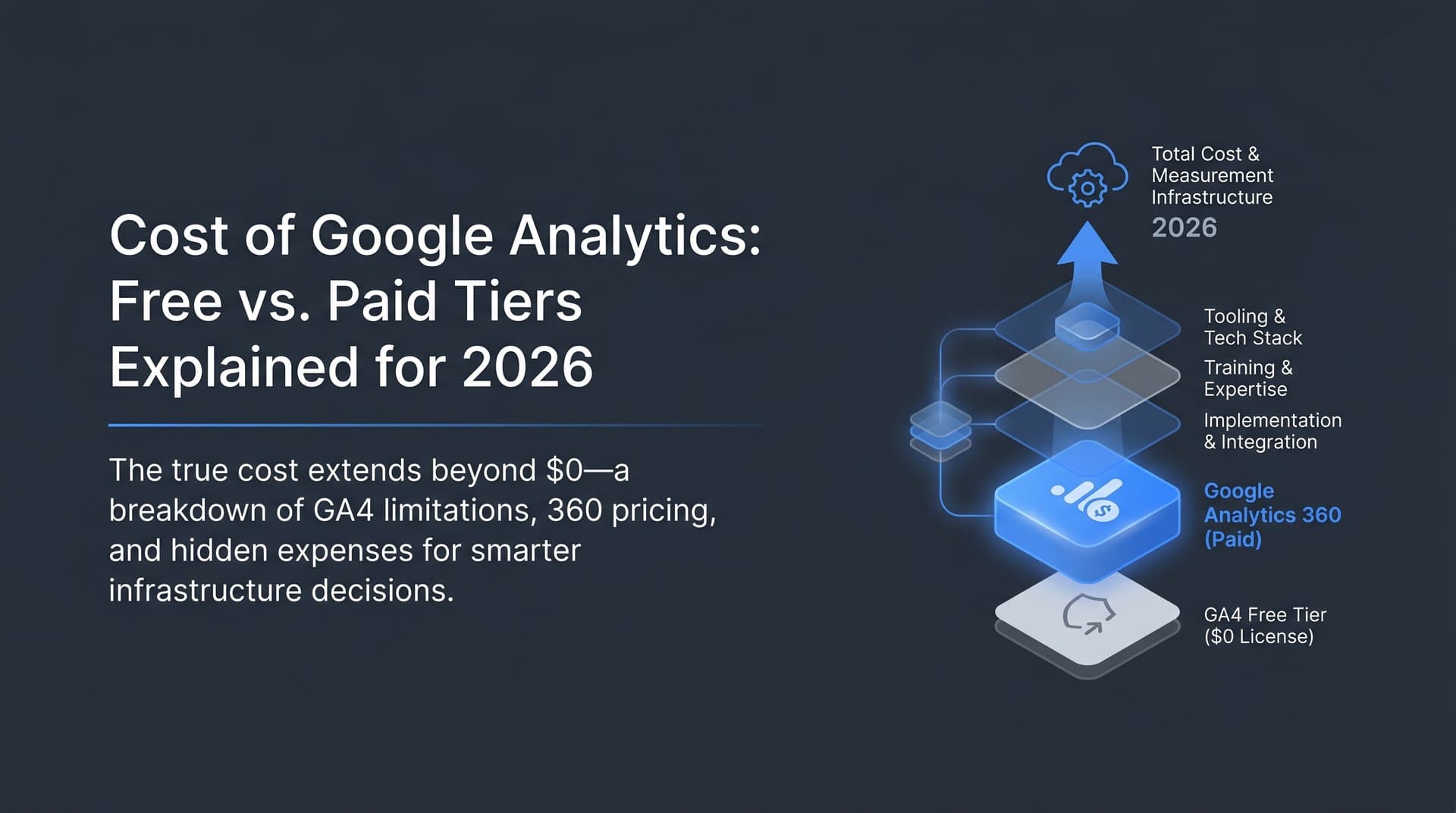
The license fee for GA4 is genuinely $0. But the moment you start factoring in developer time for proper implementation, the training curve that came with GA4's complete overhaul, the supplementary tools you need to fill the gaps, and the opportunity costs of working around its limitations, "free" starts looking a lot more expensive.
Understanding the true cost of Google Analytics in 2026 means looking beyond the sticker price. It means understanding what the free tier actually delivers, what Google Analytics 360 costs and who it's built for, and where the real expenses quietly accumulate in your analytics stack. Whether you're a founder deciding how to build your measurement infrastructure, a marketer trying to justify your tooling budget, or an agency managing analytics for multiple clients, this breakdown will help you make a genuinely informed decision.
The Two-Tier Reality: What Google Analytics Actually Costs in 2026
Google Analytics operates on two distinct tiers, and understanding the gap between them is the starting point for any honest cost analysis.
GA4 Free Tier: The standard version of Google Analytics 4 costs nothing in licensing fees. Any website owner can sign up, install the tracking code, and start collecting data. The free tier covers standard reporting, event-based tracking, up to 25 custom dimensions, audience building, and data retention of up to 14 months. For most small to mid-sized websites, this is genuinely capable analytics software.
Google Analytics 360: The enterprise tier is a different product category entirely. Based on Google's historically published pricing structure, GA 360 has started at approximately $50,000 per year, though Google uses custom enterprise pricing and current figures should be treated as approximate rather than definitive. At that investment level, you get significantly higher data limits, unsampled reports, BigQuery export capabilities, formal service level agreements, dedicated support, and deeper integration with the broader Google Marketing Platform.
The feature gap between the two tiers is meaningful, not cosmetic. Here's where the differences actually matter:
Data Freshness: GA4 free tier typically shows data with a processing delay of 24 to 48 hours for standard reports. GA 360 offers more frequent data processing, which matters for teams making real-time campaign decisions.
Sampling Thresholds: When your data volume exceeds certain thresholds in the free tier, GA4 applies statistical sampling to generate reports. This means your reports reflect estimated data, not actual data. GA 360 dramatically raises these thresholds and offers unsampled reporting, which is critical for high-traffic properties where sampling distortion can mislead decisions.
Custom Dimensions and Metrics: The free tier caps you at 25 custom dimensions and 25 custom metrics per property. GA 360 extends this to 125 of each, which matters for complex implementations tracking multiple content types, user attributes, or business-specific events.
Attribution Modeling: GA 360 provides access to more sophisticated attribution options and deeper integration with Google's broader advertising and measurement ecosystem.
BigQuery Export: This is arguably the most significant enterprise feature. GA 360 includes native BigQuery integration, allowing you to export raw, unsampled event-level data for custom analysis. The free tier has limited BigQuery export capabilities that may not meet enterprise-scale analytical needs.
For most teams reading this, GA4's free tier is the relevant product. Understanding organic traffic in Google Analytics is one of the first steps to getting value from that free tier. But the question isn't just which tier you're on. It's what that tier actually costs you in total.
The Hidden Costs Most Teams Overlook
The $0 license fee is real. What's less visible are the costs that accumulate around it.
Implementation Costs: GA4 is not a plug-and-play tool for any organization that needs meaningful data. The shift from Universal Analytics to GA4's event-based model, which became complete in July 2024, fundamentally changed how tracking is configured. Proper implementation requires defining your event taxonomy, setting up Google Tag Manager correctly, configuring conversions, testing data integrity, and debugging across browsers and devices.
For teams that migrated from Universal Analytics, this wasn't a minor update. It was effectively a rebuild. Developer time for a thorough GA4 implementation varies significantly based on site complexity, but it is rarely trivial. Ongoing maintenance, especially as your site evolves and new tracking requirements emerge, continues to consume engineering resources that have real costs even if they aren't line items in a software budget.
Training and Expertise: GA4's event-based model has a genuinely steep learning curve. Marketers who were fluent in Universal Analytics found that many of their mental models no longer applied. Concepts like sessions, bounce rate, and goal completions work differently in GA4. Building internal expertise often means formal training programs, online courses, or hiring consultants.
Consulting engagements for GA4 setup, auditing, and training can represent significant investments. Teams that skip this step often end up with implementations that collect data but don't answer the questions they actually need answered, which is its own form of cost. Understanding the true cost of SEO automation software in your stack helps put these expenses in perspective.
Third-Party Tool Costs: Here's where the cascade effect becomes expensive. GA4 is a web analytics platform. It tells you what happened on your website. It doesn't tell you why users behaved as they did, what your content looks like to users visually, where you rank for target keywords, how your backlink profile is evolving, or how your brand appears in AI-generated search results.
Most teams supplement GA4 with a collection of additional tools: heatmap and session recording platforms, SEO rank trackers, technical SEO auditing tools, content performance platforms, and increasingly, AI visibility monitoring tools that track how brands appear in responses from ChatGPT, Claude, Perplexity, and other AI platforms.
Each of these tools carries its own subscription cost. The "free" analytics tool often functions as the anchor that triggers a cascade of paid subscriptions. When you add up the full stack, the monthly cost of your analytics ecosystem can be substantial, even when GA4 itself costs nothing.
Opportunity Costs: Perhaps the most invisible cost is what you don't learn because of GA4's limitations. Decisions made on sampled data, insights missed because of 14-month retention limits, or blind spots in your measurement coverage all carry real business consequences that don't appear in any invoice.
When the Free Tier Falls Short
For many use cases, GA4's free tier is genuinely sufficient. But there are specific scenarios where its limitations create meaningful problems.
Data Sampling at Scale: If your site processes millions of sessions per month, data sampling in the free tier becomes a serious concern. When GA4 applies sampling to generate reports, it's essentially extrapolating from a subset of your actual data. For broad trend analysis, this is often acceptable. For precise conversion analysis, audience segmentation, or funnel optimization, sampled data can produce misleading conclusions.
The frustrating part is that sampling isn't always visible or obvious. Reports can look authoritative while being based on a fraction of actual events. Teams making budget allocation decisions or campaign optimizations based on sampled data may be optimizing toward a statistical artifact rather than reality. Leveraging predictive content performance analytics can help fill some of these analytical gaps.
Data Retention Limits: GA4's free tier caps data retention at 14 months. This means you cannot run year-over-year comparisons beyond a certain window without workarounds. For seasonal businesses, long sales cycles, or any analysis requiring multi-year trend data, this is a genuine limitation.
Workarounds exist: exporting data to BigQuery, maintaining manual archives, or using Looker Studio with connected data sources. But each workaround introduces complexity, requires additional setup, and often demands ongoing maintenance. The "free" solution now requires infrastructure to remain useful.
Support and Reliability: The free tier comes with no service level agreement and no dedicated support. When something breaks, you're relying on community forums, documentation, and your own debugging capabilities. For enterprise teams or agencies where data accuracy is business-critical, this is a meaningful gap. GA 360's SLA and dedicated support represent genuine value for organizations where analytics downtime or data loss has direct revenue implications.
Advanced Attribution: Sophisticated multi-touch attribution, advanced audience building for advertising activation, and deep integration with enterprise marketing platforms are areas where the free tier's capabilities are constrained. Teams running complex, multi-channel campaigns often find they need capabilities that sit behind the GA 360 paywall.
Comparing Your Analytics Options
GA4 is the default choice for most teams, but it's not the only choice. Understanding the broader landscape helps you evaluate whether GA4 is the right anchor for your analytics stack.
Matomo: An open-source alternative available as a self-hosted installation or a cloud-hosted service. The self-hosted version is free in licensing but requires server infrastructure, maintenance, and technical management. The cloud version is priced on a traffic-based model. Matomo's key advantage is full data ownership and no sampling, which appeals to privacy-conscious organizations and those with regulatory constraints around data residency.
Mixpanel: Built primarily for product analytics rather than web analytics, Mixpanel excels at tracking user behavior within applications, funnel analysis, and cohort retention. It has a free tier with usage limits and paid plans that scale with event volume. For SaaS products and mobile apps, Mixpanel often provides more actionable insights than GA4, though it's less suited for content-driven websites.
Amplitude: Similar positioning to Mixpanel, with strong product analytics capabilities, behavioral cohorts, and experimentation features. Amplitude has a free tier and enterprise pricing that scales significantly. It's particularly strong for teams running A/B tests and iterating on product experiences.
Adobe Analytics: The enterprise-tier competitor to GA 360, Adobe Analytics is a premium product with premium pricing. It offers extensive customization, sophisticated attribution, and deep integration with the Adobe Experience Cloud. It's typically relevant for large enterprises with existing Adobe investments and dedicated analytics teams.
The Emerging Frontier: AI Visibility Analytics: None of the platforms above, including GA4, address a growing and significant gap in most analytics stacks. As AI-powered search tools like ChatGPT, Claude, and Perplexity become primary discovery channels for many users, understanding how your brand appears in AI-generated responses has become a genuine business intelligence need. Dedicated AI visibility analytics dashboards are emerging to fill this exact gap.
Traditional web analytics measure what happens after someone visits your site. They don't tell you whether your brand is being recommended, mentioned, or overlooked in AI search results. This is a new analytics frontier, and it requires purpose-built tools rather than adaptations of existing web analytics platforms.
When evaluating total cost of ownership for any analytics platform, the honest calculation includes: license fees, implementation costs, ongoing maintenance, supplementary tools needed to fill gaps, and team training. Comparing the cost of GEO optimization software alongside your analytics spend gives you a more complete picture. On that basis, the "free" option is rarely the cheapest option in practice.
Maximizing ROI From Your Analytics Investment
Whether you're on GA4's free tier or evaluating an upgrade, the highest-leverage move is getting more value from what you already have before spending more.
Start With Measurement Goals, Not Configuration: The most common GA4 mistake is jumping into implementation before defining what questions you actually need answered. This leads to bloated event taxonomies, confusing reports, and implementations that collect enormous amounts of data without surfacing actionable insights. Before touching Tag Manager, document your KPIs, the decisions those KPIs inform, and the data you need to track them. This discipline dramatically reduces implementation complexity and ongoing maintenance burden.
Leverage Free Integrations Strategically: GA4's free integrations represent significant value that many teams underutilize. Connecting Google Search Console to GA4 surfaces organic search performance data alongside behavioral analytics, giving you a more complete picture of content performance. You can also check your position in Google search to validate what your analytics data is telling you. Linking Google Ads enables closed-loop attribution between ad spend and on-site behavior. Building custom dashboards in Looker Studio costs nothing and can replace paid reporting tools for many use cases.
Know What GA4 Doesn't Cover: Rather than trying to force GA4 to answer questions it wasn't built for, identify those gaps clearly and address them with purpose-built tools. Technical SEO health, content optimization guidance, website indexing status, and AI search visibility all require specialized platforms. An SEO content platform with analytics can bridge many of these gaps efficiently. Being clear about GA4's scope prevents the frustration of trying to extract insights it simply cannot provide.
Automate Where Possible: Manual reporting and data exports consume team time that compounds over months and years. Investing in automation, whether through Looker Studio scheduled reports, connected data pipelines, or platforms with automated content workflows, converts one-time setup costs into ongoing efficiency gains.
Matching Your Analytics Stack to Your Growth Stage
The right analytics investment looks different depending on where your organization is.
Startups and Small Teams: GA4's free tier is genuinely the right starting point. The priority at this stage is not analytical sophistication but rather clarity: knowing which channels drive traffic, which pages convert, and which content resonates. Pair GA4 with Google Search Console, a focused SEO tool, and a content platform that helps you generate and index optimized content efficiently. If your content isn't appearing in search results, understanding faster Google indexing for new content can help you close that gap. The budget you save on analytics licensing is better deployed into content creation and distribution.
Scaling Companies and Agencies: As traffic volume grows and decision complexity increases, the free tier's limitations become more operationally significant. If your team is regularly working around data sampling, struggling with retention limits, or spending meaningful engineering time on workarounds, the calculation changes. At this stage, it's worth honestly evaluating whether the cost of GA 360, an alternative platform, or a more robust supplementary stack is lower than the cost of the workarounds you're currently maintaining.
For agencies specifically, the question of analytics infrastructure is compounded across multiple clients. Standardizing on a stack that scales efficiently, provides reliable data, and covers emerging channels like AI search visibility becomes a competitive differentiator, not just an operational decision.
The Modern Analytics Stack: The most forward-thinking organizations in 2026 are thinking about analytics in two dimensions simultaneously. The first is traditional web analytics: what happens on your site, how users behave, and how campaigns perform. GA4 handles this reasonably well at the free tier for most use cases.
The second dimension is AI search visibility: how your brand appears in responses generated by ChatGPT, Claude, Perplexity, and other AI platforms. The reality is that AI is replacing traditional Google search traffic for many queries, making this dimension increasingly critical. As these tools become increasingly central to how users discover products, services, and information, being invisible in AI-generated responses is a meaningful competitive disadvantage. Traditional analytics tools don't measure this. Purpose-built AI visibility platforms do.
The complete modern analytics stack combines both dimensions: reliable web analytics for on-site behavior, SEO and content tools for search performance, and AI visibility monitoring for the emerging channel that GA4 simply wasn't built to address.
The Bottom Line on Analytics Costs
The cost of Google Analytics is not $0. It's the license fee ($0 for GA4, approximately $50,000 and up for GA 360) plus implementation time, plus training and expertise, plus the supplementary tools needed to cover its gaps, plus the opportunity cost of decisions made on incomplete or sampled data.
For many teams, GA4's free tier remains the right choice when paired thoughtfully with complementary tools and used within its actual capabilities. For high-traffic properties, enterprise teams, or organizations where data accuracy is business-critical, the case for GA 360 or alternatives becomes stronger.
The most important step is auditing your current analytics spend holistically. Add up every tool in your stack, every hour of developer and analyst time, and every workaround you maintain. Then ask whether that investment is giving you a complete picture of your brand's performance, including how you appear across AI search platforms that are reshaping how users discover and evaluate brands.
GA4 tells you what happened on your website. It doesn't tell you whether ChatGPT is recommending your brand, whether Claude is mentioning your competitors instead of you, or whether your content is optimized for AI-generated discovery. That's a gap that's growing more significant every month.
Start tracking your AI visibility today and see exactly where your brand appears across top AI platforms. Sight AI helps teams monitor brand mentions across ChatGPT, Claude, Perplexity, and more, generate SEO and GEO-optimized content that earns those mentions, and ensure fast indexing so your content reaches both search engines and AI models. Stop guessing how AI models talk about your brand and start making decisions with complete visibility.