Keyword cannibalization is what happens when multiple pages on your website wind up competing against each other for the same search term. It’s an internal conflict that confuses search engines like Google, forcing them to guess which page is the most relevant and ultimately splitting your SEO power.
The Core Problem With Keyword Cannibalization

Imagine sending two of your best salespeople to pitch the same exact client. Instead of working together, they end up competing, each presenting a slightly different proposal. The client gets confused, the core message gets watered down, and neither salesperson closes the deal as effectively as a single, unified team would have.
This is exactly what keyword cannibalization does to your website.
It’s a common myth that this is just about using the same keyword on more than one page. The real problem is a conflict of user intent. When you have multiple pages trying to satisfy the very same search query, you create a messy situation for search engines, and your SEO pays the price.
How Internal Competition Weakens Your SEO
Instead of building one strong, authoritative page that consolidates all your ranking signals, you’re accidentally creating several weaker, competing assets. This self-inflicted damage quietly undermines your site's performance in a few critical ways:
- Diluted Authority: Your hard-earned backlinks and internal links get split across multiple URLs instead of being concentrated on a single powerhouse page.
- Lower Click-Through Rates (CTR): When Google shows two of your pages for the same query, users might get confused, leading to lower engagement for both results.
- Wasted Crawl Budget: Search engines have limited resources. They might spend precious time crawling and indexing redundant pages instead of discovering your new, important content.
Understanding this core conflict is the first step. If you're new to this world, it helps to have a solid grasp of the fundamentals. This guide explaining What is Search Engine Optimization (SEO) is a great primer. Fixing cannibalization isn't just a technical task; it's about sharpening your strategy to send clear, powerful signals to Google.
The goal is to make each piece of content on your site a unique, valuable player—not a benchwarmer competing for the same position. By clarifying the role of each page, you strengthen your entire team.
This problem often gets worse as a site grows. For instance, a website in its first year might only see about 2.19% of its keywords overlapping. But as more and more content gets published, that number can jump to 6.44% for sites aged 3-5 years, which makes proactive management essential.
A well-planned internal linking structure is one of your best defenses. You can learn more about how to structure your site effectively by reading our guide on what is internal linking in SEO.
Why Keyword Cannibalization Hurts Your SEO Performance

Keyword cannibalization is more than just a messy content library. It’s an act of self-sabotage that actively hobbles your website's ability to rank.
Imagine your site's authority on a topic is a powerful, focused beam of light. A single, authoritative page makes that beam intense and clear, showing Google exactly where to send searchers.
But when multiple pages compete for the same keyword, you're splitting that beam into several weaker, scattered lights. None of them shine brightly enough to stand out, and the overall signal becomes murky and confusing for search engines. This dilution has very real, damaging consequences for your SEO.
It Splits Your Link Equity
One of the worst side effects is the dilution of link equity. Backlinks are SEO gold—they're powerful votes of confidence from other websites. When you have one definitive page on a topic, all those valuable backlinks naturally point to that single URL, building up its authority.
Keyword cannibalization scatters those votes. One site links to your first article, another links to a similar blog post, and a third links to a related service page. Instead of one page with 20 powerful backlinks, you end up with three pages, each with just a handful of weak links.
This fragmentation makes it impossible for any single page to build the critical mass of authority needed to compete for the top spots. You’re essentially forcing your own pages to fight over SEO scraps instead of creating one undisputed champion.
It Confuses Search Engines and Users
When several pages on your site seem to be targeting the exact same user intent, you're putting Google in a tough spot. Its algorithm has to guess which page is the real authority. That's a gamble you don't want to take.
This confusion often leads to unpredictable—and undesirable—outcomes:
- Ranking the Wrong Page: Google might decide your low-converting blog post is more relevant than your primary service page, costing you valuable leads and sales.
- Fluctuating Rankings: You might watch your pages constantly swap positions in the SERPs. One day page A is at #9, the next page B is at #12, and neither ever gains traction.
- Lower Overall Visibility: Faced with too many conflicting signals, Google might just devalue all your competing pages, pushing them further down the results.
This confusion isn't limited to search engines. If a user sees multiple similar-looking results from your site, it creates a clunky, disjointed experience. Which one has the answer they need?
By forcing Google to choose between your pages, you're relinquishing control over your search performance. A clear content structure ensures you're the one dictating which page is the most important for a given query.
It Wastes Your Crawl Budget
Every website has a crawl budget—a finite amount of resources Google allocates to discovering and indexing its pages. When search engine bots have to spend their time crawling redundant, competing articles, that budget gets wasted.
This means your newer, more important content might sit undiscovered for longer. Inefficient crawling can seriously delay your ability to rank for new topics and bog down your entire SEO momentum. It's like sending a delivery driver to three similar-looking houses on the same street instead of just one correct address.
Ultimately, knowing how many keywords per page for SEO you should target is fundamental to preventing this issue in the first place. A focused approach gives each page a distinct purpose, building your site’s authority instead of tearing it down from the inside. Fixing cannibalization isn’t just about spring cleaning; it’s about reclaiming lost authority, clarifying your site's structure for search engines, and unlocking your true potential for organic traffic.
Theory is one thing, but seeing keyword cannibalization in the wild is what really makes the concept click. Let's walk through three common scenarios to show you exactly how this internal competition pops up and the kind of damage it can do.
Think of these stories as a field guide. They'll help you spot similar patterns on your own website, turning an abstract SEO issue into a tangible problem you can actually solve. Once you see how it hits different businesses, you'll be much better equipped to find and fix it.
The E-commerce Store with Competing Categories
Picture an online outdoor gear shop, "Peak Pursuits," that sells a ton of hiking equipment. Over the years, they've accidentally created two separate product category pages that are now tripping over each other.
One is titled "Men's Waterproof Hiking Boots," and the other is "All-Weather Hiking Boots for Men." Sound familiar? Both pages are loaded with similar products, target the exact same customer, and are optimized for the keyword "waterproof hiking boots."
So what happens? In the search results, Google has no idea which page is the real authority. One week, the "Men's Waterproof" page might show up at position 12. The next, the "All-Weather" page pops up at position 15. Neither page ever builds enough momentum to crack the top 10 because their SEO juice—backlinks, click-through rate, user engagement—is split right down the middle.
This creates a messy user journey, too. A potential customer might land on one page, not see the exact style they want, and bounce, completely unaware that a slightly different (and maybe better) collection exists on a competing page. It’s a classic case of diluted authority that leads directly to lost sales.
When two pages serve the same purpose, they end up fighting for the same resources. Instead of one strong contender, you get two weak ones that cancel each other out, ensuring neither wins a top spot.
The SaaS Company with Overlapping Content
Now, let's look at a SaaS company called "TeamTask," which sells project management software. Their content team has been churning out resources left and right to attract new customers. They’ve published:
- A blog post: "The Ultimate Guide to Project Management Software"
- A features page: "Project Management Software for Small Teams"
- A webinar landing page: "Choosing the Best Project management Tool"
All three are gunning for the high-value keyword "project management software." From Google's perspective, this is confusing. What is the user looking for? An informational guide? A product solution? An educational event?
The result is often that the blog post ranks highest, even though the features page is the one built to convert. You end up sending potential buyers who are ready to pull out their credit cards to an informational article. This adds friction to the sales funnel and kills your chance of getting a sign-up.
The Content Publisher with Similar Listicles
Finally, imagine a popular food blog, "Kitchen Creations." In an effort to own the baking niche, they've published several articles over the years, including:
- "10 Easy Chocolate Chip Cookie Recipes"
- "The Best Chocolate Chip Cookies for Beginners"
- "How to Make Simple Chocolate Chip Cookies"
All three are competing for the exact same search query: "easy chocolate chip cookie recipe." Because the intent is nearly identical, Google sees them as redundant. The pages constantly yo-yo in the rankings, and their combined traffic is a fraction of what a single, authoritative article would pull in.
If the publisher consolidated the best recipes and tips into one definitive guide, they could create a powerhouse resource that would absolutely dominate the search results for that topic.
How to Find Keyword Cannibalization Issues Fast
Finding keyword cannibalization can feel a bit like detective work. The good news is you don't need a magnifying glass—just the right tools and a clear process. Uncovering these hidden content conflicts is the first real step toward winning back the rankings and traffic you've been losing.
We'll start with a surprisingly simple method that gives you a quick snapshot, then dive into a more data-backed approach. Each step is designed to be straightforward, helping you diagnose the problem with confidence, even without a deep technical background.
Start with a Simple Google Search
The fastest way to get a feel for potential issues is to use a specific Google search operator. This little command tells Google to show you only the pages from your website that it thinks are relevant for a certain keyword.
Here’s how to do it:
- Open up a Google search.
- Type
site:yourdomain.com "keyword"into the search bar. - Just replace
yourdomain.comwith your site’s URL and"keyword"with the exact search term you’re checking out.
If you see multiple pages from your site pop up in the results—maybe two blog posts and a service page all vying for the same query—that's your first major clue. It’s a clear signal that Google is getting mixed messages about which page is the real authority on the topic.
This method is great for a quick check, but it won’t give you the performance data happening behind the scenes, like which pages are actually getting impressions and clicks. For that, we need to dig a little deeper.
Use Google Search Console for Data-Driven Insights
For a much more accurate diagnosis, your best friend is Google Search Console (GSC). This free tool from Google shows you exactly how your site performs in search, pulling back the curtain to reveal which pages are competing against each other.
First, log into your GSC account and head over to the Performance report. This is where you'll find a goldmine of data on your site's queries and pages.
From there, just follow these steps:
- Filter by Query: Click the
+ NEWbutton at the top, choose "Query," and type in the keyword you suspect is being cannibalized. - Switch to the Pages Tab: Once the report updates for that specific query, click on the "Pages" tab located right below the graph.
This view shows you every single URL on your site that has earned impressions for that exact keyword.
If you see two or more URLs with a significant number of impressions, you've just confirmed a cannibalization problem. It’s common to see one page getting 80% of the clicks while another gets 20%, effectively splitting your authority and weakening both pages' potential.
A classic sign of cannibalization in GSC is seeing several pages getting impressions for a keyword, but none of them manage to lock down a stable, high-ranking position. This data is the hard evidence you need to move forward.
Streamline Your Audit with SEO Tools
While GSC is indispensable, dedicated SEO platforms can seriously speed up this whole process, especially for larger websites. Tools like Ahrefs or Semrush often have built-in features designed to flag potential keyword cannibalization.
These tools let you monitor your keyword positions over time. Consistently keeping an eye on this is a cornerstone of good SEO, and our guide on what is rank tracking explains exactly why it’s so critical. They can automatically spot when multiple URLs are ranking for the same term and highlight keywords where your pages are constantly flip-flopping in the search results—a tell-tale symptom of cannibalization.
The payoff for finding and fixing these issues can be massive. One hands-on case study showed that after consolidating competing content, a site’s organic clicks shot up by an incredible 466% in just a few months. You can see the full breakdown of the power of fixing keyword cannibalization on backlinko.com.
Whether you start with a simple search, dive into GSC, or use a paid tool, the goal is always the same: find out where your content is fighting itself. Once you have a clear list of the pages in conflict, you’re ready for the next phase—choosing the right strategy to fix it for good.
A Practical Guide to Fixing Keyword Cannibalization
Alright, you’ve done the detective work and found the pages that are tripping over each other. Now it's time to roll up your sleeves and fix the problem. This is your playbook for ending keyword cannibalization for good.
There's no magic bullet here. The right solution depends entirely on the specific content conflict you’re facing. I'll walk you through four proven strategies and show you exactly when to use each one. Choosing the right approach doesn't just solve the immediate headache; it strengthens your entire site's SEO foundation for the long haul. This is all about making smart, decisive choices to consolidate your authority and send crystal-clear signals to search engines.
This simple flowchart breaks down the first two checks you should always run when you suspect a cannibalization issue.
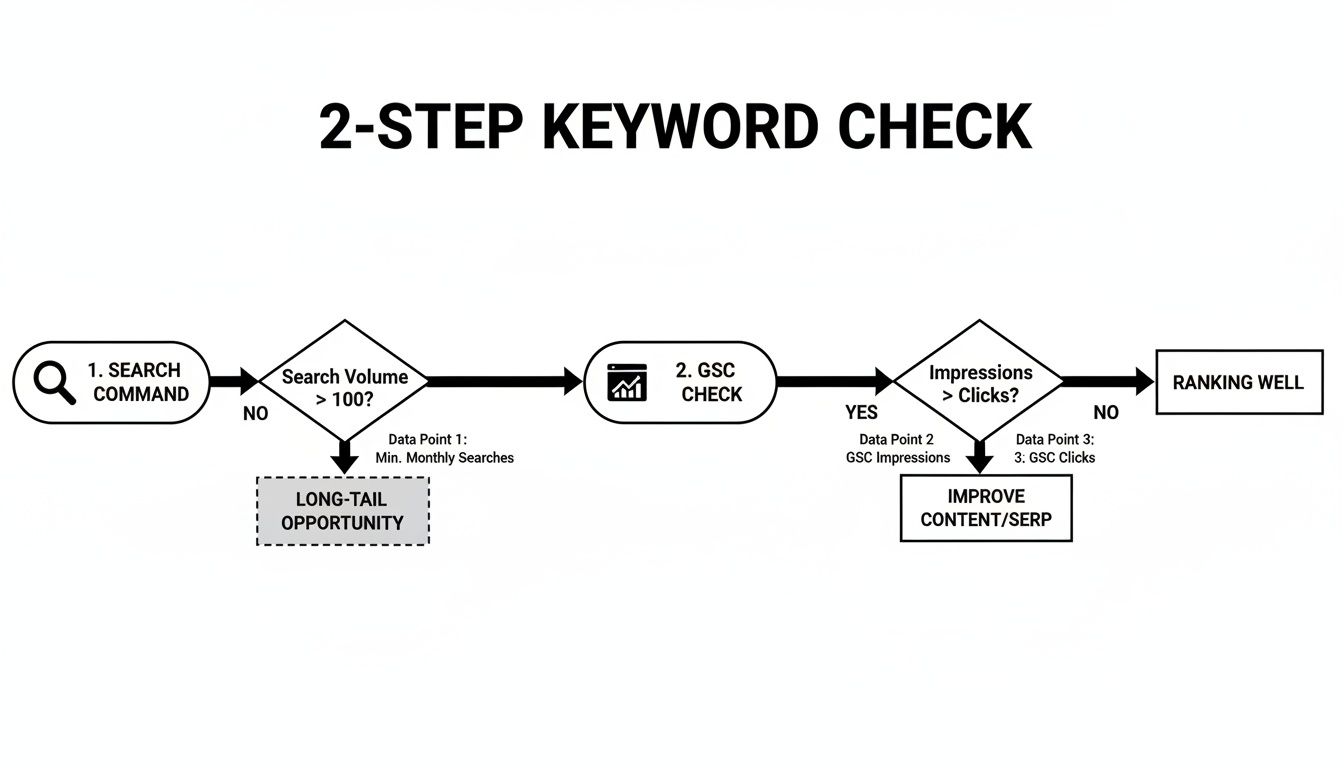
As you can see, your first move should be a quick check on Google, followed by a deeper dive into your Google Search Console data to see what’s really going on behind the scenes.
Method 1: Merge And Consolidate Content
This is usually the most powerful and effective strategy in your toolkit. It's the perfect solution when you have a bunch of weak, thin, or outdated pages all trying to cover the same topic from a very similar angle. Instead of letting them fight for scraps, you combine their best parts into one definitive, high-value resource.
Think of it like this: you have three small, struggling coffee shops on the same block. You decide to combine them into one large, bustling café. You keep the best recipes, the most talented baristas, and the prime location, creating a single business that’s far stronger than the three ever were apart.
When should you use this method?
- You have two or more blog posts covering nearly identical subtopics.
- The competing pages are underperforming on their own, with low traffic and engagement.
- The user intent behind each page is exactly the same.
The process is straightforward: identify your strongest URL (usually the one with the most backlinks or traffic), cherry-pick the best content from the weaker pages, and add it to your main page. Then, you delete the weaker pages and set up 301 redirects to funnel all their traffic and link equity to your new, consolidated powerhouse.
This approach transforms competing assets into a single, authoritative article. To learn more about building these types of comprehensive resources, check out our guide on https://www.trysight.ai/blog/what-is-a-pillar-page.
Method 2: Re-Optimize Competing Pages
Sometimes, both competing pages are valuable in their own right, but they're just optimized too similarly. They might serve slightly different user intents, but because they're both targeting the same primary keyword, they end up confusing Google. In this case, merging or deleting them would be a waste of perfectly good content.
The solution here is to re-optimize. The goal is to sharpen the focus of each page, making its unique purpose undeniable. This usually involves a bit of keyword research to find more specific, long-tail variations that better capture each page's distinct angle.
For example, instead of two pages targeting "project management software," you could re-optimize one for "project management software for small businesses" and the other for "free project management tools." By refining the title tags, headings, and body copy, you’re signaling to Google that these pages serve different audiences and deserve to rank for their own unique queries.
Method 3: Use Canonical Tags
But what if you need to have very similar pages on your site? This is a super common scenario for e-commerce stores with product variations. Imagine a shoe that comes in ten different colors—each color might have its own URL, creating a massive cannibalization issue for the main keyword, "running shoe model X."
This is where the canonical tag (rel="canonical") saves the day. It’s a small snippet of code that tells search engines that while several similar pages exist, one specific URL is the "master" copy.
A canonical tag is like telling a librarian, "These ten books are all copies of the same story, but this one is the original master copy. Please direct everyone to it." It consolidates all your ranking signals without forcing you to delete the other pages.
This technical fix is perfect when you have to keep similar pages live for the user experience but want to avoid the SEO penalties of duplicate content. It's a clean way to guide search engines without messing with your site's structure.
Method 4: Improve Your Internal Linking
Your internal linking structure is one of the most powerful—and often overlooked—tools for telling Google how your site is organized. The anchor text you use in your links is a direct signal, telling search engines what a page is about and which pages you consider the most important for certain topics.
To fix cannibalization with this method, you need to audit your internal links. Find every single mention of your target keyword across your site and make sure they all link to your one, true authority page. If you have links pointing to five different pages with the anchor text "digital marketing guide," you're sending incredibly mixed signals.
By correcting these and pointing them all to your single, primary guide, you help solidify its authority in Google's eyes. Taking control of your internal links is a critical step in a broader strategy for how to improve SEO and build sustainable growth.
Choosing The Right Cannibalization Fix
Deciding which fix to apply can feel tricky, but it boils down to understanding the value and intent of your competing pages. This table should help you make the right call based on your specific situation.
| Solution | Best For This Scenario | Key Action | SEO Impact |
|---|---|---|---|
| Merge & Consolidate | Multiple weak pages with the same user intent and overlapping content. | Combine the best content into one "power page" and 301 redirect the old URLs. | High: Consolidates link equity and authority into a single, much stronger asset. |
| Re-Optimize Pages | Both pages are valuable but target slightly different intents with the same keyword. | Differentiate the content and target more specific, long-tail keywords for each page. | Medium: Allows both pages to rank for distinct queries, eliminating direct competition. |
| Use Canonical Tags | You must keep nearly identical pages live for users (e.g., e-commerce product variants). | Add a rel="canonical" tag on duplicate pages, pointing to the "master" URL. |
Medium: Consolidates ranking signals to one page without removing content for users. |
| Improve Internal Links | Your site architecture sends mixed signals about which page is most important for a topic. | Audit and update internal links to point consistently to the single authoritative page. | Medium: Strengthens the authority signal for your primary page, clarifying hierarchy for Google. |
By carefully evaluating your pages and choosing the appropriate method, you can effectively resolve cannibalization issues and create a stronger, more organized site that search engines can easily understand and reward.
Of course. Here is the rewritten section, following all your requirements.
How to Stop Keyword Cannibalization Before It Even Starts
Fixing keyword cannibalization is one thing, but preventing it from ever happening is the real game-changer. The best long-term strategy is to get proactive. When you bake prevention into your content process, you stop inadvertently weakening your site and start building its authority with every single article you publish.
The core idea is simple: every page needs a unique job to do and a distinct user intent to target. Before you even think about writing, you need a system in place to avoid that messy overlap.
Create and Maintain a Keyword Map
Your keyword map is your single source of truth. Think of it as your content inventory—a master spreadsheet that tracks which keywords belong to which URLs. It’s how you make sure you don't accidentally order the same SEO "product" twice.
At a bare minimum, your map should track:
- The URL: The specific page on your site.
- The Primary Keyword: The main phrase you're targeting.
- Secondary Keywords: All the related long-tail variations.
- User Intent: What the searcher is actually trying to accomplish (e.g., learn something, buy something).
Keeping this document updated means your team can instantly check if a keyword is already taken before they start a new post. This simple step is one of the most powerful things you can do to prevent cannibalization. To really go deep on this, check out our guide on building a powerful keyword strategy for SEO.
A keyword map isn't just defensive; it's an offensive tool. It helps you spot valuable content gaps and plan a strategic, non-competitive content calendar that builds your topical authority piece by piece.
Build a Proactive Content Workflow
Your content creation process needs a dedicated cannibalization checkpoint. It doesn’t have to be complicated. Just add one non-negotiable step to your content briefs or pre-writing checklist.
Here’s a simple workflow you can put in place today:
- Propose a Topic & Keyword: Your writer or strategist comes up with a new content idea.
- Check the Keyword Map: Before anyone gives the green light, check the proposed keyword against your master map.
- Run a Site Search: As a quick backup, run a
site:yourdomain.com "keyword"search. This can catch any older pages the map might have missed. - Assign or Pivot: If the keyword is free, assign it and get to writing. If it’s taken, you have a choice: find a new, more specific angle for the new piece, or decide if the existing content should just be updated instead.
This kind of structured process eliminates the guesswork and turns cannibalization prevention into a shared team responsibility.
Conduct Regular Content Audits
Look, even with the best plans, conflicts can slip through the cracks. This is especially true for large sites or those that are growing fast. That's why running a content audit every 6-12 months is a must. It’s a proactive check-up that lets you spot potential cannibalization issues early, long before they can seriously drag down your rankings.
Dive into your analytics and Google Search Console data, looking for pages with overlapping keyword performance. If you spot any conflicts, you can apply the fixes we talked about earlier—merging content, re-optimizing pages, or setting up redirects. Regular audits keep your content library clean, focused, and powerful, making sure your site stays a well-organized powerhouse for both users and search engines.
Got Questions About Keyword Cannibalization? Let's Clear Things Up.
Even when you've got a handle on the basics, keyword cannibalization can throw some curveballs when you start digging into your own site. It's totally normal for specific questions to pop up. This is where we'll tackle the common "what ifs" and "how longs," giving you quick, practical answers to solidify your strategy.
Is It a Problem to Have Multiple Pages Ranking for Similar Keywords?
Not necessarily, but the answer almost always comes down to one thing: user intent.
It’s perfectly fine—even smart—to have two pages ranking for similar terms if they serve different needs. Think about it: an article on "Beginner's Guide to SEO" and another on "Advanced SEO Techniques" might both touch on "SEO," but they're aimed at completely different people. One is for newcomers, the other for seasoned pros. They can happily coexist.
The real trouble starts when multiple pages target the exact same intent. If you have two different beginner's guides to SEO, you're essentially forcing Google to choose between them. They'll end up competing, splitting your authority, and probably ensuring neither ranks as well as it could. The goal is to make sure every page has a unique job to do.
How Long Does It Take to See Results After Fixing Cannibalization?
While there's no magic stopwatch, you can often see positive movement within a few weeks to a couple of months. Once you merge content, slap up those 301 redirects, and clean things up, you have to wait for Google to do its thing. It needs to recrawl the old URLs, register the redirects, and funnel all that juicy link equity to your new, consolidated page.
A few things can speed this up or slow it down, like your site's overall authority and how often Google crawls it. For a well-established site with a high crawl frequency, you might see rankings improve in as little as 2-4 weeks. For newer or smaller sites, it could take a bit longer.
Fixing keyword cannibalization is such a powerful tactic because you aren't building authority from scratch. You're taking the authority you've already earned and focusing it like a laser beam. That’s why the results often show up much faster than other SEO efforts.
Can Keyword Cannibalization Mess Up My Local SEO Rankings?
Oh, absolutely. Local SEO is a street fight, and cannibalization is like showing up with your shoelaces tied together. It can be especially damaging here.
Imagine a local plumber has one page for "emergency plumbing in Brooklyn" and a separate, nearly identical page for "Brooklyn 24/7 plumber." From Google's perspective, which one is the real authority? It doesn't know. So, it splits the ranking signals, diluting the power of both.
By consolidating those into one powerhouse, location-specific service page, you send a crystal-clear signal to Google. This massively improves your chances of dominating the local pack and showing up on map results when a homeowner has a burst pipe at 3 AM.