So, what exactly is internal linking? Let's cut through the jargon.
Think of your website as a city. The internal links are the roads connecting different neighborhoods (pages). They create a logical path that guides visitors—and just as importantly, search engine crawlers—from one piece of content to the next. Put simply, an internal link is any hyperlink that points from one page on your domain to a different page on the same domain.
Unpacking the Power of Website Connections

At its heart, internal linking is all about building a smart, organized structure for your website. This isn't just a "nice-to-have" for users; it's a fundamental strategy that directly impacts your search engine rankings. When done right, these connections weave a powerful web that gets several critical jobs done.
This whole concept is baked into the DNA of search engines. It really took off with Google's original PageRank algorithm, which famously used links as "votes" to figure out a page's authority. While things have evolved, the core idea remains: links signal importance and relevance.
Why Internal Linking Is Not Optional
A solid internal linking strategy is a non-negotiable part of modern SEO. It’s the roadmap you give to search engine crawlers, helping them discover, understand, and index every page on your site. Without these links, important pages can become isolated "orphans," totally invisible to both search engines and your customers.
To give you a clearer picture, here’s a quick breakdown of what internal links really do.
Core Functions of Internal Linking
| Function | Impact on SEO | Impact on User Experience |
|---|---|---|
| Authority Distribution | Passes "link equity" from strong pages (like the homepage) to weaker ones, boosting their ranking potential. | Provides a clear hierarchy, signaling which pages are most important. |
| Crawlability & Indexing | Creates clear paths for search engine bots to follow, ensuring all your content gets found and indexed. | Makes the site easier to navigate, reducing user frustration. |
| Context & Relevance | Anchor text tells search engines what the linked page is about, establishing topical relationships. | Guides users to related, helpful information, keeping them engaged. |
| User Engagement | Encourages visitors to explore more content, increasing time on site and reducing bounce rates. | Improves the overall flow of the user journey, leading to a better experience. |
Ultimately, a smart linking strategy helps search engines and users make sense of your site's structure and content.
By creating a logical link structure, you're not just organizing content—you're telling Google which pages are the most important and how they all relate to one another. This contextual relationship-building is a cornerstone of effective content strategy.
A Foundational SEO Element
When you boil it down, understanding internal linking means seeing it as a core piece of both user navigation and technical health. It's a key ingredient in comprehensive SEO optimization best practices. These links are the glue that holds your website architecture together, making sure every piece of content contributes to a unified, authoritative whole.
For those ready to get their hands dirty with the nuts and bolts, our guide to technical SEO is the perfect next step: https://www.indexpilot.ai/topics/technical-seo. A smart linking strategy doesn't just connect pages; it transforms your website into a powerful, interconnected asset that drives real organic growth.
The Three Pillars of Effective Internal Linking

To really get what internal linking is all about, we have to look past the obvious stuff like navigation menus. A truly solid strategy rests on three core pillars that work in tandem to lift your website’s performance: authority distribution, crawlability, and user experience.
Once you master these concepts, your internal links transform from simple pathways into a powerful system. This system boosts your site's visibility in search engines and makes it far more valuable to your audience.
Let’s break each one down.
Pillar One: Spreading Page Authority
Picture your website’s authority—often called "link equity"—as a big reservoir of water. Your homepage is usually the main reservoir because it naturally collects the most backlinks from other sites. Internal links are the channels that let this valuable authority flow from your strongest pages out to all the others.
When a high-authority page links to another page on your site, it’s passing along a piece of its strength. This process gives a much-needed lift to the ranking potential of newer or less-visible pages, helping them actually compete in the search results. Without these connections, that authority stays locked up on a few key pages, while the rest of your content is left to fend for itself.
This strategic distribution is what makes internal linking so powerful. You can use your most authoritative pages, like your homepage or a viral blog post, to channel strength to important product pages or new articles that need an initial boost.
Think of it this way:
- High-Authority Page: Your homepage with 100 backlinks.
- Target Page: A brand-new product page with 0 backlinks.
- The Action: Adding a direct internal link from your homepage to that new product page.
- The Result: The product page gets a share of the homepage's authority, helping it rank faster and higher than it ever could on its own.
Pillar Two: Boosting Crawlability and Indexing
Search engine bots, or crawlers, discover content by following links. A well-organized internal linking structure is like a detailed map, guiding these bots through your site so they can find and index every important page. If a page has no internal links pointing to it, it becomes an "orphaned page"—and to a search engine, it might as well not exist.
This whole process is directly tied to your site's crawl budget, which is the amount of resources a search engine will dedicate to crawling your site in a given period. A messy, confusing link structure forces bots to waste this precious budget on unimportant pages or by getting lost in redirect chains.
On the flip side, a clean linking hierarchy makes it dead simple for crawlers to find your most valuable content. It helps them understand the relationship between your pages and the overall site architecture. For anyone wanting to dig deeper, we cover this in our guide to crawl budget optimization.
Simply put, efficient crawling leads to faster indexing, and faster indexing is the first step to showing up in search results at all.
Pillar Three: Improving User Experience
The final pillar is all about your human visitors. A great internal linking strategy creates an intuitive, seamless journey, guiding users to the information they need, right when they need it. When someone is reading an article and sees a link to a related topic, it encourages them to click and explore your site further.
This has a direct impact on key engagement metrics that Google and other search engines pay close attention to:
- Lower Bounce Rate: Users are less likely to leave after seeing just one page.
- Increased Time on Site: They stick around longer, consuming more of your content.
- Higher Page Views: They visit multiple pages in a single session.
For instance, a visitor on a blog post about "digital marketing basics" would naturally be interested in clicking an internal link to a more specific article like "email marketing campaigns." This logical next step keeps them engaged and satisfies their curiosity.
By anticipating what your users want and providing relevant links, you not only make their experience better but also send strong positive signals to search engines that your site is a valuable, helpful resource.
How to Build a Winning Internal Linking Strategy
Alright, let's move from theory to action. This is where a real internal linking strategy starts to take shape and deliver results. Instead of just sprinkling links around hoping for the best, a structured approach shows search engines exactly what your site is about and where your expertise lies.
The goal is to organize your content into logical frameworks. These frameworks do double duty: they guide your human visitors and they give search engine crawlers a clear roadmap.
Two of the most battle-tested models for this are Topical Silos and the Hub-and-Spoke model. Both are designed to group related content, build deep topical authority, and funnel that hard-earned link equity to your most important pages. Let’s break down how to put them to work.
Create Topical Silos for Authority
Think about how you’d organize a physical store. You wouldn't put the TVs in the middle of the produce aisle; you'd create an "Electronics" section. A topical silo is the exact same concept for your website. You're structuring content into distinct, related categories, making it crystal clear to Google what you're an expert in.
Each silo represents a core topic. The main category page—the top of the silo—links down to more specific sub-pages and articles within that topic. Here's the critical part: pages inside one silo should link heavily to each other, but rarely, if ever, to pages in a different silo. This keeps all that topical relevance concentrated.
Imagine an e-commerce site that sells outdoor gear. Their silos might look like this:
- Hiking Gear: The main category page links down to articles on "best hiking boots," "backpacking tent reviews," and "how to choose a waterproof jacket." All of these specific articles link back up to the main hiking page and to one another.
- Camping Equipment: This silo would contain pages about "family tents," "sleeping bags for cold weather," and "portable camping stoves," all tightly interlinked.
- Climbing Gear: This category would cluster pages on "climbing ropes," "choosing a harness," and "climbing helmets."
This structure stops your authority signals from getting watered down. You're not creating a messy, confusing web of links. You're building clean, powerful clusters that scream "expert" on very specific subjects.
Implement the Hub-and-Spoke Model
The hub-and-spoke model, which you might also hear called the topic cluster model, is another fantastic way to organize your content around a central theme. It's built around a main "hub" page (or pillar page) that covers a broad topic. This hub then links out to multiple "spoke" pages (or cluster content) that dive much deeper into specific subtopics.
The core idea is simple: the hub page is your definitive guide on a big subject, while the spoke pages provide exhaustive detail on related, more niche questions. Every single spoke page must link back to the central hub.
This creates a powerful, self-reinforcing loop. The hub page sends authority down to the spokes, and the spokes send relevance signals right back up to the hub. It's a win-win.
This diagram shows how a central "Hub" page connects to multiple "Spoke" articles. Notice how every spoke links back to the hub, creating a tight topical cluster. This architecture creates a very clear information hierarchy. It makes it incredibly easy for search engines to see that your pillar page is the go-to resource for that entire topic.
This model is perfect for targeting competitive, high-value keywords. For example, a digital marketing agency could create a pillar page on "Content Marketing." From that hub, they'd link out to spoke articles like:
- "How to Build a Content Calendar From Scratch"
- "A Guide to Writing SEO-Friendly Blog Posts"
- "10 Ways to Measure Content Marketing ROI"
- "Beginner's Guide to Content Distribution Strategies"
Each of these detailed articles would feature a link pointing right back to the main "Content Marketing" hub page.
Building these structures manually can be a grind, but platforms offering automated internal links can take a lot of the tedious work off your plate. This ensures your topic clusters are built efficiently and, more importantly, correctly from the very beginning. It's a strategic way to elevate your most important content and hit your biggest SEO goals.
Mastering Anchor Text For SEO Success
If your internal links are the roads connecting your website, then anchor text is the road sign. It’s the visible, clickable text in a link, and it gives both your visitors and search engines a clear idea of where they're heading next.
Getting your anchor text right is absolutely non-negotiable for a winning internal linking strategy. It turns a simple link into a powerful signal that helps Google understand what your content is about, which directly impacts your ability to rank for the keywords you’re targeting.
The Different Types of Anchor Text
Not all anchor text is created equal. A healthy, natural-looking link profile has a smart mix of different types. If you lean too heavily on one kind—especially exact-match—it can look manipulative to search engines and might even land you a penalty.
Let's break down the most common types and when you should use them.
Anchor Text Types and When to Use Them
To build a natural and effective link profile, it's crucial to understand the different kinds of anchor text and their specific roles. This table breaks down each type with examples to help you diversify your strategy.
| Anchor Text Type | Example | Best Use Case |
|---|---|---|
| Exact-Match | "blue running shoes" | Use sparingly for your most important, contextually relevant internal links to highly targeted pages. |
| Partial-Match | "comfortable blue sneakers" | A great way to add contextual relevance without keyword stuffing. Perfect for most of your internal links. |
| Branded | "IndexPilot" | Excellent for building brand recognition and linking back to your homepage or key service pages. Very safe. |
| Generic | "click here," "read more" | Best for clear calls-to-action (CTAs) where the surrounding text provides all the context. Use minimally. |
| Naked URL | "www.indexpilot.ai/blog" | Looks natural in small doses, like in a source list or reference section. A descriptive anchor is usually better. |
| Image Anchor Text | alt="blue running shoe" |
When an image is a link, Google uses its alt text as the anchor. Always write descriptive alt text for linked images. |
Using a balanced mix of these types ensures your linking looks organic to search engines while still providing strong contextual signals for SEO.
Best Practices For Anchor Text Optimization
Effective anchor text is all about balance. You need to give search engines clear signals while also creating a natural, helpful experience for your users. The secret is diversification. Your internal link profile should look organic, not like it was assembled by a robot checking off a keyword list.
Your goal should be to use anchor text that is both descriptive and concise. It should create a clear expectation for the user about what they will find when they click the link, while simultaneously signaling topical relevance to search engines.
Here's a look at how a smart linking strategy, like a hub-and-spoke model, organizes content effectively.
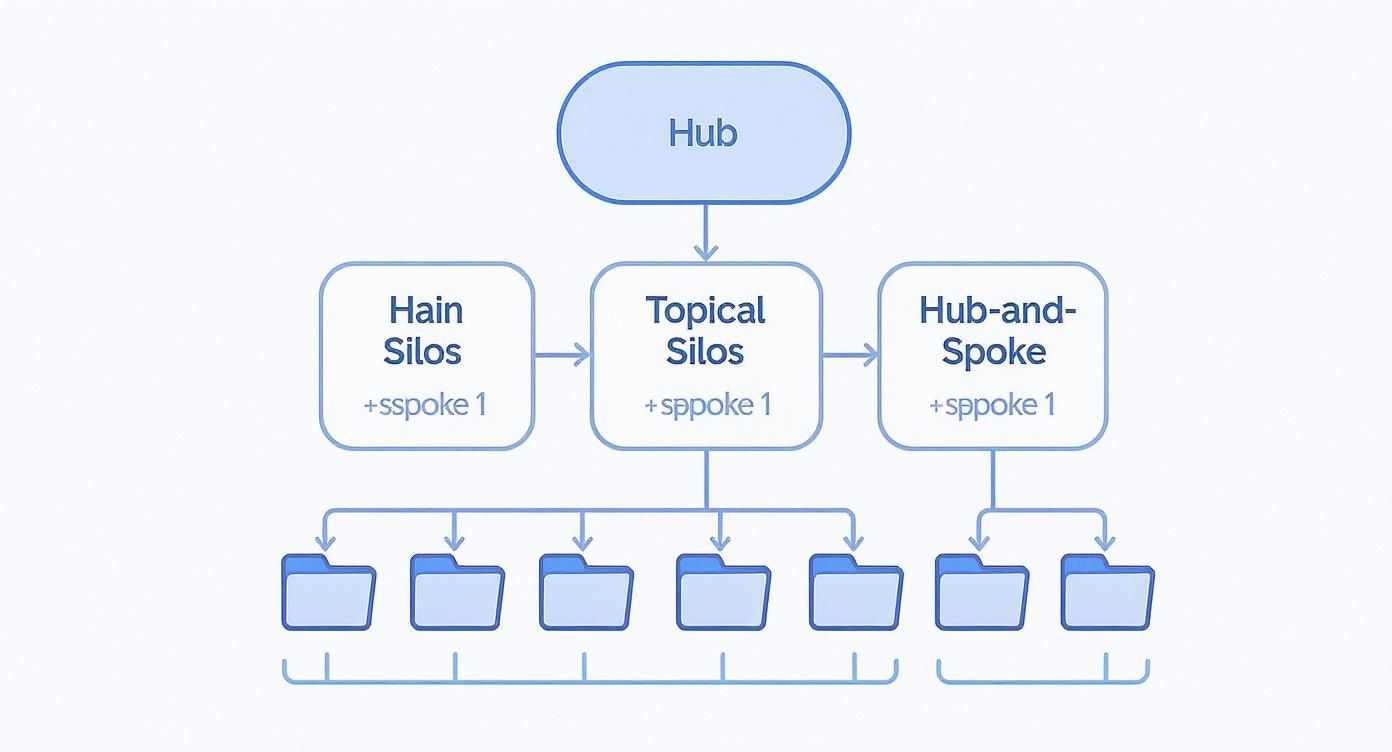
This diagram shows how a central hub page passes authority down to related "spoke" articles. Anchor text is the glue that holds this structure together. By carefully choosing the anchor text for links from the hub to each spoke, you define the specific subtopic of each article, building a powerful content cluster that search engines can easily understand.
How to Audit and Fix Your Internal Links

A powerful internal linking strategy isn't a "set it and forget it" kind of deal. Think of your website like a garden; over time, as you add, remove, and update content, things can get a little messy. Regular maintenance is the only way to make sure your links are working for you, not against you.
An internal link audit is basically a health check for your website's architecture. It’s your chance to find all the hidden problems that could be quietly tanking your SEO performance. The whole process involves firing up an SEO tool to get a complete map of your site's connections and then systematically fixing the issues you uncover.
Starting Your Internal Link Audit
First thing's first: you need to crawl your website. Tools like Ahrefs, Semrush, or Screaming Frog are perfect for this. They act just like search engine bots, following every single link to create a detailed blueprint of your site. This crawl data is the foundation of your entire audit.
Once the crawl finishes, you’ll be looking at a massive spreadsheet of all your URLs and the links between them. The trick is knowing what to look for. Don't try to boil the ocean—focus on a few critical, high-impact issues first to get the biggest bang for your buck.
Identifying and Fixing Critical Issues
Your audit is going to turn up a few usual suspects. The key is to prioritize. Here are the most important problems to hunt down and fix, starting with the most damaging ones.
1. Broken Internal Links (404 Errors) These are the worst offenders. Broken links point to pages that don't exist anymore, creating a dead end for both users and search engine crawlers. They waste your crawl budget and, frankly, just make for a terrible user experience.
- How to Find: Your site audit tool will have a dedicated report listing all "404 errors" or "broken links." It’s usually front and center.
- How to Fix: The best move is to update the link so it points to a relevant, live page. If there isn't a good replacement, just remove the link altogether. For a step-by-step guide, check out our post on how to fix broken links.
2. Orphaned Pages Think of these as islands. Orphaned pages have zero incoming internal links from any other page on your site. For a search engine crawler, if there's no path to a page, it might as well be invisible.
- How to Find: Most audit tools have a report specifically for "orphaned pages." They work by comparing the URLs found in your sitemap to the URLs they actually discovered during the crawl.
- How to Fix: Find relevant, high-authority pages on your site and add at least one or two internal links that point to the orphaned page. This gives crawlers a bridge to find it.
An internal link audit isn't just about finding what's broken. It’s also about finding what's missing. Fixing orphaned pages is one of the fastest ways to get underperforming content indexed and ranking.
Optimizing Link Distribution and Authority
Beyond just fixing what's broken, a great audit is about optimizing the flow of authority through your site. You need to find pages that are hoarding link equity and others that are starved for it.
Under-Linked Important Pages Your most important service pages or "money pages" need a ton of internal link support to signal their importance to Google. Use your audit tool to find which of these crucial pages have very few incoming internal links. Then, strategically add links from your high-authority pages—like the homepage or your most popular blog posts—to give them a boost.
Pages with Excessive Links While linking is good, more isn't always better. Stuffing too many links onto a single page can dilute the authority that each individual link passes. One comprehensive study found that pages with around 45-50 internal links tended to get the most organic traffic, with performance dipping after that point. Prune unnecessary links from cluttered pages, keeping only the most valuable and contextually relevant connections.
Common Internal Linking Mistakes to Avoid
Even the most carefully crafted internal linking strategy can fall flat if you're making a few simple, yet critical, mistakes. Knowing what not to do is just as important as following the best practices. The scary part? Many of these slip-ups can fly under the radar, quietly hurting your SEO and creating a frustrating experience for your visitors.
These errors can burn through your crawl budget, water down your page authority, and send confusing signals to search engines about what your content is really about. The good news is that once you know what you’re looking for, they’re surprisingly easy to fix. Let's walk through the most common pitfalls so you can steer clear of them.
Vague or Generic Anchor Text
This is probably the number one mistake I see. People use anchor text like "click here" or "read more," which tells users and search engines absolutely nothing about the page they're about to land on. Your anchor text is a golden opportunity to signal to Google what the linked page is about. Don't waste it.
- What Not to Do: To learn more about our services, click here.
- What to Do Instead: Learn more about our AI-powered content creation services.
See the difference? That small tweak sends a clear, keyword-rich signal that helps Google understand your content's relevance.
Creating Orphaned Content
An orphaned page is a page that has zero internal links pointing to it. Think of it as an island with no bridges leading to it. If search engine crawlers can't find a path to a page, they might never discover it. That means it won't get indexed, and it definitely won't have a chance to rank for anything. Every single page you want to see in search results needs at least one internal link.
An orphaned page is essentially invisible to search engine crawlers. It doesn't matter how great the content is if no one—including Google—can find it through your site's navigation or contextual links.
Using Nofollow on Internal Links
The rel="nofollow" attribute is a directive that tells search engines not to pass any authority through a link. While it has its place for certain external links, using it on your own internal links is a major misstep. It's like building a highway system and then putting up roadblocks on every single on-ramp. You completely stop the flow of PageRank and prevent your stronger pages from boosting your weaker ones.
Make sure all your internal links are standard "dofollow" links so they can pass value freely. On a related note, be careful not to cram too many links onto one page, which can dilute the authority each one passes. If you're wondering where that line is, our guide breaks down how many internal links is too many to help you strike the right balance.
Got Questions About Internal Linking? Let's Clear Things Up.
As we get to the end of this guide, a few common questions always seem to pop up. Let's tackle them head-on to make sure you're feeling confident and ready to put this all into practice.
How Many Internal Links Should I Put on a Page?
There’s no magic number here. The real goal is quality over quantity.
Instead of obsessing over a specific count, just focus on adding links where they genuinely help the reader. If a link provides useful context or guides them to the next logical step, add it. If it feels forced, leave it out. That's really all there is to it.
That said, some studies have pointed to a sweet spot. Pages with around 40-50 incoming internal links tend to see a nice lift in organic traffic. But don't go overboard—stuffing a page with hundreds of links just dilutes the authority each one passes.
Can Internal Links Actually Hurt My SEO?
Absolutely, if you get it wrong. A bad internal linking strategy can do more harm than good.
When done poorly, internal links can actively sabotage your SEO by creating a confusing experience for both users and search engines.
A poor internal linking strategy can lead to wasted crawl budget, a confusing user experience, and diluted page authority. It's not just about what you link to, but how and why you do it.
Here are a few common ways people mess this up:
- Broken Links: Every link to a 404 page is a dead end. It wastes your crawl budget and, even worse, frustrates your visitors.
- Keyword Stuffing the Anchor Text: Using the exact same keyword-stuffed anchor text over and over again is a huge red flag for search engines. It just looks unnatural.
- Irrelevant Linking: Linking two pages that have nothing to do with each other is just plain confusing. It muddies the topical relevance of your content for both Google and your readers.
Should All My Internal Links Be Dofollow?
Yes. Pretty much 100% of the time, your internal links should be standard "dofollow" links.
The whole point of this exercise is to let authority (or "link juice") and contextual signals flow through your site. Putting a rel="nofollow" tag on an internal link is like building a dam—it stops that flow dead in its tracks.
There are almost no legitimate reasons to nofollow a link to another page on your own website. For a healthy, well-structured site that passes authority effectively, keep it simple: all internal links should be dofollow. This lets search engines crawl your site logically and spread authority the way you intended.
Ready to build a powerful internal linking structure without all the manual busywork? IndexPilot uses AI to automatically create contextually relevant internal links as it writes your SEO content. Transform your keywords into a compounding growth engine by visiting https://www.indexpilot.ai to see how it works.