Building a workflow isn't just about ticking boxes. It's about taking the chaotic, reactive nature of day-to-day tasks and shaping it into a structured, repeatable process that actually works—from start to finish. This move from cobbled-together methods to a clear system is hands down the most effective way to improve consistency, slash errors, and give your team the breathing room to focus on big-picture, high-impact work.
Why Ad-Hoc Processes Are Silently Killing Your Growth
Let's be real—no team sets out to create chaos. It just sort of… happens. A last-minute request here, a verbal instruction there, and before you know it, your entire operation is running on sticky notes and frantic Slack messages. That’s the ad-hoc reality, and it’s a massive drain on both productivity and morale.
When there's no defined path for getting things done, every single task turns into a negotiation. Team members waste more time figuring out how to do the work than actually doing it. This confusion leads directly to inconsistent quality, blown deadlines, and a constant, low-grade hum of panic.
The True Cost of Disorder
The hidden price of a disorganized system is staggering. It’s not just about the time you lose; it’s the ripple effect that hits the entire business. Do any of these red flags sound familiar?
- Endless Follow-Ups: If your days are filled with "what's the status of this?" messages, your process is broken. It’s that simple.
- Team Burnout: When every project feels like you're reinventing the wheel, creative energy nosedives and frustration skyrockets.
- Inconsistent Quality: Without a standard way of doing things, the final result is a gamble. It depends entirely on who did the work, leading to unpredictable and often disappointing outcomes.
An unstructured workflow doesn't just slow you down; it puts a hard ceiling on your growth. It guarantees your team will always be too buried in manual tasks to focus on the strategic moves that actually drive the business forward.
Making this transition is becoming more critical by the day. A recent study revealed that 50% of companies are already redesigning their workflows with AI. They're moving past simple productivity hacks and fundamentally transforming how they operate. This trend, led by tech and financial services, signals a clear shift from casual experimentation to deep, strategic integration.
Building a structured system isn’t about adding red tape; it's about removing friction. We dive deeper into this in our guide on marketing workflow management. By creating a clear, documented, and repeatable process, you're not just organizing tasks—you're building a foundation for scalable, sustainable growth.
Mapping Your Current Process: From Chaos to Clarity
Before you can build a better workflow, you have to get painfully honest about the one you have right now—even if it feels like total chaos. I've seen too many teams jump straight into buying new software or designing new processes without ever understanding their starting point. It's a classic recipe for failure.
The goal here isn't to create some monstrous, hundred-page document. It's about getting crystal clear on how work actually gets done today.
Think of it like renovating a house. You wouldn't start knocking down walls without knowing which ones are load-bearing. This initial mapping phase is your blueprint. It shows you what’s solid, what’s broken, and where the hidden problems are. Without it, you're just guessing.
Start by Drawing It Out
Honestly, the best way to start is often the simplest: grab a whiteboard and some markers. The physical act of drawing your process forces you to confront every single step, every handoff, and every frustrating bottleneck. No fancy software needed, at least not yet.
If you prefer digital, tools like Lucidchart are great for creating flowcharts and process maps. Getting it all down visually helps everyone on the team see the same picture, and it almost instantly highlights the parts of the process that just don't make sense. You'll spot redundancies and weird, illogical steps you never noticed before.
A messy process isn't just inefficient; it kicks off a toxic cycle. It starts with chaos, which leads directly to team burnout, and the end result is always the same: lost growth and tanked productivity.
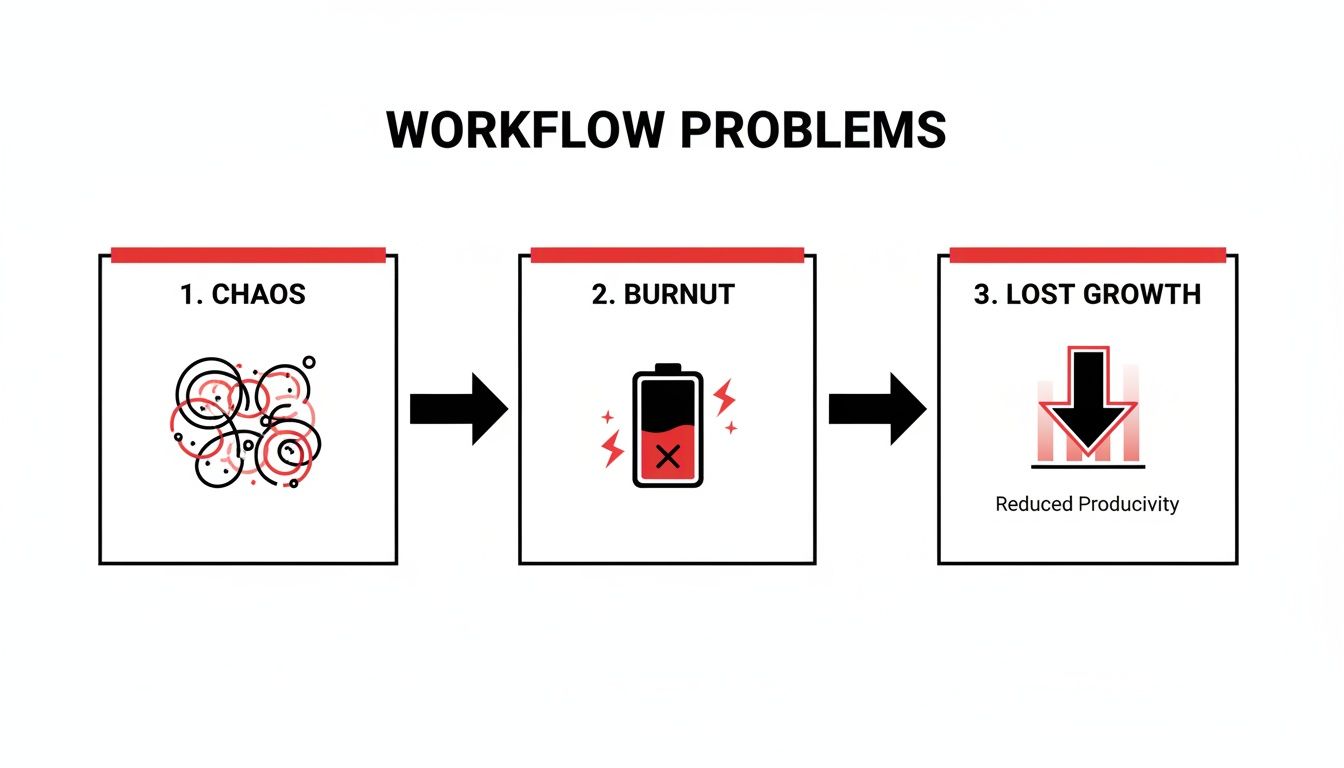
Understanding this downward spiral makes it pretty clear why moving from a "winging it" approach to a structured system is so urgent.
Get Insights Straight From Your Team
Your map is only as good as the information you put into it, and the real experts are the people doing the work every day. Their insights are pure gold. Set up some informal chats with the key people involved at each stage, from the person who comes up with the idea to the one who hits "publish."
You don't need a long list of questions. Just a few direct ones will do the trick:
- "What's the most frustrating part of this process for you?" This one almost always uncovers a hidden bottleneck right away.
- "Where do you spend most of your time waiting for someone or something?" This points directly to dependencies and communication gaps.
- "If you could wave a magic wand and change one thing about how this works, what would it be?" This empowers your team and often leads to simple, brilliant solutions you'd never think of.
The real story of your workflow isn't in a manual; it's in the daily experiences of your team. Their feedback is the most critical data you can collect during this mapping phase.
Set Clear Goals for the New Workflow
Okay, once you have a clear map of the present, you can start dreaming about the future. What does "better" actually look like for your team? If you don't set specific goals, you'll end up making changes that feel busy but don't move the needle.
Your objectives for building a workflow need to be clear, measurable, and tied to actual business outcomes.
Here are a few common goals I see with content and marketing teams:
- Cut Time-to-Publish in Half: Get from a content idea to a live article in two weeks instead of four.
- Boost SEO Performance: Make sure every single piece of content passes a standardized SEO checklist before it goes live.
- Improve Team Collaboration: Slash the number of revision cycles by 50% by creating clearer briefs and defining review stages.
Setting these goals gives you a north star for the entire project. Every decision you make from here on out—from choosing tools to defining roles—should directly support these objectives. For more guidance on this initial stage, check out our detailed article on creating a workflow from scratch.
Choosing Your Tech Stack for Workflow Automation

Once you've mapped out your current process, it's time to pick the tools that will bring your workflow to life. The right tech doesn't just make things faster; it becomes the central nervous system for your entire content operation. It connects all the moving parts and gets rid of that soul-crushing manual work for good.
You have to think of your tech stack as a single, cohesive ecosystem, not just a random collection of software subscriptions. Every tool needs to "talk" to the others, creating a seamless handoff of information from one stage to the next. The goal is a system where data moves on its own, not because someone is stuck copying and pasting it all day.
Core Principles for Selecting Tools
Before you get distracted by all the flashy features, it's best to ground your selection process in a few core principles. The perfect tech stack is one that actually supports your team's specific needs, not one that shoves you into some rigid, pre-built process. Always look for flexibility, scalability, and ease of use.
Your evaluation should really zero in on three key areas:
- Integration Capabilities: How well does this tool play with the software you're already using? Think about your CMS, analytics platforms, and project management system. Native integrations are great, but a solid API is a non-negotiable for any custom connections you might need down the line.
- Scalability: Can this tool grow with you? A platform that’s perfect for a team of two should be able to handle a team of twenty without falling apart or blowing up your budget.
- User Experience (UX): Let's be honest—if a tool is clunky and a pain to use, your team just won't adopt it, no matter how powerful it is. Always prioritize platforms with intuitive interfaces that don't require weeks of training.
Don’t fall into the trap of choosing the "best" tool on the market. Instead, focus on finding the right combination of tools for your specific workflow, goals, and team. A simple, well-integrated stack is always better than a complex, disconnected one.
This is especially true with the rise of AI. Recent data shows that in 2025, a staggering 83% of content creators are weaving AI into their workflows, with 38.7% using it throughout their entire process. As you build your stack, it's crucial to understand what is business process automation and its benefits for streamlining these modern, AI-driven operations.
Workflow Tool Comparison for Content Teams
Choosing the right combination of tools can feel overwhelming. To simplify, here's a breakdown of the essential categories you'll need to build a modern, integrated content and SEO workflow.
| Tool Category | Primary Function | Key Features | Example Integration |
|---|---|---|---|
| Project Management | Organizing tasks, deadlines, and team collaboration. | Kanban boards, Gantt charts, task assignments, status tracking | Asana task created automatically from a new brief generated in a content platform. |
| Content Optimization | Analyzing and improving content for SEO and readability. | SERP analysis, keyword suggestions, content scoring, AI writing | Sight AI pushes a fully optimized draft directly into WordPress. |
| Digital Asset Management | Storing and organizing creative assets like images. | Version control, metadata tagging, easy sharing, integrations | A finalized image from Canva is automatically synced to a shared folder in Google Drive. |
| Analytics & Reporting | Tracking performance and measuring content ROI. | Traffic monitoring, conversion tracking, keyword ranking | Google Analytics data is pulled into a Databox dashboard for a unified performance view. |
| Automation & Integration | Connecting disparate apps to automate data flow. | "If-This-Then-That" logic, pre-built connectors (Zaps), webhooks | A published Webflow article triggers a Zapier workflow to share the post on social media. |
This table highlights how different tools can work together, forming an interconnected system rather than a set of standalone subscriptions. The key is to ensure data flows effortlessly between each stage of your workflow.
Building Your Integrated Content Workflow
Let's walk through a real-world example to see how this all connects. Imagine a content marketing team that wants to speed up its entire blog production process, from the first idea to the final published post. A well-chosen tech stack can automate nearly the entire journey.
It could start with a central platform like Sight AI, which uses AI and search insights to identify high-value content gaps. From there, it can generate a comprehensive, SEO-optimized draft. This draft then gets automatically pushed to a project management tool like Asana or Trello, creating a new task and assigning it to an editor for review.
Once approved, the content is sent directly to the CMS (like WordPress or Webflow) as a draft, complete with all the necessary images and metadata. The moment it's published, the system automatically submits the new URL to Google and Bing for faster indexing. This interconnected system transforms a manual process that used to take days into a highly efficient, automated flow.
If you're ready to explore specific software options, check out our complete guide on the most essential content workflow tools.
Putting Your New Workflow into Action
A workflow on paper is just a theory. The real magic happens when it collides with the messy reality of daily work. Moving from a diagram to a living, breathing process requires a smart rollout strategy, one that doesn't completely derail your team's momentum. Let’s be honest, a chaotic launch can kill a brilliant new system before it ever gets a chance to prove its worth.
The biggest mistake I see teams make is the "big bang" launch—everything changes overnight. It's a recipe for confusion and resistance. A much better approach is to start small.
Kick things off with a low-risk pilot project. Maybe it's a single blog post or a small content campaign. This gives you a controlled environment to see how the workflow actually performs in the wild. You'll uncover friction points and unexpected hiccups without jeopardizing a major initiative.
Launching Your Pilot Program
Think of your pilot program as a data-gathering mission. Your only goal right now is to observe, learn, and tweak. Grab a small group of team members—ideally, the ones who are most open to change—and give them crystal-clear documentation and a quick, hands-on training session. Vague instructions are the enemy of adoption, so be specific.
During this test run, keep your eyes peeled for a few key things:
- Spotting the Bottlenecks: Where do tasks get stuck? Is there any confusion about who does what next?
- Testing Your Tech Stack: Do your apps actually talk to each other, or are there frustrating gaps in the integration? If you're automating publishing, our guide on CMS integration for automated publishing has some solid tips on this front.
- Getting Real Feedback: Don't wait for people to come to you. Actively ask the pilot team for their thoughts. What’s working? What feels clunky or just plain annoying?
Implementation isn't a one-and-done event; it's the beginning of a continuous feedback loop. The insights from your team are pure gold—they're what will help you shape this process into something genuinely useful.
This iterative approach is more important than ever. Technology is moving at a breakneck pace, especially in the world of AI. The generative AI market, which powers so many modern content workflows, is projected to hit $44.89 billion in 2025, a huge jump from $29 billion in 2022. This boom means workflows built on platforms like Sight AI can automate a ton of work and drive incredible results. You can dig into more stats on this market growth to see the impact.
From Feedback to Fine-Tuning
Once the pilot project is wrapped up, get the team together to go over all the feedback. This is where you turn all those observations into concrete improvements. The goal is to polish the workflow based on real-world experience, making it more intuitive and effective before you roll it out to everyone.
Even after the official launch, you need a simple way to keep the feedback coming. A dedicated Slack channel or a special board in your project management tool works great. This gives your team a clear, low-friction way to suggest improvements as they pop up.
By designing a workflow that's meant to evolve, you create a system that's resilient and efficient. It can adapt to new challenges and opportunities, ultimately becoming the engine that powers your team's growth.
Measuring Success and Optimizing Performance

A well-designed workflow definitely feels better, but how can you prove it actually works better? The only way to know for sure is to measure its impact with cold, hard data. This is what shifts the conversation from a subjective "I think this is more efficient" to a concrete, data-backed conclusion that shows real value to stakeholders.
The trick is to focus on metrics that directly reflect operational efficiency, not just the top-level marketing results. Of course, traffic and conversions are crucial, but they don't tell you if your process has improved. You need to dial in on the Key Performance Indicators (KPIs) that reveal the health and speed of your internal operations.
Identifying Your Core Workflow KPIs
To get a clear picture of how effective your new workflow is, you have to track metrics that connect directly to the problems you set out to solve in the first place. Instead of getting lost in a sea of data, just start with a few critical indicators of process health.
Here are some of the most impactful KPIs I've seen for content and marketing teams:
- Time to Publish: This is the big one. It’s the total time elapsed from the moment an idea is approved to the second it goes live. A significant reduction here is one of the clearest signs your new workflow is crushing bottlenecks.
- Content Velocity: Put simply, how many pieces of content (articles, videos, social posts) can your team produce in a given period, like a month or a quarter? A jump in velocity shows your new system is boosting capacity.
- Revision Cycle Count: This is a personal favorite. Track the average number of back-and-forth revision rounds a piece of content goes through before final approval. A lower number means clearer briefs, better communication, and a much smoother review process.
- First-Pass Approval Rate: This is the percentage of content that gets the green light after the very first review. A high rate here is a strong indicator of incredible quality and alignment within your team.
Don't just build a new process; build a measurement plan right alongside it. A workflow without KPIs is just a list of instructions, but a workflow with measurable outcomes becomes a true strategic asset for your business.
Once you have your core metrics, the next step is to make them visible. A simple dashboard in a tool like Google Data Studio or Databox can pull all this information together, giving your team a real-time view of performance. This visual feedback loop is incredibly powerful for spotting trends and identifying areas that need more fine-tuning. For a deeper dive, our guide on measuring content marketing ROI shows how to connect these process metrics to bottom-line business results.
Turning Data Into Actionable Improvements
Measurement isn't about creating a one-time report to prove you were right. It's the engine for continuous optimization.
Your data dashboard will start to reveal patterns you can act on. For instance, if you notice the 'revision cycle count' is still stubbornly high for a specific content type, that’s a clear signal to go back and beef up the briefing template for that format.
This data-driven approach lets you make precise, targeted adjustments instead of just guessing what's wrong. By regularly reviewing your KPIs, you can keep dialing in your system, ensuring that building a workflow isn’t a one-off project but an ongoing commitment to getting better every single day.
Common Questions About Building a Workflow
When teams first start thinking about building real, documented workflows, a few questions always pop up. It's totally normal. Getting past these initial hurdles is the key to building momentum instead of getting bogged down in frustration before you even start. Let's tackle the most common sticking points head-on.
Where Should a Small Team Start?
The sheer number of processes you could improve can feel paralyzing. My advice? Don't try to boil the ocean. The absolute best place to start is with your single most painful, repetitive, and time-sucking process.
Think about what consistently causes friction for your team. Is it the endless back-and-forth of getting a blog post approved and published? Or maybe it's the manual grind of pulling together a weekly social media schedule. Whatever it is, pick that one thing.
Once you have your target, map out how it works right now, find the most obvious bottleneck, and pour all your energy into streamlining just that. A small, tangible win here builds the confidence (and the buy-in) you'll need to tackle bigger, more complex workflows later on.
How Do You Get Team Members to Adopt a New Workflow?
This is a big one. True adoption isn't about forcing new rules on people; it's about making their lives genuinely easier and showing them how. The success of any new system hinges on buy-in, not just compliance.
The best way to get that buy-in is to involve your team in the design process from day one. When people have a hand in building the solution to their own problems, they feel a real sense of ownership over it.
From there, it all comes down to clear, empathetic communication.
- Explain the "Why": Don't just show them the "what." Clearly explain how this new workflow gets rid of tedious tasks, eliminates confusion, or frees them up to focus on more creative, high-impact work.
- Provide Simple Documentation: Nobody is going to read a 50-page manual. Think simple checklists, short video walkthroughs, or even a visual flowchart they can pin up. Make it easy to reference.
- Designate a Champion: Pick one person who can be the go-to for questions and feedback. This ensures nobody feels lost or ignored while they're getting the hang of it.
A workflow that feels like it’s being done to your team will always fail. A workflow that’s built with your team has a genuine chance to succeed and create lasting change.
How Often Should You Review and Update a Workflow?
A great workflow is a living document, not something you carve in stone and forget about. It has to evolve as your team, tools, and goals inevitably change. If you treat it like a static rulebook, it will become obsolete and inefficient faster than you think.
For a brand-new workflow, I recommend a review after the first 30 days of use, and then again at the 90-day mark. These early check-ins are crucial for spotting immediate problems and making quick tweaks based on how it's actually working in the real world.
Once the process feels more settled, a quarterly review is a pretty solid cadence. That said, be ready to revisit it anytime a major change happens—like bringing on a new piece of software, restructuring the team, or if you start noticing a bottleneck creeping back in. The goal is continuous improvement, not rigid adherence to an old plan.
Ready to stop wrestling with manual processes and start building a truly automated content engine? Sight AI turns AI-driven insights into optimized content, pushing it directly to your CMS and accelerating discovery. Learn how Sight AI can build and automate your entire content workflow.