A blog post outline isn't just a to-do list; it's the strategic roadmap for creating content that actually performs. It provides a solid framework with all your headings, subheadings, and key points laid out before you even start writing.
Think of it as the blueprint that transforms a rough idea into a polished, authoritative article that’s perfectly aligned with what people are searching for.
Why An Outline Is Your Most Powerful Content Tool
Before we jump into the templates, let's get on the same page about why a solid outline is non-negotiable for any serious content strategy. Skipping this step is like trying to build a house without a blueprint—you might end up with something, but I guarantee it won’t be sturdy, efficient, or what your audience actually wanted.
A well-crafted outline solves the biggest headaches content marketers face, from the dreaded writer's block to completely missing the mark with your audience. It forces you to think critically about the user's journey and organize your thoughts into a logical flow that guides them from one point to the next, seamlessly.

Aligning With Search Intent and User Experience
At its core, building a blog post outline is an exercise in empathy. It forces you to step into your reader's shoes and map out the clearest, most direct path to answering their question. This structured approach has a massive impact on the performance metrics that search engines care about.
A logical structure immediately improves a few critical factors:
- Dwell Time: When content is easy to follow, readers stick around longer. A good outline ensures your H2s and H3s create a scannable, engaging experience that keeps them on the page.
- Clarity and Flow: It’s your guardrail against rambling or going off on tangents. This keeps your message sharp and laser-focused on delivering value.
- Comprehensiveness: You can spot content gaps before you write a single word, making it easy to ensure your article covers the topic more thoroughly than your competitors.
By planning your article's structure, you're not just organizing ideas; you're intentionally designing a better user experience. If you want to dig deeper into how this works, check out the core principles of good https://www.trysight.ai/blog/structure-in-writing to see how it applies to everything you create.
Boosting SEO Performance and Authority
Using a solid blog post outline can dramatically boost your content's search engine rankings. While the top-ranking content on Google averages 1,140-1,285 words, a well-structured outline ensures you hit that sweet spot without adding a bunch of useless fluff.
This is especially critical when you consider that 32% of shoppers start their journey with a Google search. Yet, aligning content with search intent is a major challenge for 70.6% of content marketers, making this planning stage absolutely essential.
A great outline is your first line of defense against creating "thin content." It's where you strategically plan to weave in data, expert quotes, and internal links—the very signals that demonstrate Expertise, Experience, Authoritativeness, and Trustworthiness (E-E-A-T) to Google.
Ultimately, this isn't just an organizational tool. It’s a strategic framework that ensures every piece of content you publish is built to perform, connect with readers, and drive real business results. For a deeper dive into the strategic advantages, this guide on Blogging for Business: A Guide to Driving Growth is a fantastic resource.
Here’s a quick summary of how using a blog post outline directly improves the SEO performance indicators that matter most.
How an Outline Impacts Key SEO Metrics
| SEO Metric | Impact of Using an Outline | Why It Matters for Your Blog |
|---|---|---|
| Dwell Time | Increases reader engagement by making content scannable and easy to follow. | Longer dwell times signal to Google that your page is valuable, which can boost rankings. |
| Keyword Targeting | Ensures primary and secondary keywords are placed naturally within relevant headings and sections. | Proper keyword placement helps search engines understand your content's topic and relevance. |
| Content Depth | Helps identify and fill gaps, creating a more comprehensive resource than competitors. | In-depth, authoritative content is favored by Google and satisfies user intent more effectively. |
| Internal Linking | Allows you to plan strategic internal links to other relevant content, boosting topical authority. | A strong internal linking structure helps distribute page authority and keeps users on your site longer. |
As you can see, the simple act of outlining sets the foundation for a piece of content that is primed to rank well and deliver a great user experience.
The Foundational SEO Blog Post Outline Template
If there's one tool that acts as the absolute workhorse for content marketing, this is it. Think of this SEO outline as the blueprint for any high-value, comprehensive article you want to rank. It’s not a rigid set of rules, but a flexible framework you can easily adapt for pillar pages, ultimate guides, or in-depth tutorials. The whole point is to align your content with what both users and search engines crave: clarity, structure, and authority.
This kind of structured approach forces you to think strategically before you even write the first sentence. By mapping out your headings, key points, and internal links ahead of time, you guarantee every section has a purpose. It ensures you’re answering a specific question and building a piece that genuinely feels authoritative.

Core Components Of The SEO Template
A solid SEO outline is so much more than just a list of headings. It's a strategic document that guides your writer and, more importantly, anticipates what your reader is looking for. Each piece is a building block toward an article that actually performs. Before we get to the template itself, let's break down the 'why' behind each part.
- Working Title/H1: This is your main headline. It has to include your primary keyword, but it also needs to be compelling enough to get someone to click on it from a crowded search results page.
- Introduction: Your hook. This is where you immediately reassure the reader they're in the right place. State the problem you're about to solve and give them a quick preview of what they’ll learn.
- Main Body (H2s & H3s): Here’s the heart of your article. Each H2 should tackle a major subtopic or a closely related keyword. The H3s are where you can drill down into long-tail keywords and answer those very specific user questions.
- Strategic Inserts: These are just little notes to yourself within the outline—reminders to place a quote, drop in some data, add an internal link, or insert a specific image. Planning these ahead makes them feel intentional, not just tacked on.
- Conclusion & CTA: The wrap-up. Briefly summarize the most important takeaways and then tell the reader what to do next with a clear call-to-action (CTA).
Remember, for an article to really hit the mark, the outline needs to be built from a solid plan. The ideas here go hand-in-hand with a well-researched https://www.trysight.ai/blog/seo-content-brief-template, which lays the strategic foundation—like keyword targets and competitor insights—that this outline builds on.
The Fill-in-the-Blank SEO Outline
Here’s the plug-and-play structure you can copy and paste for your next big content piece.
Pro Tip: Don't just stuff keywords into your headings. Phrase them as questions or statements that speak directly to what the user wants to know. For instance, instead of an H2 that just says "Content Outline Tools," go with something like "What Are the Best Tools for Creating a Content Outline?" It’s a small change that makes a big difference.
[Working Title / H1 - Include Primary Keyword Here]
Introduction
- Hook: Kick things off with a relatable problem or a surprising statistic.
- Thesis: Briefly state what the article is about and why it's valuable.
- Internal Link: Plan to add a link here to a relevant introductory post on your blog.
H2 Subtopic 1 - Address a Core User Question
- Key Point: Explain the concept clearly and concisely.
- Supporting Data: Make a note to include a specific statistic or data point here.
- H3: Dive Deeper into a Nuanced Aspect
- Use a bulleted list for actionable tips or steps.
- Note where to add an expert quote to build authority.
H2 Subtopic 2 - Target a Secondary Keyword
- Example/Case Study: Briefly describe a real-world example to make your point tangible.
- Visual Aid: Plan for an infographic, chart, or custom image right here.
- H3: Address a "How To" Long-Tail Keyword
- Write out a short, numbered list for a simple step-by-step process.
H2 Subtopic 3 - Common Problems or Mistakes to Avoid
- Bulleted List: Identify 3-5 common mistakes people make related to your topic.
- Expert Insight: Note where to sprinkle in a unique perspective or quote.
- Internal Link: Link out to a more advanced or troubleshooting guide on your site.
Conclusion
- Summary: Quickly recap the 2-3 most important takeaways.
- Call-to-Action (CTA): Tell the reader what to do next. Should they download a resource, start a trial, or read another post?
While our focus here is on blog posts, the principles of a strong content blueprint are universal. For instance, looking at a good book outline template can even offer some great insights into structuring much longer-form content. This foundational SEO outline gives you a powerful and repeatable starting point for creating content that consistently ranks and provides real value.
Of course. Here is the rewritten section, designed to sound like it was written by an experienced human expert, following all the provided requirements.
5 Battle-Tested Outline Templates for Any Content Goal
Let's be honest: a single, one-size-fits-all blog post outline can only get you so far. The real magic happens when you match your content's structure to its specific goal. A deep-dive product review needs a completely different skeleton than a quick, scannable listicle.
So, I've put together five distinct, ready-to-use outline templates designed for the content formats that actually drive traffic and engagement. Think of this as your personal playbook for creating a healthy mix of high-performing content without the guesswork. Each template is packed with prompts for hooks, body sections, and calls-to-action that work.
Choosing the Right Outline Template
Use this quick guide to select the best blog post outline template based on your specific content goal.
| Template Type | Primary Goal | Best Use Case | Ideal Word Count |
|---|---|---|---|
| Skyscraper Listicle | Become the definitive resource | Ultimate guides, "best of" lists | 2,000 - 5,000+ words |
| In-Depth Product Review | Build trust and drive conversions | Honest software or product evaluations | 1,500 - 3,000 words |
| How-To Guide | Teach a specific skill or process | Step-by-step tutorials | 1,200 - 2,500 words |
| Thought Leadership | Build authority and start conversations | Unique perspectives, contrarian takes | 1,500 - 3,000 words |
| Quick-Hit News/Update | Announce information quickly | Product updates, company news | 500 - 1,000 words |
Now that you have a high-level view, let's break down exactly how to use each one.
The Skyscraper Listicle Outline
This is your go-to for creating massive, "ultimate guide" style listicles (think "25 Actionable Tips," "15 Best Tools"). The entire point is to build the most thorough and valuable resource on the topic, making your post the tallest "skyscraper" in the city of search results.
Pro Tip: Don't just list things. For every single item, add a short paragraph explaining the 'why' and the 'how.' This simple addition adds a ton of value and transforms a basic list into an authoritative guide.
[Working Title H1 - e.g., 25 Proven Strategies for [Topic]]
Introduction
- Hook: Kick things off with a surprising statistic or a relatable question about your topic.
- Value Proposition: Tell the reader exactly what they'll learn and why this is the only list they'll ever need.
- Jump Menu: If it's a long one, pop in a table of contents. It's a huge help for navigation.
H2 Item 1 [First Tip/Strategy/Tool]
- H3: The Core Idea: Explain the concept in a nutshell.
- H3: Why It Works: Give a quick rundown of the benefits.
- H3: How to Implement It: Provide a clear, actionable step.
H2 Item 2 [Second Tip/Strategy/Tool]
- (Repeat that same H3 structure for every item to keep it consistent and easy to read.)
(Keep going for all your list items.)
Conclusion
- Summary: Briefly recap the top 2-3 most powerful points from the list.
- Call-to-Action (CTA): Challenge readers to apply one tip today or download a related checklist.
The In-Depth Product Review Outline
This structure is all about building trust to drive conversions. It walks the reader through a balanced, honest evaluation, giving them everything they need to know before they pull out their credit card. Transparency is your best friend here.
[Working Title H1 - e.g., [Product Name] Review: Is It Worth It in [Year]?]
Introduction
- Hook: Start by hitting on the reader's main pain point—the very problem this product claims to fix.
- Your Experience: Establish credibility. A simple "I've been testing [Product Name] for the past three months..." goes a long way.
- Verdict Up Front: Don't make them wait. Give a quick, one-sentence summary of your final opinion right away.
H2 What Is [Product Name] and Who Is It For?
- Core Function: Explain what the product does in plain English.
- Ideal User: Be specific about who this product is perfect for (and who it's not for).
H2 Key Features Breakdown
- H3: Feature 1: Describe the feature and, more importantly, its primary benefit.
- H3: Feature 2: Do the same for the next key feature.
- H3: Feature 3: And the next. Focus on benefits over just listing specs.
H2 Pros and Cons
- Bulleted List of Pros: List 3-5 of its biggest strengths.
- Bulleted List of Cons: Be honest and list 2-3 drawbacks or limitations. This builds immense trust.
H2 Pricing and Value
- Table: Create a simple table to compare pricing tiers.
- Value Assessment: Give your take on whether the price tag is justified by the features.
H2 Final Verdict and Alternatives
- Recommendation: Circle back to your initial verdict and expand on it.
- CTA: End with a clear next step, like "Try [Product Name] for free" or "See our list of top alternatives."
The How-To Guide Outline
Clarity and actionability are everything for a great how-to guide. This blog post outline is laser-focused on a logical, step-by-step flow that helps the reader get something done.
[Working Title H1 - e.g., How to [Achieve a Specific Outcome]: A Step-by-Step Guide]
Introduction
- Hook: State the awesome final outcome the reader will achieve by following your guide.
- Prerequisites: List out any tools, materials, or prior knowledge they'll need before they start.
- Quick Overview: Briefly outline the main stages of the process so they know what to expect.
H2 Step 1: [First Action]
- Clear Instruction: Explain exactly what to do. No fluff.
- Visual Aid: Make a note to add a screenshot or an image here to show, not just tell.
- Pro Tip: Drop in a blockquote with a little expert tip for this specific step.
H2 Step 2: [Second Action]
- (Repeat the same structure from Step 1 for every step.)
(Continue for all necessary steps.)
H2 Troubleshooting Common Issues
- Bulleted List: Anticipate problems. Address 2-3 potential roadblocks and offer clear solutions.
Conclusion
- Recap: Quickly summarize the process they just completed and the fantastic result.
- CTA: Suggest what the reader should do next now that they have this new skill.
The Thought Leadership Outline
This template is for articles where you're presenting a unique perspective, challenging a common industry belief, or introducing a brand-new idea. It's less about instructions and more about building a rock-solid argument.
[Working Title H1 - e.g., Why [Common Belief] Is Wrong About [Topic]]
Introduction
- Hook: Lead with a provocative statement or a question that makes people stop and think.
- Thesis Statement: Clearly and boldly state your unique argument or perspective.
H2 The Current State of [Topic]
- Context: First, explain the prevailing wisdom or the common approach everyone else is taking.
H2 The Flaw in the Current Thinking
- Argument: This is where you present your core counter-argument, backing it up with data, logic, or personal experience.
- Evidence: Use a blockquote to feature an expert quote or a powerful statistic that supports your claim.
H2 A Better Way Forward: A New Framework
- Your Solution: Lay out your proposed new model, framework, or way of thinking.
- Bulleted List of Benefits: Clearly explain the advantages of adopting your approach.
Conclusion
- Restate Thesis: Summarize your main argument one last time, making it memorable.
- CTA: Invite discussion in the comments section or encourage readers to explore more of your unique content generation ideas.
The Quick-Hit News or Update Post
Sometimes you just need to get information out there—fast. This stripped-down template is perfect for company announcements, industry news, or product updates. The goal is clarity and speed.
[Working Title H1 - e.g., Announcing [New Feature/Update/Event]]
Introduction
- The Big News: State the announcement clearly and directly in the very first sentence. Get to the point.
- The "Why": Immediately follow up by explaining why this news matters to the reader.
H2 What's New in Detail
- Bulleted List: Break down the key changes or updates into scannable bullet points.
H2 How to Get Started
- Actionable Steps: Give them a simple, numbered list explaining how to access the new feature or participate in the event.
Conclusion
- Look Ahead: Give a little teaser about what might be coming next.
- CTA: Direct users exactly where you want them to go—a product page, a help document, or a registration link.
Adapting Your Template to Audience and Intent
A great blog post outline is a solid starting point, but it's never the finished product. Think of it as a clean, reliable engine. To actually win the race, you need to tune that engine for the specific track and conditions—in this case, your unique audience and their search intent.
If you stick rigidly to a generic structure, you're almost guaranteed to create content that feels sterile and completely misses the mark. The real magic happens when you evolve your template from a basic skeleton into a custom content plan, built specifically for the person on the other side of the screen.
This means digging deeper than standard headings to find the nuanced questions, specific pain points, and unspoken expectations your audience has. True authority isn't built by just filling in the blanks; you earn it by showing a deep, almost personal understanding of what your reader actually needs.
To get started, this decision tree can help you pick the right foundational template based on your main goal.
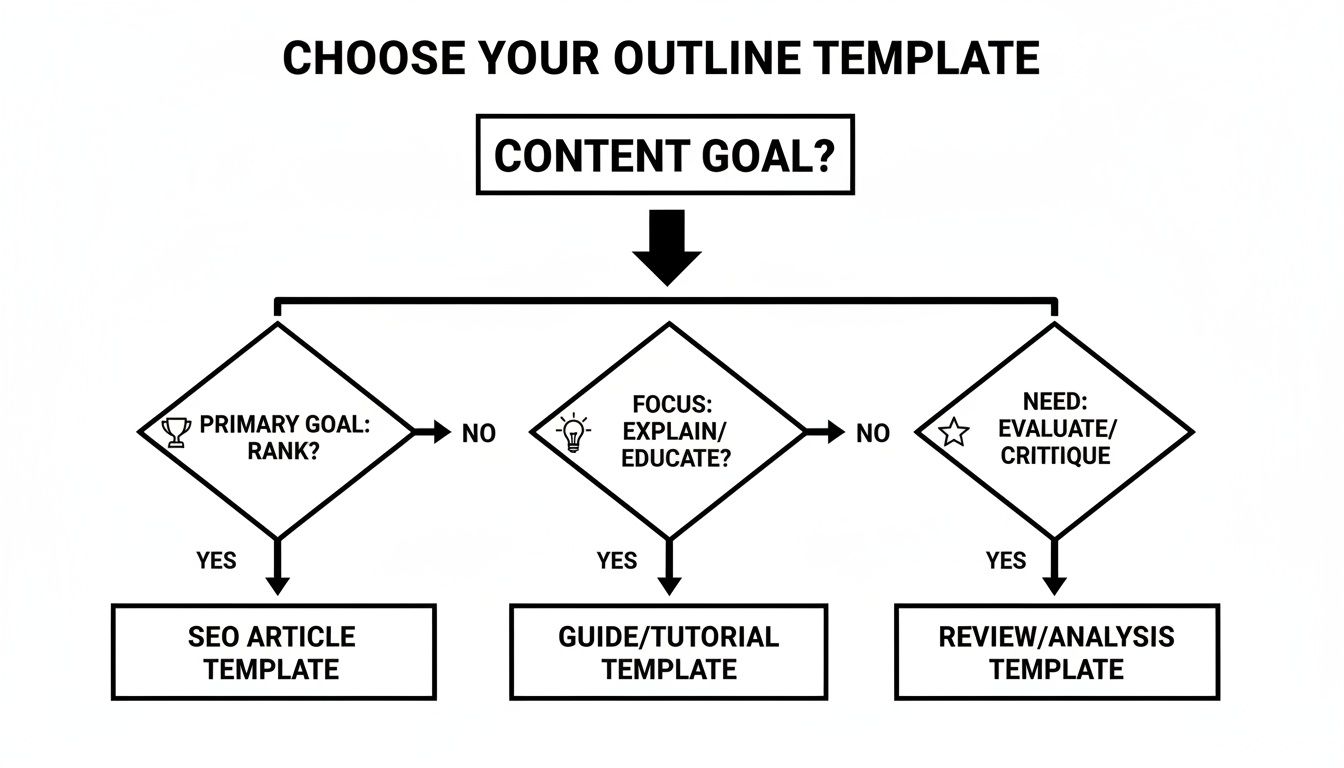
The key takeaway here is that your content's purpose—whether it's to rank, explain, or review—should dictate its initial structure before you even think about customizing it.
Uncovering The Real Questions Your Audience Is Asking
Before you can start tweaking your outline, you need some raw intel on what your readers are really looking for. This goes way beyond just your primary keywords. It’s about getting to the "why" behind their search.
The good news? You don't need fancy, expensive tools to gather these insights. Your first stop should be Google itself.
- People Also Ask (PAA): This is a goldmine. Type your main keyword into Google and take a close look at the PAA box. These are the literal questions your audience is asking, and each one is a potential H3 or even a full H2 section for your outline.
- Related Searches: Scroll to the bottom of the search results. This little section shows you how people refine their searches, giving you valuable clues about secondary topics and long-tail keywords to weave into your content.
Next, go hang out where your audience lives online. Forums like Reddit and Quora are unfiltered firehoses of user intent. Search for your topic and find threads where people are frustrated, confused, or asking for recommendations. The exact language they use and the problems they describe are pure content fuel.
Translating Insights Into a Custom Outline
Once you’ve gathered all this intel, it’s time to put it to work. This is the part where you transform a standard template into a high-performance, custom-built outline that speaks directly to your audience’s needs.
Key Takeaway: The best outlines aren't just lists of keywords. They are structured conversations that anticipate and answer a reader's follow-up questions before they even have to ask them. This is how you create content that feels genuinely helpful and comprehensive.
Here’s how to turn that research into concrete sections for your outline:
- Add a Dedicated FAQ Section: Pull the best questions from the "People Also Ask" box and those Reddit threads to create a robust FAQ section at the end of your post. This move directly targets specific user queries and can help you snag featured snippets.
- Create New Subheadings (H3s): Did you spot a recurring pain point or a common myth during your research? Turn it into its own H3. For example, if you're writing about "email marketing software" and see tons of people asking about deliverability, add an H3 like "How to Actually Avoid the Spam Folder."
- Refine Your Angle: Your research might show that all your competitors are hammering on features, but your audience is really worried about ease of use. That insight lets you pivot your entire outline to focus on a user-friendly angle, which immediately makes your content stand out.
By methodically applying these techniques, you ensure your final article isn’t just another piece of content—it’s the definitive resource they were looking for. Understanding the nuances of reader motivation is crucial, which is why it's worth learning more about what is search intent in SEO to truly master this process.
Bringing Your Outline to Life with Modern Tools
An exceptional blog post outline is your strategic blueprint, but it’s only as good as the finished article. The real magic happens when you bridge the gap between that detailed plan and a polished, published piece. This is where modern tools and smart workflows come in, turning your framework into a high-performing asset without wasting hours.

Today, that workflow almost always starts with AI. A detailed, well-researched outline is the perfect fuel for an AI writing assistant. By feeding it your structured headings, key points, and data, you can generate a solid first draft in minutes, not days. This isn't about letting a robot take over; it's about using it as a powerful accelerator to do the initial heavy lifting.
This draft gives you a strong foundation to then refine, edit, and infuse with your brand's unique voice and expertise. For a deeper look at this process, our guide on using AI for blog writing breaks down advanced techniques for getting the best possible results.
From Draft to Published Post in Your CMS
Once you have a refined draft, it’s time to move it into your Content Management System (CMS), whether that’s WordPress, Webflow, or Ghost. This is where the structural integrity of your outline truly pays off. All that careful planning makes the technical side of publishing much more straightforward.
Here’s a practical checklist to run through as you move content from your document into the CMS:
- Properly Format Headings: Make sure your main title is set as an H1, your main sections use H2s, and any subsections are tagged as H3s. This hierarchy is non-negotiable for both reader experience and SEO.
- Add Metadata: Don't forget to write a compelling SEO title and meta description. Your outline should have already given you a great starting point for this.
- Place Internal Links Strategically: Your outline already noted where internal links should go. Now, go in and add them, making sure your anchor text is descriptive and relevant.
- Optimize Images: Upload your planned visuals and ensure each one has descriptive alt text. This is a must for accessibility and image search visibility.
Your outline is your single source of truth during the publishing process. It keeps you from forgetting key elements like a specific call-to-action, an expert quote, or a critical internal link that boosts your topical authority.
Automating for Speed and Accuracy
Most bloggers create outlines for their posts, and for good reason: they slash creation time while lifting performance. With 70.6% of marketers admitting they struggle with search intent, an automated outlining and drafting process provides a massive competitive advantage.
For businesses using a platform like Sight AI, this means turning visibility insights—like brand sentiment tracking or competitor analysis—into fully outlined, SEO-optimized articles in a fraction of the time. It’s a game-changer when you’re trying to scale your content efforts.
This structured workflow ensures that the strategic decisions made during the outlining phase are perfectly executed in the final article. It transforms your blog post outline from a simple document into the core of an efficient, results-driven content engine, ensuring every piece is ready to rank, engage, and convert from the moment you hit "publish."
Of course. Here is the rewritten section, crafted to sound human-written and match the provided examples.
Common Questions About Blog Post Outlines
Even with the best templates in hand, some questions always seem to pop up. It happens to everyone, whether you're a seasoned pro or just starting out. Let's tackle some of the most common sticking points people run into when working with outlines.
Think of this as your quick-reference guide for those "what if" moments. We'll clear up any confusion so you can get back to creating fantastic content.
How Detailed Should a Blog Post Outline Be?
There’s definitely a sweet spot here. You're looking for a comprehensive roadmap, not a rigid script that boxes you in. A good rule of thumb is to map out your working title, all your H2 and H3 headings, and then drop a few bullet points under each one.
Those bullets should capture the key topics, data points, or specific arguments you plan to hit in that section. For a standard 2,000-word article, your outline will probably land somewhere in the 300-400 word range.
The core idea is this: the more complex your topic, the more detail your outline needs. This helps you maintain a logical flow and ensures nothing critical gets left on the cutting room floor. It should be detailed enough that another writer could pick it up and instantly grasp the article's structure and purpose.
Can I Reuse the Same Outline Template for Every Post?
While a foundational template is a massive time-saver, you’ll get far better results by tweaking it for each article's specific format and search intent. A "how-to" guide needs a fundamentally different structure than an in-depth product review. One is all about sequential steps, while the other needs dedicated sections for features, pricing, and pros and cons.
Key Insight: Before you finalize any outline, always check the top-ranking content for your target keyword. See what kind of structure is already winning with your audience and the search engines, then adjust your base template to match—or improve upon—that proven format.
How Does an Outline Help with Google's E-E-A-T?
An outline is the perfect place to strategically build Expertise, Experience, Authoritativeness, and Trustworthiness (E-E-A-T) into your content from the ground up. Instead of treating these signals as an afterthought you sprinkle in later, the outlining phase is where you plan for them intentionally.
This is your chance to systematically map out exactly where to:
- Drop in expert quotes to strengthen your arguments.
- Cite authoritative studies or original research as hard evidence.
- Showcase original data or personal case studies to prove you've got real-world experience.
- Link out to credible, non-competing sources to build reader trust.
Taking this methodical approach ensures your claims are well-supported from the start. It builds a much stronger sense of authority than trying to shoehorn these elements in after the fact.
What Are the Best Free Tools for Creating Outlines?
You absolutely do not need expensive, specialized software to create powerful outlines. In fact, some of the best tools for the job are probably already part of your workflow and are completely free.
Here are a few excellent options to get you started:
- Google Docs: This is a fantastic choice. Its built-in heading styles (H1, H2, H3) automatically create a navigable document outline in the sidebar. This makes it incredibly easy to see your structure at a glance and jump between sections as you write.
- Notion or Trello: If you're more of a visual thinker, these tools are great. You can use cards, pages, or toggles to represent different sections, which you can then easily drag and drop to rearrange your content's flow on the fly.
- Google Search Itself: Honestly, this is one of the best free resources for an SEO-focused outline. The "People Also Ask" section and the "Related searches" at the bottom of the page give you the exact questions and phrases real users are searching for—perfect subtopics to build out your article.
Ready to turn AI-driven insights into high-ranking content? Sight AI monitors how AI models talk about your brand, uncovers high-value content gaps, and uses specialized AI agents to produce SEO-optimized articles in a fraction of the time. Stop guessing and start growing with a smarter content workflow. Learn more and get started with Sight AI today.