An internal linking audit is the process of methodically analyzing and improving the hyperlinks that connect pages on your own website. It’s a core SEO task, but I think of it less as a task and more as drawing a clear roadmap for both Google and your visitors. You're making sure search engines can discover all your content, that authority flows to your most important pages, and that people can actually find what they're looking for.
Why an Internal Linking Audit Is an SEO Superpower

Ever feel like you're putting out great content but not seeing the ranking improvements you deserve? More often than not, the problem isn't the content itself—it's how everything is connected. This is where a strategic audit becomes your secret weapon, turning what seems like a routine technical check into a massive growth opportunity.
An internal linking audit goes way beyond just fixing a few broken links. It's about intentionally designing your site’s architecture to hit specific SEO goals. By methodically digging into your link structure, you can find hidden issues that are quietly holding back your performance.
Uncover Hidden Growth Opportunities
A huge part of any audit is finding and fixing "orphan pages." These are valuable pieces of content with zero internal links pointing to them. To a search engine, these pages are practically invisible, no matter how amazing the content is. By identifying them and linking to them from relevant, authoritative pages, you essentially bring them back from the dead.
Another key focus is making sure your most important "money pages"—like your core service or product pages—are getting enough support from the rest of the site. The audit helps you answer critical questions:
- Are your high-authority blog posts passing link equity to the pages that actually convert?
- Is your homepage, often the most powerful page on your site, linking to your top-priority services?
- Do you have "dead-end" pages that stop both users and search crawlers in their tracks?
The Tangible Impact on Rankings and Traffic
The results from a proper internal linking audit can be seriously impressive. We've seen enterprise organizations experience ranking improvements between 25–60% after getting their internal links in order.
The benefits didn't stop there. These companies also saw up to 30% more pages indexed by Google and a 40–80% jump in organic sessions after implementation. These aren't small numbers; they're game-changers.
An internal linking audit isn't just a technical task; it's a strategic review of how you distribute authority and guide users. It’s one of the few SEO activities where you have 100% control, making it a reliable lever for growth.
This process is fundamental to website health. To see how internal linking fits into the bigger picture, it helps to understand the essentials of comprehensive technical SEO audits. And if you're just getting started, our complete guide on what is internal linking in SEO will give you the foundational knowledge you need to get going.
Assembling Your Audit Tools and Data
Before you can start fixing any linking issues, you need the right instruments to see what’s really going on under the hood. A successful internal linking audit isn’t built on guesswork; it’s built on solid data pulled from a few key sources. When you combine these datasets, you get a 360-degree view that no single tool can offer on its own.
Your goal here is to move beyond a simple list of links. You want to understand the full story of your site's architecture, how users behave, and what search engine crawlers are actually doing. This holistic approach is what separates a routine check-up from a high-impact strategic analysis.
Your Core Data Toolkit
To kick things off, you'll need to gather information from three primary sources. Each one provides a unique piece of the puzzle, and together, they paint a complete picture of your internal linking health.
A Site Crawler: Tools like Screaming Frog (the industry workhorse) or Sitebulb are non-negotiable. They act like your own personal search bot, crawling your website page by page to map out its structure. This is where you'll get the raw architectural data—the backbone of your entire audit.
Google Search Console (GSC): Think of GSC as your direct line to Google. It shows you how Google sees your site and, just as importantly, how users interact with it in search results. This data is gold for finding pages that are almost ranking and just need a little authority boost from some internal links.
Server Log Files (Optional but powerful): If you're ready for a more advanced audit, analyzing your server log files is the way to go. This data reveals exactly how Googlebot and other crawlers navigate your site. You can uncover crawl budget inefficiencies and see which pages search engines prioritize, offering a layer of insight you just can't get anywhere else.
The most effective internal linking audits happen at the intersection of these three data sources. A crawler tells you what should be happening based on your site's structure, GSC tells you what is happening in search, and log files tell you what bots are actually doing.
The Essential Data Exports
Once you have your tools ready, the next move is to export the right information. Being specific here will save you hours of sorting through messy data later. To kickstart your internal linking audit, you might consider leveraging a comprehensive Website SEO Audit to gain foundational insights into your site's current state.
To make this practical, I've put together a table outlining exactly what you need to pull.
Your Core Data Sources for an Internal Linking Audit
Here’s a breakdown of what to collect from each source and the insights you'll gain for your audit.
| Data Source | Key Data Points to Export | Primary Insight Gained |
|---|---|---|
| Site Crawler | URLs, Status Codes, Inlinks, Outlinks, Anchor Text, Crawl Depth | Your site’s current link architecture and structure. |
| Google Search Console | Pages by Clicks & Impressions, Top Queries per Page | User engagement patterns and high-opportunity pages. |
| Log Files | Googlebot Hits per URL, Response Codes, Crawl Frequency | Actual search engine crawler behavior and priorities. |
With these exports in hand, you have everything you need to begin the analysis phase. The next step is to consolidate this information into a master spreadsheet or analysis tool. This integrated dataset is where the magic happens—it allows you to spot correlations and uncover issues that would otherwise remain hidden.
For a clear idea of how to structure your findings, reviewing an SEO audit report sample can provide a helpful template for presenting your data.
How to Analyze Your Data and Spot Critical Issues
Alright, you've done the grunt work. Your crawlers have finished, you've pulled your Google Search Console data, and you’ve even wrangled those server logs. Now the real fun begins. This is where we stop being data collectors and start being detectives, turning spreadsheets full of URLs into a concrete action plan. The whole point of this phase is to connect the dots and find the patterns that are secretly holding back your site’s performance.
First things first, you need to merge your datasets. On its own, crawl data tells you what your site structure looks like. But when you layer in GSC data, you start to understand the so what. For instance, your crawler might show a page has plenty of internal links, but if GSC reveals it's getting tons of impressions and a dismal click-through rate, that’s a huge red flag. It’s a clear signal that the anchor text isn't compelling or the page needs more authority.
This is the general flow for pulling together the foundational data you’ll be working with.
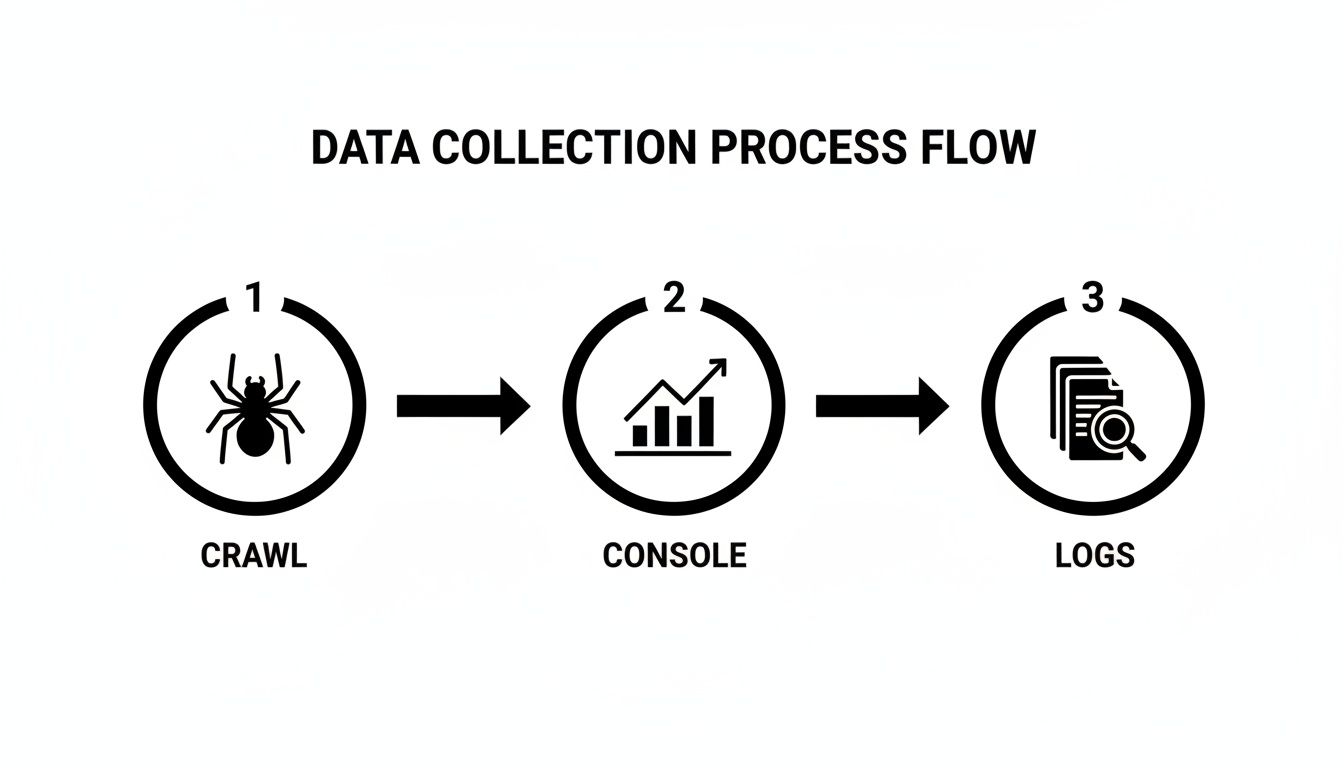
Each of these sources—your site crawler, Google Search Console, and your server logs—gives you a unique piece of the puzzle. When you put them together, you get a complete picture of your site’s internal linking health.
Hunting for Orphan and Dead-End Pages
Your first mission is to track down two of the most common (and damaging) offenders: orphan pages and dead-end pages. Think of them as opposite ends of the same broken linking spectrum. Both are bad news for your SEO.
Orphan pages are the easiest to spot. These are URLs floating in the void with zero incoming internal links. From Google's perspective, if you don't even link to a page from your own site, why should they consider it important? These are often old blog posts, forgotten landing pages, or product pages that got dropped from the navigation.
Dead-end pages are the reverse. These pages have links coming in but nothing going out, stopping users and search engine crawlers cold. When a crawler hits one of these, it’s a dead end. That valuable link equity gets trapped, and the crawler can't discover other pages on your site. The usual suspects here are old thank-you pages, outdated legal notices, or thin blog posts that were never updated.
Finding these is simple. Just fire up your SEO crawler and filter your URL list to show pages where inlinks = 0 (orphans) and outlinks = 0 (dead ends).
Mapping Your Site's Authority Flow
Let's be clear: not all internal links are created equal. A link from your high-authority homepage packs a much bigger punch than one from a blog post you published yesterday. A crucial part of any internal linking audit is making sure that authority flows logically to the pages that actually drive your business.
Start by identifying your most powerful pages. These are usually your homepage, major service or category pages, and popular blog posts that have earned a lot of backlinks. You can find them by sorting your crawl data by the number of inlinks or by using a metric like Screaming Frog’s “Link Score” or Ahrefs’ “URL Rating.”
Once you have that list, identify your most important "money" pages—your core service pages, key product pages, or lead-gen landing pages. Now, ask the critical question: Are your powerful pages linking to your important pages?
I once worked with an e-commerce store that had top-ranking blog posts on "how to choose a running shoe," but none of them linked to their best-selling running shoe product pages. It was a massive missed opportunity. By simply adding a few relevant, contextual links from the blog posts to the products, we channeled all that existing authority directly to the pages that generate revenue.
Auditing Your Anchor Text Strategy
Finally, it’s time to get surgical with your anchor text. Vague phrases like "click here" or "learn more" are SEO poison—they tell Google almost nothing about the page you're linking to. Your goal is to use descriptive, keyword-rich anchor text that clearly signals the topic of the destination page.
Export a complete list of your internal links and their anchor text from your crawler. You’re looking for problematic patterns:
- Over-optimized anchor text: Are you hammering the exact same keyword for every single link pointing to a page? That can look spammy and unnatural.
- Generic anchor text: How many of your links use useless phrases like "read more" or "our solutions"?
- Irrelevant anchor text: Does the link text actually describe the content of the page it’s pointing to? A link to a page about "email marketing software" with the anchor "our services" is a wasted opportunity.
A far better approach would be using anchors like "our email marketing software" or a relevant long-tail variation.
While you're at it, keep an eye on link density. You want to provide useful pathways for users and crawlers without turning your pages into a wall of blue links. For a deeper dive on finding that sweet spot, check out our guide on how many internal links is too many for a single page. By spotting these issues, you’re doing more than just cleaning up links—you’re building a stronger, more intuitive site architecture.
Creating a Smart Plan to Fix Your Linking Issues

Finding all the kinks in your internal linking is one thing; figuring out what to tackle first is where the real strategy kicks in. You'll likely end up with a long, intimidating list of issues. Just diving in without a plan is a recipe for scattered work that doesn't actually move the needle.
The trick is to turn that raw data into an organized, actionable project plan. You want to prioritize the changes that will give you the biggest SEO bang for your buck. It’s all about working smarter, separating the quick, high-impact fixes from the bigger projects that will take more time and resources. This way, you build momentum and get results you can actually show people, which is key for getting buy-in for more ambitious SEO work later.
Identifying Your Quick Wins
The best place to start is always with the "quick wins." These are the high-impact, low-effort changes that can deliver results almost immediately. We're talking about fixes that don't require a developer or a complete content overhaul. Think of it as harvesting the lowest-hanging fruit to get a fast boost.
A simple prioritization matrix is perfect for this. Just plot every issue you found based on its potential SEO impact versus the effort needed to fix it.
- High-Impact, Low-Effort (Quick Wins): Your top priority. This could be as simple as fixing a broken link on a high-authority page or adding a couple of internal links to a newly discovered orphan page.
- High-Impact, High-Effort (Major Projects): These are the big-ticket items that need more planning, like restructuring an entire content hub or overhauling the main navigation.
- Low-Impact, Low-Effort (Fill-in Tasks): Good for when you have a spare moment but not your main focus. An example would be updating a few generic anchor texts on old, low-traffic blog posts.
- Low-Impact, High-Effort (Re-evaluate): These are tasks that probably aren't worth your time. It’s almost always better to focus your energy elsewhere.
By zeroing in on that "Quick Wins" quadrant first, you can demonstrate the value of your audit right away. These small victories create a positive feedback loop, making it much easier to get the resources you need for the bigger, more complex projects down the road.
A Playbook for Common Linking Fixes
Once your priorities are straight, it's time to get to work. Having a clear playbook for common issues makes the whole process smoother and more consistent. No need to reinvent the wheel every time—just apply a proven solution.
Fixing Broken Internal Links
When a link points to a 404 page, you're not just creating a bad user experience; you're leaking valuable authority.
- Spot the Broken Link: Pull up your crawl report to find all the 404 errors.
- Find a Relevant Replacement: Find a live page on your site that covers a similar topic.
- Implement a 301 Redirect: Set up a permanent 301 redirect from the broken URL to the new one. This passes along most of the link equity and sends users to a page that’s actually helpful.
De-Orphaning a Valuable Page
If you find a great piece of content that's just floating out there with no internal links, your job is to connect it back to the mothership.
- Find Linking Opportunities: A quick way to do this is with the
site:search operator in Google. For example:site:yourdomain.com "relevant keyword". This will show you pages on your own site that talk about the orphan page's topic. - Add Contextual Links: Go into those pages and add a contextual, keyword-rich internal link pointing to the orphan page. Aim for at least 2-3 new links to give it a solid footing.
A Real-World B2B Scenario
Let's walk through a classic example. Imagine a B2B service company runs an audit and finds out its "Case Studies" page is seriously under-linked. The content is fantastic, but with only a few internal links pointing its way, it's not ranking for anything meaningful.
Here’s a simple plan to fix that:
- Identify Linking Pages: The SEO manager identifies five high-traffic blog posts that discuss industry problems their services solve. These are perfect places to add a link.
- Craft Effective Anchor Text: Instead of just using generic anchor text like "case studies," they get more descriptive with phrases like "see how we solved this for a client" or "our customer success stories."
- Implement and Monitor: They add the new links and pop an annotation into Google Analytics. After a few weeks, they can check Google Search Console to see if impressions and clicks for the "Case Studies" page are heading in the right direction.
This kind of tactical approach turns a simple observation into a targeted SEO win. To really speed up your workflow, you can automate parts of this process. It’s worth exploring the benefits of automated internal links to see how technology can help you maintain a healthy site structure at scale.
Keeping Your Link Structure Healthy Over Time
An internal linking audit is never a "one-and-done" project. Think of your website as a living, breathing thing—every time you publish a new blog post, add a service page, or update a product, its architecture shifts just a little. This constant evolution is exactly why new linking issues pop up, making ongoing maintenance absolutely essential for long-term SEO success.
The real difference between a good site and a great one is treating internal linking as a continuous process, not just a periodic fix. It’s about building a system where every new piece of content is properly integrated, easily found by search engines, and contributes to your site’s authority from the moment it goes live.
Finding Your Rhythm for Regular Audits
So, how often should you be doing this? The honest answer is: it depends entirely on how quickly your site changes. For most businesses, a quarterly review is a solid baseline to keep everything connected and flowing smoothly. But for more dynamic sites, you’ll need to pick up the pace.
Quarterly Audits: This is the sweet spot for business sites or blogs that publish content a few times a month. This schedule lets you catch emerging problems, like new orphan pages or broken links, before they snowball.
Monthly Audits: If you're running a high-volume site like an e-commerce store or a news publisher that adds content daily, a monthly check-up is non-negotiable. It helps you jump on new linking opportunities in real-time.
Immediate Audits: Drop everything and run an audit after any major website change. I’m talking about a site migration, a complete redesign, or a huge content push.
This proactive approach is what stops your site structure from slowly degrading over time. Most sites will do just fine with quarterly internal link reviews, but if you're publishing frequently, monthly audits are the only way to stay on top of linking gaps and opportunities.
Advanced Maintenance Strategies
Beyond just routine checks, ongoing maintenance is where you can get strategic. After your first big internal linking audit, you'll have a crystal-clear map of your site's strongest and weakest areas. This map becomes your guide for all future content and linking decisions.
A powerful strategy here is to continuously strengthen your topical hubs. Whenever you publish a new article that fits into an existing topic cluster, make it a standard part of your workflow to link it back to the main pillar page and other relevant posts in that cluster. This is how you build and reinforce topical authority over time.
For bigger, more complex websites, another advanced tactic is link pruning. This is the art of strategically removing unnecessary or low-value links from a page. Getting rid of links to outdated content or redundant pages helps focus your crawl budget on what really matters, ensuring search engines spend their limited resources on your most important URLs.
Your goal is to make strategic internal linking a natural part of your content creation process. Instead of fixing problems after the fact, you’re building a healthy structure from the ground up, one link at a time.
Setting Up a Continuous Monitoring Process
A sustainable maintenance plan hinges on a simple, repeatable process. Schedule your lightweight audits and actually stick to the calendar. During these quick checks, your main focus should be on new and recently changed content.
- Run a Fresh Crawl: Fire up your favorite SEO tool and run a new crawl, but this time, zero in on the URLs added since your last audit.
- Check for New Orphans: Filter that crawl data to quickly spot any new pages with zero incoming internal links. These are your newest orphans.
- Review Link Integration: For every new piece of content, double-check that it has been linked from relevant existing pages and that the anchor text makes sense.
- Monitor Key Metrics: Keep an eye on the performance of pages you've recently added links to. Tracking the right data is everything. Our guide on key website metrics to track can help you focus on what actually moves the needle.
This kind of lightweight, continuous monitoring turns what feels like a daunting task into a manageable routine. It’s how you ensure your internal link structure remains one of your most powerful SEO assets.
Common Questions About Internal Linking Audits
Even with a solid game plan, you're bound to run into questions during an internal linking audit. Getting clear, no-nonsense answers is what helps you move forward with confidence and make smart calls for your site’s SEO. Let's tackle some of the most common questions we get.
How Many Internal Links Should Be on a Page?
There's no magic number. Seriously. If you're focused on hitting a specific count, you're already thinking about it the wrong way.
The old advice from Google to keep it under 100 links is ancient history. The real goal is to create helpful, contextually relevant pathways for your users. A massive pillar page might naturally have over 100 links pointing to its sub-topics, while a tightly focused blog post might only need 10 to 20. Overwhelming a user with a wall of links is always a bad move.
Instead of counting, ask a better question: "Does every single link on this page serve a clear purpose and help the user?" Your audit should be about the quality and strategic placement of links, not hitting some arbitrary number.
What's the Difference Between Orphaned and Dead-End Pages?
Think of these as two sides of the same coin, and both are bad news for SEO.
An orphaned page is basically an island. It has zero internal links pointing to it. No matter how incredible the content is, search engines and users will probably never find it because it's completely disconnected from your site structure.
A dead-end page is the opposite—it's a brick wall. It has links coming in, but none going out to other pages on your site. When a user or a crawler lands there, the journey just stops. This traps any link equity on the page and creates a pretty frustrating user experience. Your audit needs to find and fix both: connect your orphaned pages to the site and build pathways from your dead-end pages.
Should I Ever Use Nofollow on Internal Links?
In almost every situation, the answer is a hard no. The whole point of internal linking is to guide crawlers and pass authority (link equity) between your pages. Slapping a rel="nofollow" tag on an internal link tells search engines not to pass that authority, which completely defeats the purpose.
The old-school tactic of "PageRank sculpting" by selectively nofollowing internal links is outdated and doesn't work like it used to. You want Google to crawl and understand your entire site architecture.
The only rare exceptions might be for links to pages you absolutely don't want indexed or associated with your main link graph, like:
- Login or account pages
- Internal search results
- Certain administrative URLs
How Can I Find High-Impact Linking Opportunities Fast?
This is where your audit really pays off. The fastest way to find a huge win is to cross-reference a few key data points.
Here’s a simple process to nail down these quick wins:
Find Your "Almost Ranking" Pages: Jump into Google Search Console and pull a report of pages with high impressions but a low click-through rate. These are your pages that are knocking on the door of page one but just need a little push.
Identify Your "Power" Pages: Use your crawl data from a tool like Screaming Frog to find your most authoritative pages. These are usually the ones with the most internal links already pointing at them—think your homepage, major service pages, or popular pillar content.
Connect the Dots: Now for the fun part. Find a topically relevant, high-authority "power page" and add a keyword-rich internal link from it directly to your "almost ranking" page.
This one strategic link can provide the exact boost needed to turn thousands of impressions into real clicks and traffic. It’s one of the most effective moves you can make right out of the gate after an audit.
Ready to turn AI and search visibility into measurable growth? With Sight AI, you can monitor how top AI models see your brand, uncover high-value content gaps, and generate optimized articles in minutes. Automate your content creation and accelerate discovery to compound your organic traffic over time. Learn more at https://www.trysight.ai.