It’s easy to write off broken links as a minor technical hiccup—just another small item on an endless website maintenance to-do list. But that mindset misses the bigger picture. In reality, broken links are quietly inflicting some serious, cumulative damage to your brand.
Think of each broken link as a small crack in your website's foundation. It might not seem like a big deal at first, but over time, these cracks undermine your user experience, hurt your search engine rankings, and can directly impact your bottom line.
This isn’t just theoretical. Imagine a potential customer for your SaaS product, excited to learn more. They click the "Request a Demo" link on a key feature page, only to be met with a 404 error. Just like that, a warm lead is gone. Or consider an e-commerce store where a customer clicks a link from an old blog post, ready to buy, but the product page has vanished. These are the daily frustrations that erode trust and kill conversions.
The True Cost of Link Rot
There's a term for this: "link rot." It’s the natural decay of links over time as pages get moved, renamed, or deleted. And it's happening a lot more than you might think. We all pour resources into creating amazing content, but link rot can make its value completely evaporate.
A massive Ahrefs study revealed a shocking statistic: 66.5% of links pointing to over two million websites have rotted since 2013, all leading to dead pages. When you factor in other errors, that number jumps to an incredible 74.5% of all links being effectively useless.
This decay has some serious consequences for your site's health.
- Terrible User Experience: Nothing says "we don't care" like a 404 error. When a visitor clicks a link, they expect to land somewhere useful. A dead end creates instant frustration and makes your brand look unreliable.
- Wasted Crawl Budget: Search engine bots have a limited amount of time and resources to crawl your site. Every time they hit a dead link, they're wasting that precious budget on pages that don't exist instead of finding and indexing your valuable new content. You can learn more about this in our guide to what a crawl budget is: https://www.trysight.ai/blog/what-is-crawl-budget
- Lost SEO Authority: Inbound links are gold. They pass authority (or "link equity") from other sites to yours. But if those valuable links point to a broken URL, all that authority vanishes into thin air, weakening your site's overall SEO power.
A broken link is more than just an error message. It’s a clear signal to both users and search engines that your website is outdated, poorly maintained, and ultimately, less trustworthy.
To truly understand why broken links are so damaging, it helps to understand what SEO entails. Every 404 error tells Google that you're not providing a great user experience, which can directly harm your rankings.
That's why regularly checking for broken links isn't just a chore. It's a fundamental part of protecting your SEO investment and keeping your website performing at its best. The simplest way to start is by checking for 404 errors in Google Search Console, then leveling up to a dedicated site crawler like Screaming Frog or Ahrefs' Site Audit to get a complete picture of every internal and external dead link.
Choosing the Right Toolkit to Find Every Broken Link
Alright, so you understand just how much damage broken links can do. Now it's time to roll up our sleeves and move from the "why" to the "how."
Picking the right tool to hunt down broken links really comes down to a few things: your budget, how comfortable you are with technical tools, and the sheer size of your website. There’s no single "best" tool for everyone, but there's definitely a right fit for you.
For those just getting started or managing a smaller site, free tools are a fantastic way to dip your toes in the water without spending a dime. They’ll give you the essential data you need to find the most obvious problems. On the other hand, if you're serious about this, dedicated crawlers offer a ton of power and can scale with you, giving you insights that go way beyond simple link checking.
Free and Accessible Starting Points
You don't need a huge budget to start cleaning up your site. In fact, some of the most powerful initial insights can come from tools you probably already have access to. They're perfect for quick spot-checks and knocking out the low-hanging fruit.
Google Search Console (GSC): Think of this as your direct line to Google. It's free, and it's indispensable. Head over to the "Pages" report (under the Indexing section), and Google will flat-out tell you which URLs it tried to crawl but couldn't. These are usually flagged as "Not found (404)." This isn't just a list of broken links; it's the list of broken links that Google cares about, which is a huge deal for your SEO.
Browser Extensions: For checking links on a single page as you browse, extensions like Check My Links for Chrome are incredibly handy. You just click a button, and it instantly scans the page you're on, highlighting every good and bad link in real-time. This is a lifesaver for content editors who want to do a quick validation pass before hitting "publish."
These free options are great for getting your feet wet and maintaining smaller websites. But as your site grows, you’ll start to feel their limitations. When you need to do a full, site-wide audit, it’s time to call in the big guns.
Heavy-Duty Tools for Deep Audits
When you absolutely, positively need to find every single broken link—whether it’s internal, external, hidden in an image, or lurking in a JavaScript file—you need a dedicated site crawler. These tools are the gold standard for technical SEO.
Screaming Frog SEO Spider is a desktop tool that's a legend in the SEO world for a reason. It crawls your website just like Googlebot does, collecting a massive amount of data along the way. You just pop in your URL, hit start, and let it do its thing. Once the crawl is done, you can jump over to the "Response Codes" tab and filter for "Client Error (404)" to get a neat, exportable list of every broken link and where it lives on your site. The free version lets you crawl up to 500 URLs, so you can easily take it for a spin.
Another top-tier option is Ahrefs' Site Audit tool. This is a cloud-based crawler, so there's no software to install. You just set up a project, and it will automatically run crawls on a schedule, alerting you when new problems pop up. It flags broken links as a high-priority issue, making them impossible to ignore.
Here’s a peek at what the Ahrefs Site Audit dashboard looks like—it immediately shows you that broken links are a critical error.
Finally, Semrush's Site Audit offers very similar functionality and is baked into a wider suite of SEO tools. It gives you a prioritized list of issues, explains why they're a problem, and even suggests how to fix them.
Key Takeaway: To do this right, you can't just spot-check. You need to run a complete and methodical website crawl test to uncover every issue hiding on your site.
Premium tools like these turn a massive, complex task into a manageable workflow. For any business that’s serious about its online presence, the investment is well worth it. The ability to schedule automated crawls means you can stay on top of link rot proactively instead of just reacting when things break.
Comparing Popular Broken Link Checkers
With so many options out there, choosing the right tool can feel a bit overwhelming. I've put together this table to give you a quick comparison of the most popular choices, highlighting where each one really shines. This should help you zero in on the best fit for your specific situation.
| Tool | Best For | Key Features | Pricing |
|---|---|---|---|
| Google Search Console | SEOs and site owners on a budget | - Identifies 404s seen by Google - Monitors indexing status - Completely free |
Free |
| Screaming Frog | Technical SEOs and in-depth audits | - Crawls up to 500 URLs for free - Rich data on response codes, redirects, etc. - Desktop application |
Freemium (Free, Paid) |
| Ahrefs Site Audit | All-in-one SEO & automated monitoring | - Scheduled cloud-based crawls - Integrated with backlink & keyword data - Health score and issue prioritization |
Subscription |
| Semrush Site Audit | Marketers using a broad SEO toolkit | - Prioritized issue lists with "how-to-fix" guides - Comprehensive site health checks - Integration with other Semrush tools |
Subscription |
| Check My Links | Content editors and quick page checks | - Real-time link validation - Simple color-coded results - Free browser extension |
Free |
Ultimately, the best tool is the one you’ll actually use. For small sites, starting with GSC and a browser extension is a great first step. For larger, more complex websites, investing in a dedicated crawler like Screaming Frog, Ahrefs, or Semrush will pay for itself many times over in saved time and improved SEO performance.
How to Read Your Link Audit Report
So, your crawl is finished, and now you’re staring at a spreadsheet filled with URLs and status codes. It can feel a little overwhelming, but this raw data is exactly what you need to build a solid action plan. The first step is learning how to translate all this technical jargon into something you can actually use.
Think of this report as more than just a list of errors. It's a diagnostic tool that shows you the health of every connection on your website. Once you get past the simple 404s and start understanding the nuances of different HTTP status codes, that spreadsheet transforms from a data dump into a clear, prioritized to-do list.
This flowchart can help you visualize how to get started, guiding you from free tools like Google Search Console all the way to paid, enterprise-level solutions.
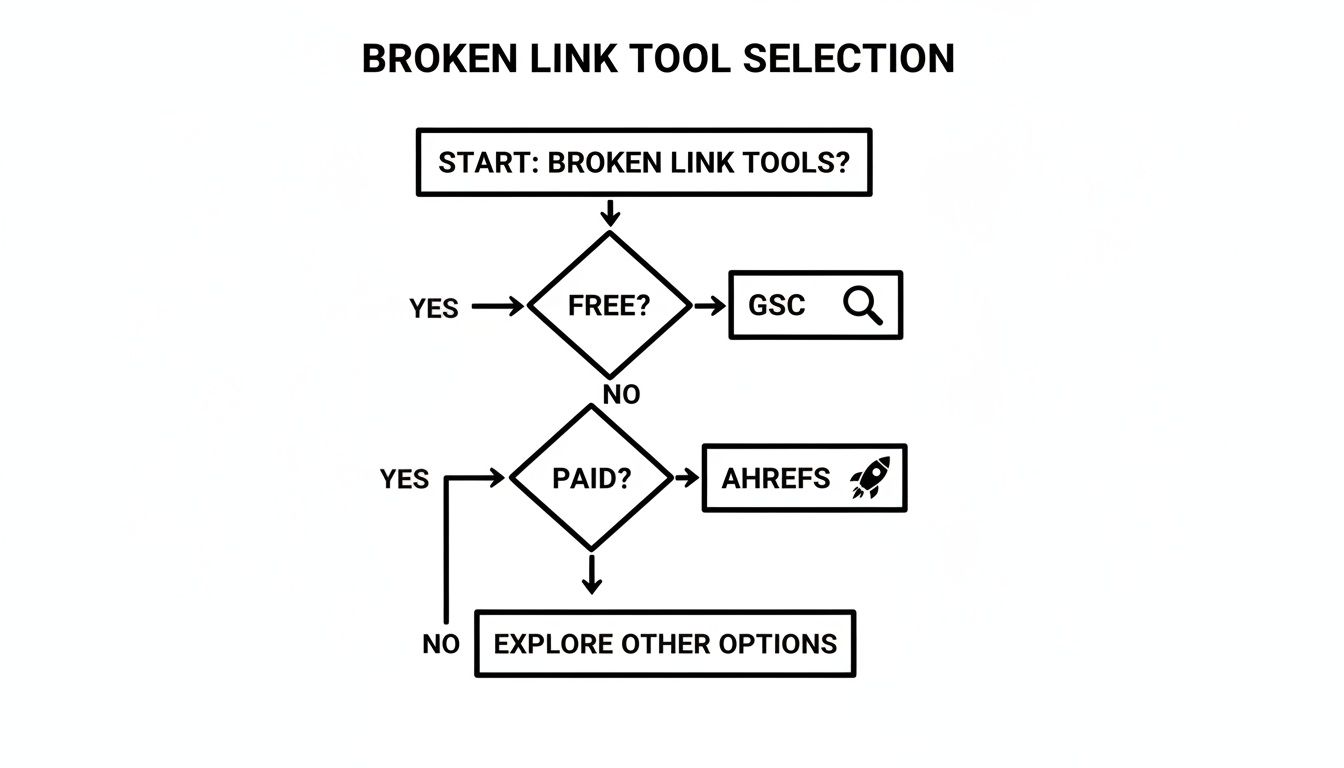
The key takeaway here? No matter your budget, there's always an accessible starting point for finding and fixing critical link issues on your site.
Decoding Common HTTP Status Codes
Your audit report will likely group links by their server response. While a 200 OK status means everything is working perfectly, your focus should be on the codes that signal a problem. These aren't just random numbers; each one tells a specific story about what happened when the crawler tried to follow a link.
Here are the usual suspects you'll run into:
404 Not Found: This is the classic broken link. It means the server couldn't find the page you asked for, creating a dead end for both users and search engine crawlers. These are your top priority.
410 Gone: This one is similar to a 404, but it’s intentional. A 410 tells crawlers that the page was permanently removed and they shouldn’t bother coming back. It’s a much cleaner signal than a 404 if you've deliberately deleted a piece of content.
5xx Server Error: Codes like 500 or 503 point to a problem with the server itself, not the specific page. The page might exist, but the server couldn't deliver it. This is a critical issue that needs immediate attention from your development team.
Getting a handle on these codes is the first step. To see how experts present these findings in a broader context, it can be helpful to look at some actionable SEO audit sample reports.
Identifying Redirect Chains and Loops
Beyond links that are flat-out broken, your report will also flag issues with redirects, especially those with 301 (Permanent Redirect) and 302 (Temporary Redirect) codes. Redirects are a normal part of managing a website, but when they're set up incorrectly, they can cause serious SEO headaches.
A redirect chain is what happens when one URL redirects to another, which then redirects to a third, and so on. Each "hop" in that chain bleeds a small amount of link equity and, just as importantly, slows down the experience for your users. As a rule of thumb, anything more than two redirects in a row should be fixed by updating the original link to point directly to the final destination.
Even worse is a redirect loop. This occurs when a URL redirects back to itself or to a previous URL in the chain, creating an infinite loop that traps browsers and crawlers. These are critical errors that need to be fixed immediately.
Your link audit report is more than a list of broken URLs. It's a map that shows where your site's authority is leaking and where user journeys are breaking down. Interpreting it correctly allows you to reclaim lost value and improve navigation.
When you're digging into your data, sort it to spot these patterns. Look for URLs that appear as both a source and a destination in your redirect list. Fixing these issues is a core part of any successful internal linking audit, as it ensures that precious link equity flows efficiently through your entire site.
Your Action Plan for Fixing Broken Links
Staring down a massive spreadsheet full of broken links from your latest audit can be paralyzing. It’s a common feeling—getting lost in the data and having no idea where to even start. But here’s the good news: you don't need to fix everything at once. The real secret is a smart, strategic approach that tackles the most critical issues first, giving you quick wins for both your SEO and user experience.
The key is to slice up your report into manageable chunks, zeroing in on the type of broken link and its potential impact. Prioritizing your effort this way ensures your time is spent on the fixes that will actually move the needle.
Start with High-Value Internal Links
Your first move should always be to fix broken internal links. These are the connections you have total control over, and they are absolutely essential for guiding users and search engine crawlers through your site. Think of a broken internal link as a dead-end street—it stops the flow of traffic and kills any authority that link was supposed to pass.
Don't just fix them at random. Go after the ones on your most important pages first.
- Homepage: A broken link here is a huge red flag and looks unprofessional.
- Pricing Pages: This one’s a no-brainer. A broken link could literally cost you a sale.
- Key Service/Product Pages: These pages are built to convert, and broken links completely undermine that mission.
- Pillar Content: Your big, comprehensive guides and blog posts usually have tons of internal links. Keeping them healthy is a must.
Once you’ve spotted a broken internal link on a high-value page, you’ve got a few ways to handle it. The right fix really depends on the situation.
- Update the URL: Often, the simplest fix is the right one. If it's just a typo or the target page's URL slug was updated, you can just edit the link on the source page. Easy.
- Set Up a 301 Redirect: If the original page was deleted but you have a very similar replacement, a 301 redirect is your best friend. This tells search engines the page has moved for good and passes most of the original link equity.
- Remove the Link: When a page is gone and there’s no good replacement, your last resort is to just delete the link. It's always better to have no link at all than a broken one.
Reclaim Value from Broken Inbound Links
Next up, shift your focus to broken inbound links. These are links pointing to your site from other websites, but they lead to a page that doesn’t exist anymore. Each of these is a vote of confidence from another site, and when it hits a 404 page, you're just throwing that valuable link equity away.
Your audit tool, especially something like Ahrefs or Semrush, will have a report for "broken backlinks." That's your hunting ground.
Reclaiming the value from broken inbound links is one of the fastest ways to get a real SEO boost. You're basically patching leaks in your site's authority, which can lead to better rankings for related pages.
The go-to solution here is almost always a 301 redirect. Find the most relevant, live page on your site and redirect the dead URL to it. For instance, if a major industry blog linked to a case study you’ve since deleted, redirect that broken URL to a similar case study or your main case studies hub page.
Address Broken Outbound Links
Finally, it’s time to clean up broken outbound links—these are the links on your site pointing out to other websites. While they might feel less urgent, they still have an impact on user experience and how search engines perceive your site's quality. A page full of dead outbound links can make your content look stale and poorly maintained.
Your game plan for fixing these is pretty straightforward:
- Find a Replacement: If the original source just moved, a quick search should help you find its new home. Update the link, and you’re done.
- Link to an Alternative: If the original page is gone for good, find another high-quality, relevant source and swap it in.
- Remove the Link: No good replacement in sight? It's perfectly fine to just remove the link entirely.
By working through your broken links in this order—internal, inbound, then outbound—you guarantee your efforts are focused where they matter most. This structured plan makes the whole process feel less overwhelming and a whole lot more effective. For a deeper dive, our comprehensive guide on how to fix broken links has even more strategies and technical tips.
Setting Up Automated Link Monitoring
Fixing a giant backlog of broken links feels great, but let's be honest, that's just playing defense. The real win comes when you shift from being reactive to proactive. A one-off audit is just a snapshot in time. The web is always in flux, and new broken links are going to pop up—it's inevitable.
Proactive monitoring is what separates the pros from the amateurs. It’s all about catching problems before they can do any real damage to your SEO or tick off your users.

The goal is to put your link checks on autopilot. By setting up scheduled, automated crawls, you get health reports delivered right to your inbox without having to think about it. This approach saves a ton of time and, more importantly, protects the ranking power you've worked so hard to build.
Scheduling Regular Site Audits
Most premium SEO tools, like Ahrefs and Semrush, have scheduling features built for this exact purpose. Instead of manually kicking off a crawl, you can tell the tool to automatically check your website for broken links on a set schedule.
You can usually dial in the frequency to match your site's rhythm. I've found a few cadences that work well in different situations:
- Weekly Scans: This is the sweet spot for most websites. It’s frequent enough to catch new issues before they become a big deal, but not so often that you're buried in notifications.
- Daily Scans: If you're running a large, fast-moving site like an e-commerce store or a news publication, daily scans are non-negotiable. With URLs and content changing constantly, you need that daily check-in to stay on top of link rot.
- Monthly Scans: For smaller, more static sites that don't get updated often, a monthly once-over is probably all you need to keep things clean.
Setting up a scheduled crawl is like a regular health check-up for your website. It establishes a consistent baseline, making it dead simple to spot new problems the moment they appear instead of letting them fester for months.
Once your schedule is set, the tool will run the audit in the background and pop an email into your inbox summarizing any new problems it found. This flips link maintenance from a massive quarterly project into a quick, five-minute task each week.
Integrating Link Checks into Your Workflow
For teams with a bit more technical firepower, the absolute best way to handle broken links is to stop them from ever going live. This means baking automated link checking right into your development and content publishing process, often called continuous integration (CI).
The concept is straightforward: before any new code or content gets pushed to your live site, an automated script runs to validate every single link. If it finds a broken one, the deployment fails. This forces the developer or editor to fix the problem before it can ever reach your users.
You can set this up with various open-source tools and scripts that plug into your deployment pipeline. It’s a powerful safety net that keeps your site’s quality high as the team continues to build and publish. On a similar note, automating your sitemap is another key piece of technical SEO, ensuring search engines always have an up-to-date map of your valid pages. You can dive deeper into that in our guide to sitemap automation for websites.
By adopting this preventative mindset, you move from constantly cleaning up messes to maintaining a pristine, healthy website from the get-go.
Common Questions About Broken Link Audits
Even with a solid plan, questions always pop up when you start digging into your website's links. It’s totally natural. This section tackles some of the most common hurdles and curiosities that come up during a link audit, giving you clear, straightforward answers to get you through the process.
Think of this as the troubleshooting guide for your link maintenance strategy. We'll get into specific scenarios that go beyond the basic steps, reinforcing what you've learned and getting you ready for the real-world messiness of keeping a website healthy.
How Often Should I Check My Website for Broken Links?
There's no single magic number here. The right frequency really depends on your website's size and how often you're pushing out new content. A small business blog is a totally different beast than a massive e-commerce site.
Here’s a practical guideline to follow:
- Large, Dynamic Sites (e.g., e-commerce, news portals): A weekly or even daily crawl is essential. With products, articles, and pages constantly being added or removed, link rot can set in fast.
- Active Business Blogs or SaaS Sites: A bi-weekly or monthly audit usually hits the sweet spot. This is frequent enough to catch issues before they snowball and impact SEO, but not so often that it becomes a burden.
- Small, Static Websites: If your site rarely changes, a quarterly check-up is likely all you need to keep things in order.
The most important thing is consistency. Once you set up an automated schedule, as we talked about earlier, this stops feeling like a daunting task and just becomes a routine part of your website maintenance.
Do Broken Outbound Links Hurt My SEO?
Yes, they do—just not in the same direct way that broken internal links do. A broken link pointing to another website doesn't cause you to lose "link equity" because the authority is flowing out of your site. But they still chip away at your site's credibility in other important ways.
Put yourself in your user's shoes. They click a link on your site expecting a helpful resource and instead hit a 404 error. That reflects poorly on you, making your content feel outdated or untrustworthy.
Search engines like Google are obsessed with user experience. A site littered with dead outbound links sends a clear signal that it's poorly maintained, which can indirectly ding your rankings over time. It screams "lack of quality control."
So, while fixing a broken outbound link won't give you the same immediate SEO juice as reclaiming a broken backlink, it’s a critical piece of maintaining a high-quality, trustworthy website that both users and search engines love.
Are Broken Links Really That Common?
It's easy to think of broken links as a problem for old, neglected websites, but they are shockingly widespread. You'll find them on high-traffic, professionally managed sites all the time. Link rot is just a constant, natural process across the entire web.
The problem is genuinely pervasive. A 2024 analysis from the Pew Research Center found that 23% of news webpages have at least one broken link. That number climbs to 25% for top-tier news sites. This isn't just a minor annoyance; it's a systemic issue that disrupts user journeys and erodes the value of online content.
For any business, these numbers are a wake-up call. You simply can't afford to assume your links are healthy. Regular audits are non-negotiable.
What Is the Difference Between a 404 and a 410 Error?
This is a great technical question, and getting the answer right allows for much more precise SEO management. Both codes tell a visitor the page is gone, but they send very different messages to search engines.
404 Not Found: This is the standard "oops, it's not here" error. It basically tells crawlers, "I couldn't find this page right now, but maybe it'll be back later." Google will likely try to crawl this URL again in the future to see if the page has returned.
410 Gone: This is a much more intentional and permanent signal. It tells crawlers, "This page has been permanently deleted. Stop looking for it, and don't come back."
Using a 410 is a best practice when you've deliberately removed content and have no plans to replace it. It helps Google de-index the old page faster and cleans up its records, which is a more efficient way to manage your site's crawl budget. A 404 is better suited for accidental errors or pages that might just be down temporarily.
Ready to stop guessing and start fixing? Sight AI doesn't just help you create new content; it ensures your entire website foundation is solid. Our platform can help you identify content gaps where old, broken links once lived, and our AI agents can generate relevant, optimized articles to fill those holes, turning lost authority into new traffic. Discover a smarter way to manage your content lifecycle at https://www.trysight.ai.