Writing SEO-friendly articles is all about creating content that does two things really well: it has to satisfy your reader, and it needs to be built for search engines. This boils down to digging deep into keyword research, giving your article a logical flow, and answering questions so thoroughly that people stick around. Nail these, and you're setting your content up to climb the ranks.
Mastering Keyword Research And User Intent
Before you type a single word, the real work begins. You can't just guess what people want to read. True SEO success comes from using data to figure out the exact questions your audience is asking. This single step is what separates an article that vanishes into the digital ether from one that becomes a reliable traffic magnet.
But this isn't just about grabbing a keyword with high search volume. You have to get inside the user's head and understand their intent—the why behind their search. Are they just looking for a quick answer? Trying to buy something? Comparing their options? Getting this right from the start will shape everything that follows.
Uncovering The Right Keywords
The best keywords are rarely the most obvious ones. Sure, those short, popular terms (we call them head terms) get a ton of searches, but they're also insanely competitive. The real gold is in long-tail keywords—those longer, more specific phrases people type into Google.
Think about it. Instead of going after a broad term like "coffee tables," you could target something like "best round coffee tables for small apartments." The search volume is lower, but the user's intent is crystal clear. Someone searching for that is probably close to making a purchase, making them the perfect reader for your content.
So, how do you find these hidden gems?
- Check Google's "People Also Ask" Box: This is a goldmine. It tells you the exact related questions people are asking, giving you a ready-made list of subtopics.
- Spy on Your Competitors: See what keywords are already working for them. SEO tools can show you which terms are driving the most traffic to their top pages, often revealing gaps you can swoop in and fill.
- Hang Out on Reddit and Quora: These forums are where real people ask questions using their own words. Search for your main topic and you'll find dozens of long-tail keyword ideas you would've never thought of on your own.
Key Takeaway: Keyword research isn't about finding words to stuff into your article. It's about building a complete picture of your audience's pain points and questions. That's the insight that will guide your entire content creation process.
Decoding Search Intent
Once you've got a list of potential keywords, you have to match them to the correct user intent. This part is non-negotiable. If you write a detailed "how-to" guide for a keyword where users are clearly looking for a list of products to buy, your article will almost certainly fail to rank—no matter how brilliant it is.
This whole process is a simple, three-step flow: start with broad research, get specific by analyzing intent, and then group related keywords together.
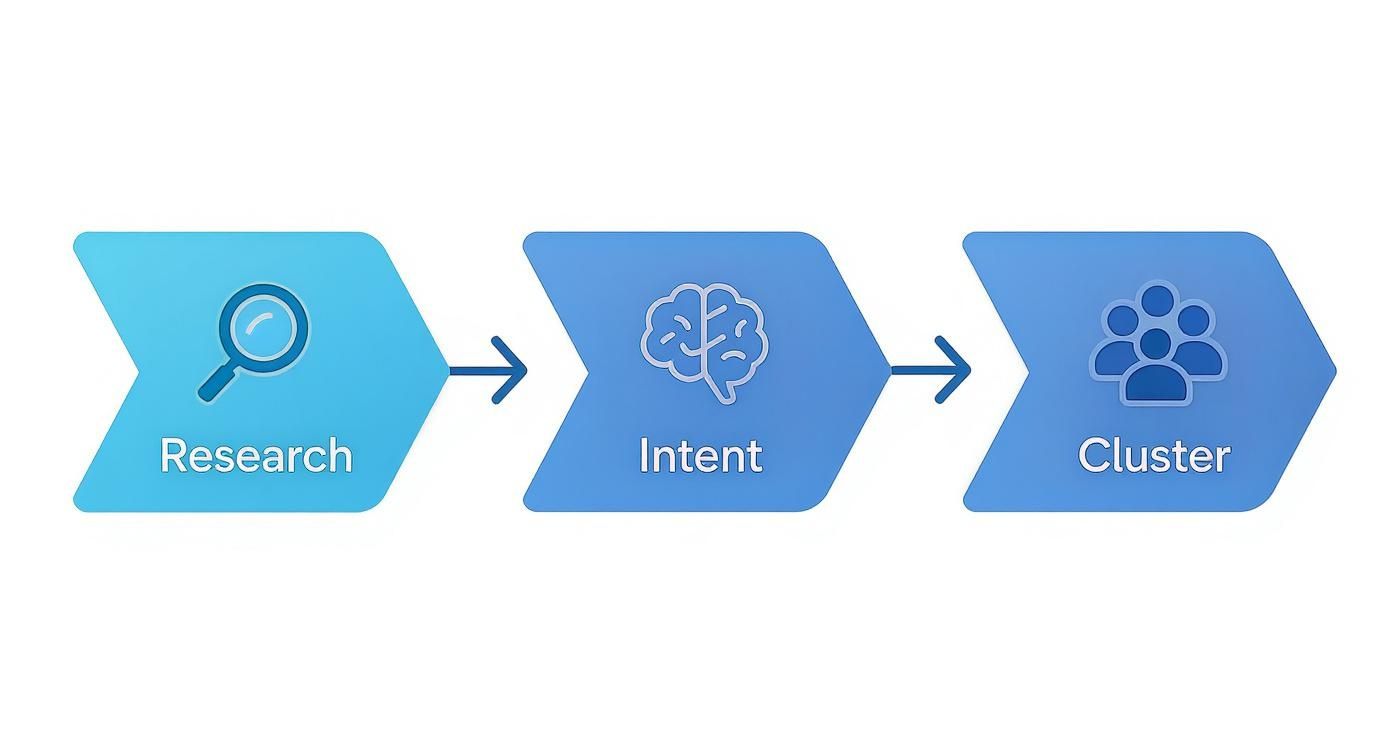
This approach ensures your content strategy is built on a solid foundation of audience understanding, not just guesswork. If this is new territory for you, exploring effective keyword research strategies will give you a much deeper dive.
To make things simple, here’s a breakdown of the four main types of search intent and how to spot them.
Matching Content to User Search Intent
This table breaks down the four core types of search intent, providing clear examples of keywords and content formats that align with each to help you meet audience needs.
| Intent Type | What the User Wants | Keyword Examples | Ideal Content Format |
|---|---|---|---|
| Informational | To learn something or find an answer. | "how to brew coffee", "what is SEO", "best way to clean gutters" | Blog posts, guides, tutorials, infographics |
| Navigational | To find a specific website or page. | "IndexPilot blog", "YouTube", "Twitter login" | Homepage, specific product/service pages |
| Commercial | To research and compare options before buying. | "best running shoes", "IndexPilot vs Jasper", "Mailchimp review" | Comparison articles, reviews, listicles |
| Transactional | To complete a purchase or take an action. | "buy iPhone 15", "running shoe sale", "IndexPilot pricing" | Product pages, pricing pages, e-commerce category pages |
By understanding these distinctions, you can create content that perfectly matches what the user is looking for, which is exactly what Google wants to see.
The easiest way to figure out intent? Just search for your target keyword in an incognito window and look at the top results. Is Google showing you blog posts, product pages, or comparison reviews? That’s your biggest clue for what kind of content you need to create. For a more detailed breakdown, check out our guide on finding high-value organic search keywords.
Building Topic Clusters
Finally, stop thinking about keywords one by one. The most powerful way to show Google you're an authority is by creating topic clusters. This strategy involves a central "pillar" page covering a broad topic, which is then supported by several "cluster" articles that dive into specific subtopics.
For example, your pillar page could be "The Ultimate Guide to Home Brewing." From there, your cluster content would be articles like "Best Coffee Beans for Beginners," "How to Use a French Press," and "Espresso Machine Maintenance Tips."
Each of these cluster articles links back to the main pillar page. This creates a powerful, interconnected web of content that signals deep expertise to search engines, helping all of your related articles rank better.
Structuring Your Article For Readers And Search Engines

Once you've nailed down your keywords, it's time to build the actual framework for your article. This isn't just about making things look tidy; a solid structure is a roadmap for both your readers and the search engine crawlers trying to make sense of your page.
Without a logical flow, even the most brilliant advice gets lost. Readers get confused and bounce, and Google is left scratching its head about what your content is actually about. A great structure makes your article scannable for people in a hurry and gives search engines clear signals about your topic hierarchy, which is a huge factor in ranking.
Crafting An Introduction That Hooks
Your intro is everything. It's your one and only shot to convince a visitor that your article is worth their time. A weak, rambling introduction is a surefire way to send your bounce rate through the roof.
You need to do more than just announce the topic. Think of it like a three-part hook that grabs the reader and doesn't let go:
- Connect with their pain point. Kick things off by showing you understand their struggle. If the article is about SEO writing, you might start with the shared frustration of hitting "publish" on a post that nobody ever finds.
- Promise a clear solution. Tell them exactly what they'll learn and how it will solve that specific problem. This sets immediate, valuable expectations.
- Offer a glimpse of the payoff. Tease a key takeaway or an interesting stat they'll find inside. Give them a reason to be curious and keep scrolling.
Nailing this formula builds an instant connection and signals that you have the answers they're looking for.
Using Headings To Create A Logical Flow
Headings (your H2s and H3s) are the signposts that guide readers through your content. They break up intimidating walls of text, letting people scan and find the exact piece of information they need.
They're just as critical for SEO. Search engines rely on headings to understand the main sections and sub-points of your article, piecing together its overall meaning.
A good structure is hierarchical and intuitive:
- H1 Title: This is your main event, the title of the article. There should only be one, and it absolutely needs to feature your primary keyword.
- H2 Subheadings: Use these to break down the major pillars of your topic. Each H2 should tackle a significant sub-topic.
- H3 Subheadings: When an H2 section gets a bit long, use H3s to dive into more specific details and keep things organized.
Pro Tip: Your headings are prime real estate for your primary keyword and related secondary keywords. Don't waste them on generic phrases like "Next Steps." An H2 like "Optimizing Your On-Page Elements" is far more descriptive and SEO-friendly.
Formatting For Scannability And Engagement
Let's be honest—people don't read online content word-for-word. They scan. Your job is to make your article as easy to scan as possible. Great formatting not only creates a better user experience but also makes your content more likely to be pulled into Google's rich snippets.
To boost readability, make sure you're using these elements:
- Short Paragraphs: Stick to 1-3 sentences per paragraph, max. This creates welcome white space and makes the text feel much less dense.
- Bulleted and Numbered Lists: Any time you're listing steps, features, or examples, use a list. They're incredibly easy for the human eye to follow and are a favorite for featured snippets.
- Bold Text: Use bold text strategically to make key terms, stats, or important takeaways pop. This helps guide the reader's eye to the most critical info.
- Internal Links: Linking to other relevant articles on your site is a must. It helps readers discover more of your great content and shows search engines how your pages are related. A smart internal linking strategy is a cornerstone of great SEO. For example, you can learn more about how to set up automated internal links to build topical authority without the manual effort.
Writing In-Depth Content That Builds Authority
 Once you have a solid content outline, the real work begins: filling it with substance. The goal isn't just to answer a question. It's to create the definitive resource on that topic—the kind of article that makes a reader feel like they've struck gold.
This is how you build genuine authority and climb the search rankings. It’s not about fluffing up your word count. It’s about anticipating every possible follow-up question your reader might have and answering it before they even think to ask. You want to deliver so much value that they have zero reason to hit the back button.
Going Beyond The Basics
So many articles just skim the surface. They offer up basic definitions or simple lists, and that’s about it. To really make an impact, you have to go deeper.
Ask yourself: what are my competitors not talking about? What unique angle, personal story, or hard data can I bring to the conversation?
Let's say your keyword is "how to start a podcast." A basic article would list the necessary equipment. A great article digs into the stuff that actually trips people up:
- Acoustic treatment for different room types: How do you get good sound in a tiny apartment versus a dedicated home office?
- Guest outreach that actually works: Share the exact email templates you used or a story about how you landed a dream guest.
- Monetization beyond sponsorships: What about affiliate marketing, selling digital products, or even offering premium content?
Covering these specific sub-topics is what turns a generic guide into an indispensable resource. This depth is a massive signal to Google that you're a true expert. If you find yourself stuck, our guide on https://www.indexpilot.ai/blog/where-to-find-blog-content-ideas can help kickstart some fresh thinking.
Why Long-Form Content Often Wins
You've probably noticed a connection between content length and high search rankings. But it's not the word count itself that Google cares about. Longer articles simply tend to cover a topic more thoroughly, which means they satisfy a wider range of related search queries.
One study found that articles over 3,000 words pull in three times more traffic than the average article. That same research showed long-form content also gets 4 times more social shares and 3.5 times more backlinks—all critical ranking signals.
The data is pretty clear. Comprehensive content earns more engagement and authority. When you write a truly in-depth piece, you create more opportunities to weave in related keywords, add helpful internal links, and attract backlinks from other sites that recognize your article as the definitive source.
Integrating Keywords Naturally
Your primary and secondary keywords need to feel like they belong in the content, not like they were crammed in to please an algorithm. Think of them as guideposts that keep your writing on track, not a checklist you have to tick off.
Here’s how to get it right:
- Headings and Subheadings: Put your primary keyword in your main H1 title and at least one H2. Then, sprinkle your LSI keywords (semantically related terms) into your H3s to signal the specific sub-topics you're covering.
- Introduction and Conclusion: Mention your main keyword within the first 100 words to instantly confirm the topic for both readers and search crawlers. Bringing it up again in your conclusion helps tie everything together.
- Image Alt Text: Use natural language to describe your images. For a screenshot of a keyword tool, something like, "Using a keyword research tool to find long-tail keywords" is perfect.
The golden rule is to write for people first. If a sentence sounds clunky because you forced in a keyword, rewrite it. And if you're using AI writing assistants, it's crucial that the final output sounds human. Learning how to properly humanize AI-generated text is a key skill for maintaining an authentic voice.
Building Authority With Links
Strategic linking is one of the most effective ways to show search engines what your article is all about and where it fits in the wider web. This means using both internal links (pointing to other pages on your site) and external links (pointing to other high-quality websites).
Internal Links
Internal links are your way of creating a connected web of content on your own site. They show search engines how your pages relate to one another and help build your topical authority. When you link from your new, in-depth article to other relevant blog posts, you pass along some "link equity" and can even help those older pages rank better.
External Links
Don't be scared to link out to other credible sources. Pointing to authoritative studies, industry reports, or expert articles shows you’ve done your homework. It’s a sign of confidence that builds trust with your readers. Just make sure you're linking to non-competing content that adds real value to your own piece.
Optimizing Images And Meta Elements For Clicks
https://www.youtube.com/embed/NmeC6i2Pe_s
The words you write in your article are only half the battle. To really get your content to perform, you need to optimize all the supporting elements that search engines and users see before they even land on your page. These details—your page title, meta description, URL, and images—are powerful signals about your content's relevance and quality.
Think of the search results page as a digital storefront. Your title tag is the sign above the door, and the meta description is the compelling window display. If they aren’t sharp and enticing, users will walk right past to a competitor, even if your content is way better. These elements are your first, and often only, chance to earn that click.
Crafting Compelling Title Tags And Meta Descriptions
Your title tag is arguably the most critical on-page SEO element you have. It’s the blue clickable link everyone sees on the search results page, and it’s a huge factor in how Google understands what your page is all about. It absolutely must be clear, concise, and feature your primary keyword, ideally right near the beginning.
The meta description is that short snippet of text that appears under your title. While it's not a direct ranking factor anymore, it has a massive influence on your click-through rate (CTR). A well-written meta description basically serves as ad copy, persuading searchers that your page has the answer they're looking for.
Here are a few best practices I always follow:
- Keep it brief: Aim for under 60 characters for titles and under 160 characters for descriptions. Anything longer and you risk getting cut off.
- Include your keyword: Naturally place your main keyword in both the title and description to signal relevance to search engines and users.
- Use action words: Kick off your description with verbs like "Learn," "Discover," or "Find" to encourage that click.
- Be honest: Make sure your title and description accurately reflect the content on the page. Misleading people is a surefire way to get a high bounce rate.
A great title tag doesn't just state the topic; it offers a real benefit. Instead of "SEO Writing Tips," try something like "10 SEO Writing Tips to Double Your Traffic." The second one makes a promise and is far more clickable.
If you want to go deeper on this, our guide on creating an effective SEO page title is packed with advanced strategies and examples.
Optimizing Images For Search
Images do more than just break up text and make your content more engaging—they're also powerful SEO assets in their own right. Google can't "see" an image, so it relies entirely on the text you provide to understand its content and context.
First things first, your file name matters. Before you even upload an image, change generic names like IMG_8432.jpg to something descriptive that includes your keyword. For example, seo-friendly-article-structure.jpg is perfect. Always use hyphens to separate the words.
Next, you have to write descriptive alt text. This is the text that shows up if an image fails to load, and it's what screen readers use to describe the image to visually impaired users. It's also a key signal for search engines.
- Good Alt Text: "A flowchart showing the structure of an SEO-friendly article, from title to conclusion."
- Bad Alt Text: "image" or "article flowchart"
This simple step helps your images show up in Google Images search, which can be another fantastic source of traffic for your article.
Structuring Clean And Readable URLs
Finally, let's talk about the URL slug—that's the part of the URL that comes after your main domain name. It needs to be clean, short, and descriptive. A well-structured URL is easy for both people and search engines to understand at a glance.
Imagine you wrote an article titled "15 Essential Steps for Writing SEO Friendly Articles in 2025." A messy, auto-generated URL might look like /15-essential-steps-for-writing-seo-friendly-articles-in-2025. It's just too much.
Instead, trim it down to the core keyword: /how-to-write-seo-friendly-articles. This is much cleaner and reinforces the main topic without all the extra fluff. It's a small change that makes a big difference.
Before you hit publish, it's a good idea to run through a quick final check of all these on-page elements. It’s easy to forget a small detail in the rush to get content live, but these components are too important to overlook.
Pre-Publish On-Page SEO Checklist
Here's a quick reference table you can use to make sure every critical element is optimized before your article goes live.
| Element | Key Optimization Point | Why It Matters |
|---|---|---|
| Title Tag | Under 60 characters, primary keyword near the front, compelling benefit. | The most important on-page signal for search engines and the main driver for clicks. |
| Meta Description | Under 160 characters, includes keyword, uses action-oriented language. | Acts as "ad copy" in the SERPs to convince users to click on your result over others. |
| URL Slug | Short, descriptive, and contains the primary keyword. | A clean URL is user-friendly and helps search engines understand the page topic. |
| Image File Name | Descriptive with keywords, uses hyphens (e.g., keyword-topic.jpg). |
Provides context to search engines before the image is even crawled on the page. |
| Image Alt Text | Accurately describes the image, includes relevant keywords naturally. | Crucial for accessibility and helps your images rank in Google Image search. |
Running through this checklist for every article ensures you're not leaving any "easy wins" on the table. Consistent optimization of these small but mighty elements is what separates good content from content that truly ranks and drives traffic.
Refreshing Old Content For Sustained SEO Success

Hitting "publish" isn't the finish line. Honestly, it’s just the starting gun for your content's real journey. The web doesn't sit still for a second—new competitors pop up, search trends pivot, and that article you were so proud of a year ago can slowly slide into the digital abyss.
This is exactly why a proactive content refresh strategy is non-negotiable. So many marketing teams get caught in the "publish and forget" cycle, always chasing the next new topic while their existing library gathers dust. But those old articles? They're goldmines. With a little TLC, they can keep pulling in traffic and building your authority for years.
Plus, regularly updating your content sends a huge signal to Google that your site is active, current, and a trustworthy source of information. That's a powerful ranking factor right there.
Identifying Your Best Refresh Opportunities
So, where do you begin? You can't update everything at once, which means you have to get smart about prioritizing. Your mission is to find the articles with the highest potential for a major performance boost. For this, Google Search Console is your absolute best friend.
Hop into GSC and hunt for two specific scenarios:
- Content with Declining Traffic: Look for articles that used to be rock stars but have seen a steady decline in clicks and impressions over the last six months. This "content decay" is a classic sign that the info is stale or a competitor has simply done it better.
- "Striking Distance" Keywords: Find pages that are hovering on the bottom half of page one or the top of page two (think positions 8-15) for high-value keywords. These articles are so close to hitting the big time. A strategic update is often all it takes to vault them into the top five, where the real click-through magic happens.
Pro Tip: When you're looking at that "striking distance" content, zero in on keywords with high commercial intent. Bumping a page from position 9 to position 3 for a term that drives leads or sales can have a massive, immediate impact on your bottom line.
A Practical Checklist For Effective Content Updates
Once you've picked your target, the refresh needs to be more than just changing the publication date. You have to add real, tangible value that makes the article demonstrably better than its previous version.
This isn't just about tweaking a few words. A systematic refresh can deliver huge results. In fact, we've seen that updating old blog posts with fresh data, better formatting, and new information can boost traffic by as much as 106%. If you're curious, you can dig into some key SEO statistics to see the data for yourself.
Here's a quick checklist I run through to make sure every update counts:
- Update All Data and Statistics: Swap out old numbers for the freshest ones you can find. If your post cites a 2021 study, find a 2024 replacement. This instantly boosts credibility.
- Improve On-Page SEO: Take another look at your title tag and meta description. Can you write a more compelling hook? Hunt for new, relevant keywords that have popped up and weave them into your H2s and H3s.
- Add New Sections: What are people asking now about this topic? Google's "People Also Ask" box is a goldmine for this. Adding a new section to address a common question adds serious depth.
- Upgrade Your Visuals: Ditch those old, blurry screenshots. Add fresh graphics, updated product shots, or even embed a short video tutorial. Visuals are huge for engagement.
- Strengthen Internal and External Links: Add new internal links pointing to relevant articles you've published since the original went live. Also, run a quick check on your external links to fix any broken ones and link out to newer, more authoritative sources.
Re-Promoting Your Updated Content
After putting in the work to seriously level up your article, don't just quietly hit the update button. You need to treat it like a brand-new piece of content to get the most mileage out of your efforts.
First, change the publish date to today. This tells both users and search engines that the information is fresh. Most content management systems, like WordPress, do this automatically when you make significant changes.
Next, get it back in front of people. Share the refreshed article with your email list, highlighting what’s new and improved. Blast it across all your social media channels. This new wave of traffic and engagement sends a flurry of positive signals to Google, which can help speed up the re-ranking process. Don't let your hard work go to waste—a solid re-promotion push is the final, crucial step.
Answering Your Top SEO Writing Questions
Even with a solid grasp of how to write SEO-friendly articles, a few questions always seem to surface. It's totally normal. Getting these details right can make a huge difference in your strategy, so let's clear up some of the most common sticking points we run into.
One of the first things people ask about is length. There's a lot of obsession over hitting a specific word count, but the reality is a bit more complex.
How Long Should an SEO Friendly Article Be?
There’s no magic number that automatically gets you to the top of Google. The truth is, comprehensive, in-depth content almost always crushes thin, shallow articles. You might see stats floating around that the average first-page result is about 1,447 words, but remember, that's just an average.
A much better way to think about it is this: does your article completely satisfy the searcher's needs? For competitive topics, that often means writing something in the 2,000-3,500 word range. The goal isn't the number itself, but to create a resource that's more thorough and genuinely more helpful than anything else out there.
Key Takeaway: Stop worrying about word count and start obsessing over value. Your article needs to be long enough to be the absolute best resource for that search query—and not a single word longer.
Another holdover from old-school SEO is the idea of "keyword density." Let's set the record straight on that one.
What Is The Ideal Keyword Density?
Honestly? The whole idea of "keyword density" is a relic of the past. Modern SEO has moved way beyond just stuffing a keyword into your article a certain number of times. In fact, that's a great way to get penalized for keyword stuffing.
Instead of counting keywords, focus on topical relevance and writing like a human. Here’s a much more effective way to approach it:
- Use your main keyword naturally in a few high-impact spots: the title tag, at least one H2 heading, and somewhere in your first 100 words.
- The real magic happens when you weave in a wide variety of related keywords, synonyms, and long-tail variations throughout the piece.
This approach gives search engines a much richer understanding of your article's context and depth than just repeating the same phrase over and over again ever could.
How Often Should I Update Old SEO Articles?
This really comes down to your industry. If you’re in a fast-paced space like tech or digital marketing, it's a good idea to review your most important cornerstone content every 6-12 months. Things change fast, and your content needs to keep up.
For more evergreen topics that don't change much, a content audit every 18-24 months is probably fine. The biggest red flag telling you it's time for a refresh is a slow, steady decline in traffic or rankings for a post that used to perform well.
A pro tip is to prioritize updating articles that are lingering just off the first page—think positions 8 through 15. A strategic update can often be the little nudge they need to jump into those top spots and start pulling in serious traffic. To learn more about crafting content that consistently ranks, check out our guide on SEO copywriting best practices.
Ready to stop the manual busywork and put your content strategy on autopilot? IndexPilot uses trainable AI Agents to handle everything from keyword research and strategy to writing, optimizing, and publishing SEO-friendly articles at scale. Transform your SEO into a reliable growth engine that compounds traffic and drives revenue. Get started with IndexPilot today.