Getting eyes on your blog can feel like an impossible task, but the formula for success is actually pretty straightforward. If you want to increase blog traffic, you need a repeatable system built on three core pillars: creating seriously valuable content, mastering search engine optimization (SEO), and actively promoting your work.
This isn't about chasing a one-hit viral wonder. It's about building a sustainable engine that brings in readers day after day.
Your Blueprint for Sustainable Blog Growth
So many bloggers fall into the "publish and pray" trap. They hit publish, cross their fingers, and hope for the best. That’s not a strategy; it’s a lottery ticket. A successful blog operates more like a well-oiled machine, where every single article has a purpose and a plan to reach the right people.
Sustainable traffic doesn't come from a single magic bullet. It’s the result of a deliberate, multi-faceted approach. To make it happen, you have to bake these three activities into your regular workflow:
- Content Creation: This is your foundation. I'm not just talking about writing. It’s about creating comprehensive resources that solve real problems for your target audience—the kind of stuff they can't help but bookmark and share.
- SEO Optimization: This is how new readers find you in their sleep. By getting a handle on SEO, you make your content pop up on Google when people are actively searching for answers, driving a steady, passive stream of visitors. To really dig in, check out these strategies to increase organic search traffic.
- Strategic Promotion: This is how you light the fire. Publishing great content isn't enough. You have to get out there and share it where your audience already hangs out—from social media feeds to niche forums and email newsletters.
This visual breaks down how these pieces fit together to turn great ideas into consistent traffic.
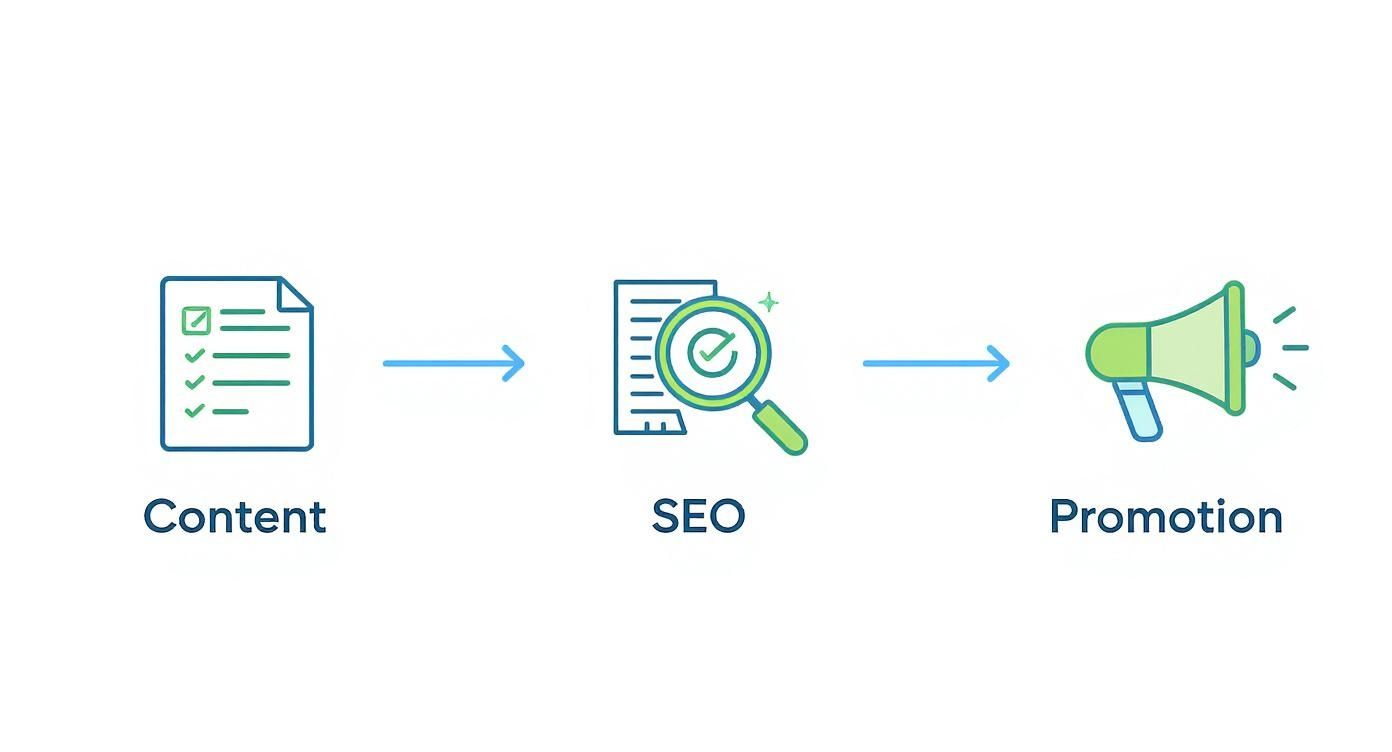
As you can see, it's a cycle. Each element feeds the next, building momentum over time. The real secret to long-term success is figuring out how to scale this process without burning out.
If you’re ready to turn this blueprint into a high-output system, we've got a detailed guide on https://www.indexpilot.ai/blog/how-to-scale-content-marketing that you'll want to read.
For now, let’s break down each of these pillars into actionable steps you can start using today.
Crafting Content That Attracts and Engages
You can have the most stunning blog design and a killer promotion strategy, but if your content doesn't deliver, your traffic will always hit a ceiling. Let's be honest: great content is the engine of any successful blog. It has to solve real problems, answer pressing questions, and build a genuine connection with your audience.
This is how you stop chasing temporary traffic spikes and start building a real, long-term asset.
The goal isn't just to publish another article. It's to create the best possible resource on a given topic. When someone lands on your post, they should feel like they've struck gold—the definitive answer they were searching for, with no reason to hit the back button. This is the kind of content that naturally earns backlinks, social shares, and top search engine rankings.
Think of it this way: a short, generic post is a flimsy brochure. A comprehensive, in-depth article is a detailed instruction manual that people save, share, and come back to again and again.
Why Long-Form Content Wins
In the world of SEO, depth is king. The days of churning out 500-word fluff pieces just to have something new on your site are long gone. Today, search engines reward content that screams expertise, authority, and trustworthiness. This is exactly where long-form content shines.
Comprehensive articles let you tackle a topic from every angle, pack in detailed examples, and answer follow-up questions before the reader even thinks to ask them. That kind of thoroughness is a massive signal to search engines that your content is valuable. The trend is undeniable. Research from 2025 shows the average blog post is now around 1,427 words, which is a whopping 77% longer than a decade ago.
Key Takeaway: Longer, more detailed content not only satisfies reader intent more effectively but also provides more opportunities to rank for a wider range of related keywords, which is a powerful way to increase blog traffic over time.
Of course, "long" doesn't mean "filled with fluff." Every single sentence has to earn its spot on the page. The key is to add genuine value, not just words.
Structuring Content for Readability
Writing a long article is one thing; making it a pleasure to read is a whole different ballgame. A massive wall of text will send visitors running for the hills, no matter how brilliant the information is. This is where strategic formatting becomes your best friend.
Your main job is to make your content scannable. Most people will do a quick scroll to see if an article has what they need before they commit to reading it word-for-word.
Here’s how to structure your posts for maximum engagement:
- Use Sharp, Descriptive Headings: Break your content into logical chunks with clear H2 and H3 headings. Instead of something generic like "Tips," try "Practical Tips for Brainstorming Topic Clusters." It tells the reader exactly what to expect.
- Keep Paragraphs Short: Stick to a maximum of 1-3 sentences per paragraph. This creates crucial white space that makes the content feel less intimidating and way easier to digest, especially on a phone.
- Incorporate Bullet Points and Numbered Lists: Lists are fantastic for breaking down complex information, outlining steps, or highlighting key takeaways. They are incredibly effective at drawing the reader's eye and making information pop.
By using these simple structural elements, you guide your reader through the content, making it easy for them to find exactly what they’re looking for.
From Ideas to Authoritative Content
The foundation of a killer article is a killer idea. But how do you find topics that will actually pull in readers? The secret is understanding what your audience is actively searching for online.
Start by brainstorming broad "pillar" topics that are central to your niche. If you run a fitness blog, your pillars might be "Strength Training," "Nutrition," and "Cardio." From there, you can branch out into more specific "cluster" topics like "best strength training exercises for beginners" or "high-protein meal prep ideas." This topic cluster model helps Google see your blog as a true authority on a subject. For a deeper dive, we have a helpful guide on where to find blog content ideas that work.
Once you’ve locked in a topic, it's time for some deep research. This means:
- Analyzing Top-Ranking Articles: See what the current top results on Google are doing well. What common themes do they cover? What questions do they answer? And most importantly, what gaps can you fill?
- Gathering Data and Statistics: Backing up your claims with recent data makes your content instantly more credible and trustworthy.
- Finding Unique Angles: Don't just rehash what's already out there. Add your own personal experiences, unique insights, or a fresh perspective to make your content truly stand out from the crowd.
Finally, write with an authentic voice. Your personality is your greatest advantage. Write like you're explaining the topic to a friend—be clear, helpful, and engaging. That’s how you turn a first-time visitor into a loyal reader who keeps coming back for more.
Different content formats serve different purposes, from driving quick social traffic to capturing high-intent search users. Choosing the right format for your topic and your audience is a strategic move that can dramatically impact your traffic goals.
Content Formats and Their Traffic Potential
| Content Format | Ideal Length/Type | Primary Traffic Goal | Key Benefit |
|---|---|---|---|
| Listicles | 1,500-2,500 words | Social Shares & Search | Highly shareable and easy to scan, great for attracting a broad audience. |
| How-To Guides | 2,000-4,000 words | Organic Search Traffic | Captures high-intent users looking for specific solutions, builds authority. |
| Case Studies | 1,000-2,000 words | Referral & Direct Traffic | Builds trust and credibility by showing real-world results, ideal for leads. |
| Infographics | Visual with text | Backlinks & Social Shares | Easily digestible and highly shareable, attracting links from other sites. |
| Expert Roundups | 2,500+ words | Referral & Social Traffic | Leverages the audiences of contributors, excellent for networking and shares. |
Ultimately, a well-rounded content strategy often includes a mix of these formats. By understanding their strengths, you can tailor your content plan to attract different segments of your audience and achieve a wider range of traffic-building objectives.
Mastering SEO to Dominate Search Results
If you think of great content as the engine of your blog, then Search Engine Optimization (SEO) is the high-octane fuel that makes it go. Without a smart SEO strategy, even the most brilliant articles get lost in the digital static, completely invisible to the millions of people Googling for answers every single day.
Getting a handle on SEO is your ticket to unlocking a steady, hands-off stream of organic traffic.
Forget the scary jargon and overly complex theories. At its heart, SEO is just about making it easy for search engines to find, understand, and trust your content. It’s about sending clear signals to Google that your article is the absolute best answer for a specific question someone just typed into the search bar.

This process breaks down into two main buckets: on-page tactics (the stuff you do directly on your blog posts) and off-page tactics (how other sites on the internet see you). Let's dig into the strategies that will give you the most bang for your buck, right now.
Keyword Research The Right Way
Before you even think about writing, you have to know what your audience is actually looking for. This is where keyword research comes in, and it's the absolute foundation of any decent SEO plan. The goal is to find topics people are actively searching for that you can realistically rank for.
You don't need to break the bank on premium tools right away. Powerful free resources like Google Keyword Planner or even just the "People Also Ask" section in Google's search results can give you incredible clues about what people want to know.
For example, a broad keyword like "fitness" is a lost cause. Instead, you might uncover a gem of a long-tail keyword like "how to start strength training at home without equipment." This kind of specific phrase is way less competitive and targets readers who know exactly what they need, meaning they're much more likely to stick around.
Key Takeaway: Solid keyword research isn't about chasing the highest search volumes. It's about finding the right terms—the ones that strike a perfect balance between search volume and a realistic chance for your blog to actually show up on page one.
Smart On-Page SEO Implementation
Once you've locked in your target keyword, the next step is to weave it into your content strategically. This is how you help Google instantly understand what your article is all about. Think of it like putting up clear, helpful signposts for the search engine crawlers.
Here are the most important spots to place your primary keyword:
- Your Post Title (H1 Tag): This is non-negotiable. Try to get the keyword as close to the beginning of the title as you can.
- The URL Slug: A clean, keyword-focused URL (like
yourblog.com/increase-blog-traffic) is way better than a jumble of numbers and random words. - Meta Description: This doesn't directly impact your rankings, but a killer meta description that includes your keyword can seriously boost your click-through rate from the search results page.
- Within the First 100 Words: Mentioning your keyword early in the intro just confirms for Google (and your reader) that they're in the right place.
- In Subheadings (H2, H3): Sprinkling your keyword and related terms into subheadings adds structure and reinforces your topic's relevance.
Getting your keyword placement right is a huge piece of the on-page puzzle. For a full deep dive on this, check out our complete guide on how to optimize content for SEO which walks through every one of these elements in detail.
Building an Internal Linking Web
Internal linking is probably the most underrated SEO tactic out there, but it's incredibly powerful. This is just the simple act of linking from one page on your website to another relevant page on your own site. It’s a small effort with a big payoff.
First off, it guides your visitors to more of your awesome content, keeping them on your site longer and telling Google that people find your stuff valuable. Secondly, it helps spread "link equity," or authority, around your site. If you have one post that's getting a lot of love from other websites, you can pass some of that juice to your other pages by linking out to them.
Finally, it helps search engines map out the structure of your website and understand how all your content fits together. A tight web of internal links can establish your site as a true authority on a specific topic.
| Link Placement | Why It's Important | Best Practice Example |
|---|---|---|
| Pillar to Cluster | Establishes topical authority | Your "Ultimate Guide to Strength Training" links out to "Best Beginner Exercises." |
| Cluster to Pillar | Reinforces the main guide's value | Your "Best Beginner Exercises" post links back up to the main "Strength Training" guide. |
| Within Body Text | Provides contextual reader value | A sentence mentions meal prep, and you link the words "meal prep" to your article on that topic. |
Earning Authority with Backlinks
While on-page SEO is what you control, off-page SEO is all about how the rest of the web views your site's credibility. The main currency here is backlinks—links from other websites pointing back to yours. You can think of every backlink from a quality site as a vote of confidence in your content.
Building a portfolio of high-quality backlinks is a long game, but it’s absolutely essential if you want to compete for valuable keywords. Stay far away from sketchy tactics like buying links; that's a surefire way to get penalized by Google. The focus should always be on earning links naturally.
One proven method is guest posting, where you write a fantastic article for another blog in your niche and get a link back to your site in return. Another is to create truly unique, data-backed content or slick infographics that other people will want to reference and link to in their own articles. To really step up your game and build a brand that attracts links without you even having to ask, diving into specific Creator SEO strategies can be a game-changer.
Using Visuals to Skyrocket Blog Engagement
Let's be honest: in a world overflowing with information, walls of text just don't cut it anymore. If you're serious about figuring out how to increase blog traffic, visuals are your secret weapon. They're what turn a good blog post into a great one, breaking up the monotony of text and making complex ideas click in an instant.
When you weave in compelling images and videos, you're not just decorating the page. You're creating a better experience for your reader, which sends a powerful signal to search engines that your content is top-notch. The result? Better rankings, more social shares, and a real, measurable boost in visitors.
The numbers behind this are staggering. Blog posts that include relevant images pull in 94% more views than articles that are just plain text. It doesn't stop there. Bloggers who make it a habit to use at least seven images per post are 2.3 times more likely to report strong results. And when you bring video into the mix? Engagement can jump by as much as four times. You can discover more insights about blogging performance to see just how critical visuals have become.
Sourcing High-Quality Visuals Without Breaking the Bank
A lot of bloggers get nervous about using images, worried about copyright strikes or the sticker shock of stock photography. The good news is, you don't have to be. There are some incredible, completely free resources out there.
Forget playing Russian roulette with a Google Image search. Instead, head straight to platforms built for creators like us:
- Unsplash: My go-to for beautiful, high-resolution photos from a massive community of talented photographers. It’s all free.
- Pexels: This is a great one-stop shop because it offers both free stock photos and videos.
- Canva: More than just a design tool, Canva has a huge built-in library of free photos, icons, and illustrations you can drag and drop right into your graphics.
When you're picking an image, the golden rule is relevance. The visual needs to actually support the point you’re making, not just fill space. A generic photo of a person smiling at a laptop doesn't add much value to a technical guide on SEO, does it?
Pro Tip: Keep an eye out for images that have negative space (or blank areas). This is prime real estate for overlaying text for a custom title card, a social media graphic, or a call-to-action banner. It makes your visuals work that much harder.
Turning Data Into Digestible Infographics
Got a ton of stats, steps, or complicated data to explain? Don't bury it in a dense paragraph where it'll be skimmed over. This is a perfect opportunity to create an infographic.
Infographics are absolute gold because they're incredibly shareable. People love them, post them, and link back to them, driving new waves of traffic straight to your blog.
And you don't need a design degree to make one. Tools like Canva and Piktochart have user-friendly templates that let you just plug in your data and customize the look in minutes.
A killer infographic can:
- Simplify a complex process: Break down a how-to guide into simple, visual steps.
- Visualize data: Make boring statistics pop with engaging charts and graphs.
- Create a comparison: Use a side-by-side format to clearly compare two products or ideas.
Optimizing Images for SEO Performance
Okay, you've added some fantastic visuals. But if you just upload them without a second thought, you could be slowing down your site and tanking your SEO efforts. Image optimization isn't just a "nice-to-have"; it's a must-do.
First up, compress your images before you even upload them. Bloated image files are one of the biggest culprits of slow-loading pages, and site speed is a huge ranking factor. Use a tool like TinyPNG or a WordPress plugin to shrink the file size without killing the quality.
Next, get into the habit of using descriptive file names and alt text. Instead of uploading IMG_8472.jpg, rename that file to something a human (and a search engine) can understand, like how-to-increase-blog-traffic-with-visuals.jpg. It gives Google immediate context about the image.
Finally, always write clear alt text for every single image. This is the text that describes the image to visually impaired users and search engine crawlers. Think of it as another opportunity to naturally include your target keywords. For the file name above, your alt text could be something like: "An infographic showing how visuals like images and video increase blog traffic."
Updating Old Content for a Massive Traffic Boost
Not every traffic-boosting strategy requires you to start from a blank page. In fact, one of the most powerful tactics is probably already hiding in plain sight: your content archives. Think of your old blog posts as a goldmine just waiting to be rediscovered.
Refreshing and republishing your existing content is an absolute game-changer. Search engines like Google are hungry for fresh, relevant information, and updating an article sends a direct signal that your content is still valuable and current. This simple act can give you a massive rankings boost for a fraction of the effort it takes to write a whole new post.
Finding the Right Posts to Update
First things first, you need to pick the right candidates for a refresh. Don't just update posts at random—you need a data-driven approach to pinpoint articles with the most potential. A quick dive into your analytics is the perfect place to start.
I always look for two types of "low-hanging fruit":
- Posts with Declining Traffic: These are articles that were once your star players but have started slipping down the rankings. A content refresh can breathe new life into them and get them climbing back up.
- Posts Stuck on Page Two of Google: I call these the "almost famous" articles. They're so close to hitting the big time, and a strategic update is often the final push they need to jump onto page one, where the real clicks happen.
The screenshot from Google Analytics below shows exactly how you can spot pages with declining traffic over a set period.

This kind of comparison view makes it incredibly easy to see which once-strong articles are now underperforming. Those are your prime targets.
Your Content Refresh Checklist
Once you've picked a post, it's time for a thorough overhaul. The goal here isn't just to change a few words; it's to make the article significantly better. You want to add real, tangible value that both your readers and the search engines will notice.
This is critical because, surprisingly, most of a blog's organic traffic often comes from older posts, not brand-new ones. Some of the most successful companies make it a habit to update their key articles quarterly, weaving in new keywords and adding more depth to keep them at the top of the search results.
Here’s a practical checklist I use for my own content refreshes:
- Update for Accuracy and Freshness: Swap out old statistics, fix any broken links, and correct any information that's no longer accurate. For instance, if you wrote about a software feature that's since been updated, get in there and add the latest details.
- Improve On-Page SEO: Take a fresh look at your keywords. Can you add more relevant long-tail variations? Tweak your title, headings, and meta description to make them more compelling and improve your click-through rate.
- Add New Content and Depth: Is there a new angle you can cover or a common follow-up question you can answer? Beef up existing sections to make the content more comprehensive. If your original post was "5 Tips," see if you can expand it to "15 Actionable Tips."
- Enhance with New Visuals: Add some new images, create a simple infographic, or embed a relevant video. High-quality visuals make the content far more engaging and can seriously improve the time people spend on the page.
- Strengthen Your Internal Linking: Weave in some new internal links pointing from your updated post to your newer, relevant articles. This is great for guiding readers deeper into your site and spreading link equity around.
Key Takeaway: The goal of a content refresh is to make the old post so good that it could be published as a brand-new article today. Don't just edit—elevate.
After you've made these major improvements, you have to let the search engines know. The final step is to republish the post with the current date and resubmit its URL to Google for re-crawling. If you want to dive deeper into this final, critical step, our guide on https://www.indexpilot.ai/blog/how-to-make-google-crawl-your-website provides a complete walkthrough. Taking this last action can dramatically speed up the process of getting your refreshed content re-indexed and climbing up the search rankings.
Have Questions About Growing Your Blog Traffic?
Getting into the nitty-gritty of growing a blog always brings up a ton of questions. It’s like peeling an onion—every time you figure one thing out, another question pops up. This is totally normal. Let's tackle some of the most common questions we hear from bloggers who are serious about getting more traffic.

How Quickly Can I Increase My Blog Traffic?
This is the million-dollar question, isn't it? The honest, no-fluff answer is: it depends. If you're starting with a brand-new blog, hitting your first 1,000 monthly visitors is a realistic goal within three to six months of consistent work. Getting to a bigger milestone like 10,000 monthly visitors often takes a full year, sometimes longer.
Your growth speed really comes down to a few key things:
- Your Niche: If you're writing about something super specific with less competition, you'll see traction much faster than if you jump into a crowded space like personal finance.
- Content Frequency: A steady drumbeat of one high-quality, SEO-focused post per week builds momentum. Sporadic posting, on the other hand, gets you nowhere fast.
- Promotion Efforts: You can't just hit "publish" and hope for the best. Actively sharing on social media, participating in relevant forums, and building an email list will put fuel on the fire.
SEO is the ultimate long game. It’s not uncommon for a new article to take 6-12 months to climb the Google ranks and show its true potential. You might get quick hits from social shares, but organic search traffic is what creates a sustainable, growing asset over time.
Should I Focus on Creating New Content or Updating Old Posts?
You need to do both, but so many bloggers sleep on the power of updating their old stuff. When you're just starting, your main job is to build a solid library of new, foundational content. Think of these as your "pillar" posts that establish your authority on a topic.
Once you have a decent base—say, 20-30 articles—it’s smart to shift about 30% of your time to refreshing what you've already published. Why? Because it's way easier to bump an article from the second page of Google to the first than it is to get a brand-new piece to rank from scratch.
Your blog archives aren't a graveyard; they're a goldmine. Refreshing older posts with new data, better visuals, and updated keywords is one of the most efficient traffic-boosting tactics out there.
What Are the Most Important Metrics to Track for Traffic Growth?
It's easy to get obsessed with vanity metrics like total page views. While seeing that number climb feels good, it doesn't tell the whole story. The real goal isn't just more traffic; it's more of the right traffic—people who are actually interested in what you have to say.
To get a real pulse on your growth, keep a close eye on these metrics:
- Organic Traffic: This is your bread and butter. It shows how many people find you through search engines. If this number is steadily climbing, your SEO efforts are paying off.
- Top Landing Pages: Which posts are bringing in the most traffic? This tells you exactly what topics are hitting the mark with your audience. Double down on what works.
- Bounce Rate: A high bounce rate might mean your content isn't what people expected when they clicked. Your goal is to get them to stick around.
- Average Time on Page: This is a huge indicator of engagement. If people are spending several minutes reading your article, you know you've created something valuable.
Getting a handle on this data is what separates amateur bloggers from the pros. For a deeper dive, check out our guide on the key website metrics you should be tracking.
How Often Should I Publish New Blog Posts?
Consistency will always trump frequency. Seriously. Publishing one amazing, deeply researched article every single week is infinitely better than cranking out five mediocre posts one week and then disappearing for a month. Both search engines and human readers reward predictability.
For most new blogs, aiming for one to two new posts per week is a great rhythm. It gives you enough time to create something truly in-depth without getting burned out, leaving room for promotion and other crucial tasks.
If you’re strapped for time, focus on one killer, long-form article every two weeks. Quality is what wins the long game in organic search. Don't fall for the content mill mentality of publishing just to hit a quota.