
The best SEO report generator depends on what you need the report to do. Semrush is the strongest all-in-one option for branded, scheduled client reports. Ahrefs and Screaming Frog give the deepest technical crawl data, though you build the final report yourself. SEOptimer and WooRank produce instant white-label audit PDFs for prospecting.
Free routes also exist: Screaming Frog's free tier (500 URLs), Ahrefs Webmaster Tools for verified sites, and template marketplaces like Etsy. Below we compare 7 generators and sample sources, with pricing, report output, and trade-offs, followed by a breakdown of what a client-ready SEO audit report should contain.
A good report is more than a data dump. It is a prioritized roadmap that turns technical issues into an action plan stakeholders can approve. We analyze what makes each seo audit report sample effective, from the executive summary to data-backed recommendations. Your audit approach should also account for algorithm shifts such as Google's latest core update, which can change which issues matter most.
Pricing note: tool prices change frequently. Figures below reflect published list prices at the time of the latest update, so confirm on each vendor's site before you buy.
1. Semrush: The All-in-One Client-Ready Report Builder
Semrush earns its top spot by offering a powerful, end-to-end workflow that takes you from a deep technical crawl to a polished, client-ready PDF without ever leaving the platform. It's an ideal solution for agencies, freelancers, and in-house teams who need to generate a professional seo audit report sample that is both data-rich and easy to understand.
The platform's strength lies in its integration. The Site Audit tool crawls your website and categorizes issues by severity (Errors, Warnings, Notices), providing a clear starting point. From any tab within the audit, like the Overview or Thematic Reports, you can generate a one-click PDF. This is perfect for quick, internal status updates or for appending to a larger document.
Strategic Breakdown and Key Features
For more formal reporting, the My Reports module is the standout feature. It allows you to move beyond simple data exports and build fully customized, white-label reports. You can pull in data not just from the Site Audit but from over 50 Semrush tools and widgets, including keyword rankings, backlink profiles, and organic traffic insights.
What makes this unique is the ability to connect Google Analytics and Google Search Console, creating a single, comprehensive narrative of a site's SEO performance. You can drag and drop modules, add your own branding and commentary, and even use AI-powered summaries to generate executive-level insights quickly. This level of customization is invaluable when tailoring a report for different audiences, from a tech-savvy developer to a C-suite executive.
Actionable Takeaways & Pricing
- Tip for Agencies: Use the scheduling feature in My Reports to automate weekly or monthly SEO reports for clients. This saves significant time and ensures consistent communication.
- For In-house Teams: Combine Site Audit data with Google Analytics traffic data in a single report to directly correlate technical health improvements with organic performance gains.
- Pricing: Site Audit is included in all paid Semrush plans (Pro starts at $139.95/month). A free account allows a limited audit of up to 100 pages, useful for testing. My Reports offers a base level of access, but advanced customization, white-labeling, and branded reports require a higher-tier plan or the Agency Growth Kit add-on, which increases the overall cost.
Semrush is more than just a crawler; it's a full-fledged reporting engine that streamlines the entire audit process. Its ability to combine robust technical data with polished, brandable presentation makes it one of the most efficient tools for creating impactful SEO audits. For a deeper look into its capabilities compared to other platforms, you can explore this detailed breakdown of the top SEO tools available.
Website: https://www.semrush.com/kb/905-exporting-site-audit
2. Ahrefs: The Power Crawler for Detailed Technical Exports
Ahrefs secures its spot with one of the most robust and comprehensive technical crawlers on the market. While it lacks a dedicated, multi-page report builder like Semrush, its strength lies in generating highly detailed, exportable data sets that serve as the foundation for an in-depth seo audit report sample. It's the go-to tool for SEOs who prefer to analyze raw data and build their reports from scratch using spreadsheets or other presentation software.
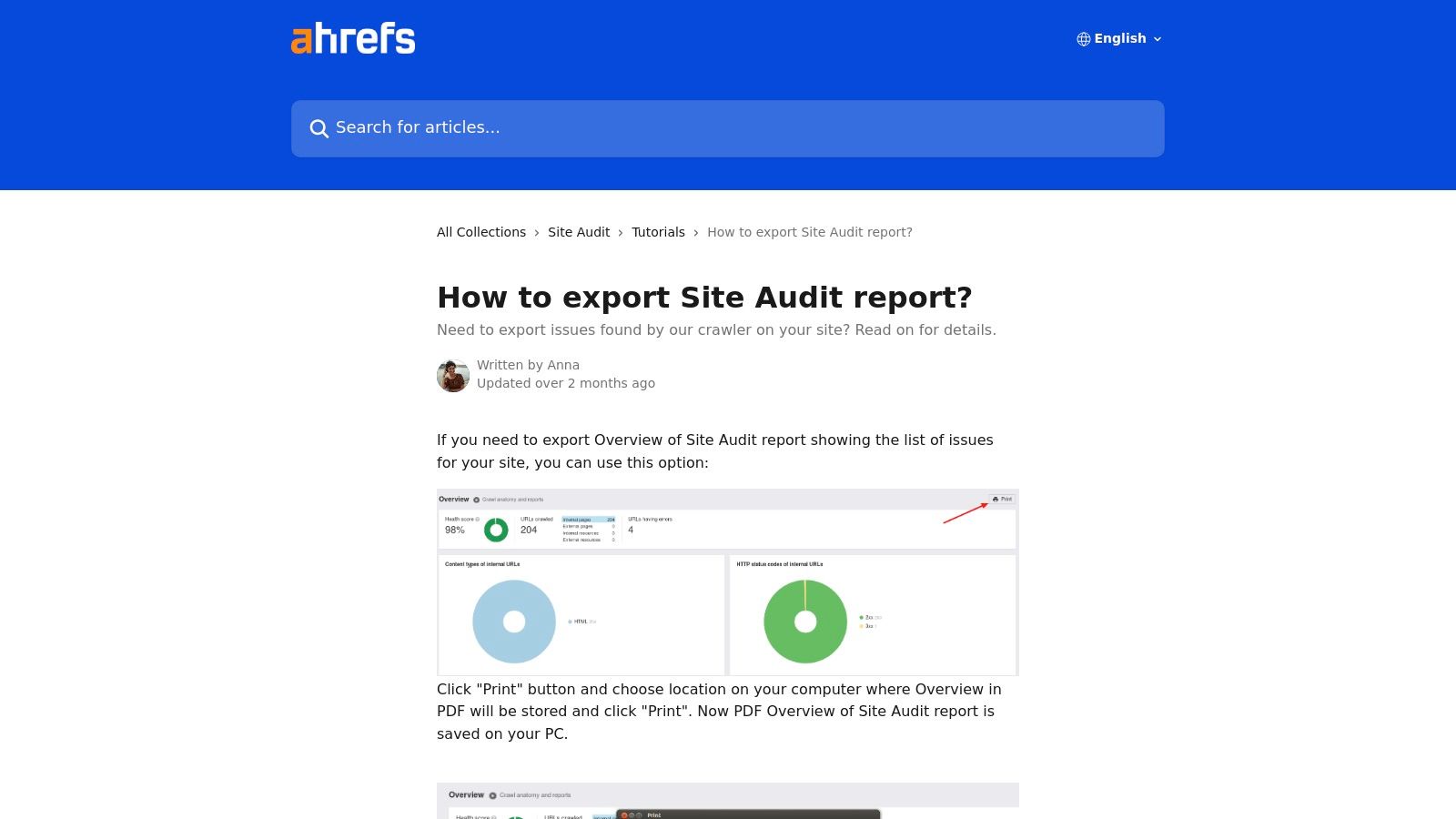
The platform's Site Audit tool is renowned for its speed and scale, offering generous crawl credits that accommodate even the largest, most complex websites. After a crawl completes, Ahrefs presents a clean, digestible overview dashboard. Users can quickly "Print to PDF" this overview, creating a crisp, shareable summary of the site's health score, key issues, and top-level metrics. This function is perfect for generating a preliminary audit or a high-level snapshot for stakeholders.
Strategic Breakdown and Key Features
Ahrefs excels at providing granular data exports. Instead of a single, all-encompassing PDF, the platform allows you to export specific issue reports as CSV or XLSX files. For instance, you can export a complete list of all pages with 404 errors, pages with missing meta descriptions, or URLs with slow load times. This segmented approach empowers SEO professionals to dive deep into specific problem areas and present targeted data sets with precise recommendations.
This method is particularly effective for technical SEOs who need to provide developers with exact, actionable lists of URLs and corresponding issues. The platform also keeps a historical record of crawls, allowing you to track your "Health Score" over time and visually demonstrate the impact of your SEO fixes. While it requires manual assembly into a final report, the quality and depth of the exported data are second to none.
Actionable Takeaways & Pricing
- Tip for Agencies: Use the granular CSV exports for specific issues (e.g., broken internal links, duplicate content) as appendices in your client reports. This provides tangible proof and a clear task list.
- For In-house Teams: Leverage the historical data trend charts from the Site Audit dashboard. Screenshot these graphs to include in your monthly internal reports, showing progress on technical SEO health to management.
- Pricing: Site Audit is included in all paid Ahrefs plans (Lite starts at $129/month), with crawl credits rising on higher tiers. For sites you own, the free Ahrefs Webmaster Tools account runs the same Site Audit crawler after you verify the site, which makes it one of the best free SEO audit report generators for in-house teams.
Ultimately, Ahrefs is a crawler-first tool that prioritizes data depth and accuracy over built-in presentation features. It’s ideal for SEOs who want complete control over their final report and need the most comprehensive technical data possible to back up their recommendations. For those evaluating its capabilities, understanding the key differences in what to look for in SEO tools can provide valuable context.
Website: https://help.ahrefs.com/en/articles/2646667-how-to-export-site-audit-report
3. SEOptimer: The Instant White-Label Audit Generator
SEOptimer carves out its niche by focusing on one thing and doing it exceptionally well: generating beautiful, white-label audit reports in seconds. It is specifically designed for agencies and freelancers who need a fast, professional, and scalable way to produce a compelling seo audit report sample for lead generation and client onboarding.
The platform’s core strength is its speed and simplicity. You enter a URL, and within moments, SEOptimer performs over 100 automated checks covering on-page SEO, links, Core Web Vitals, and even social media presence. The output is a clean, visually appealing report that clearly grades the site's performance and highlights key areas for improvement, making it perfect for initial client conversations.

Strategic Breakdown and Key Features
SEOptimer shines in its white-labeling and lead-generation capabilities. The reports are highly customizable with your own branding, logo, and color scheme, ensuring a professional touch. You can choose from multiple templates to fit the specific needs of a prospect. The platform doesn't just create reports; it helps you acquire clients.
Its standout feature is the embeddable audit tool, which you can place directly on your agency's website. This acts as a powerful lead magnet, offering potential clients a free, instant audit in exchange for their contact information. The ability to run bulk reports is another key advantage for agencies looking to scale their prospecting efforts by auditing hundreds of potential leads at once.
Actionable Takeaways & Pricing
- Tip for Agencies: Embed the SEO audit form on your "Services" or "Contact" page. This provides immediate value to visitors and generates a steady stream of qualified, high-intent leads for your sales pipeline.
- For Freelancers: Use the fast, branded PDF reports as a value-add during initial discovery calls. A pre-made, professional seo audit report sample shows initiative and helps frame the conversation around specific, data-backed recommendations.
- Pricing: SEOptimer is very competitively priced, with a 14-day free trial available. Plans start at just $19/month for a DIY SEO tool and $29/month for the White Label Reporting plan. The most popular White Label & Embedding plan is $59/month, offering a cost-effective solution for agencies.
While SEOptimer may not offer the granular data depth of an all-in-one suite like Semrush, its value lies in its efficiency and client-facing presentation. It excels at turning a technical audit into a visually engaging sales tool, making it an indispensable asset for agencies focused on growth. To see how it stacks up against other reporting solutions, explore this guide to the best SEO reporting tools.
Website: https://www.seoptimer.com/white-label/
4. WooRank: The Instant Review & Lead Generation Report
WooRank carves out its niche by offering a lightning-fast way to generate clean, easy-to-digest SEO "Reviews" that function as a perfect preliminary seo audit report sample. It's built for speed and simplicity, making it an excellent tool for agencies looking to quickly qualify leads or for businesses needing a high-level overview of their site's health without getting lost in technical jargon.
The core of the platform is its one-click "Review" generator. You enter a URL, and WooRank produces a scored report covering on-page SEO, usability, performance, and social media presence. This report can then be downloaded as a straightforward PDF on its Pro and Premium plans, creating a client-friendly asset that clearly outlines top-level issues and opportunities.
Strategic Breakdown and Key Features
WooRank’s primary advantage is its low setup overhead and focus on agency workflows. The platform isn't just about creating a single report; it's designed to be part of a sales and client acquisition process. The LeadGen tool, an add-on feature, allows agencies to embed a white-label audit widget on their own site to capture prospective clients by offering them a free, instant website review.
This transitions the SEO audit from a simple diagnostic tool into a powerful marketing asset. When a lead uses the widget, their details are captured, and a branded PDF report is generated. This creates a warm, data-driven entry point for a sales conversation. While it doesn't offer the deep customization of a tool like Semrush's My Reports, its strength lies in its automation and accessibility for non-technical stakeholders.
Actionable Takeaways & Pricing
- Tip for Agencies: Use the LeadGen tool on your "services" or "contact" page to offer a free SEO analysis. This provides immediate value to potential clients and gives your sales team a tailored report to discuss during the first call.
- For In-house Teams: The weekly automated "Reviews" can serve as a simple health-check dashboard. Use these reports to monitor for sudden drops in your SEO score, which could indicate new critical errors that need immediate attention.
- Pricing: WooRank offers several tiers, with downloadable PDF reports available on the Pro plan (starting around $89.99/month) and Premium plan. The LeadGen tool and other advanced agency features are typically included in higher-tier plans or as add-ons, so it's important to confirm feature availability for your chosen plan.
WooRank excels at turning a technical audit into an accessible, actionable summary ideal for initial client conversations or high-level internal reporting. Its streamlined review-to-PDF workflow is one of the fastest ways to produce a presentable audit. For those considering its place among other tools, you can explore this overview of top SEO software alternatives.
5. Screaming Frog (SEO Spider): The Technical SEO's Data Powerhouse
Screaming Frog's SEO Spider is the industry-standard desktop crawler, beloved by technical SEO professionals for its unparalleled depth and raw data output. Unlike all-in-one SaaS platforms, its strength lies not in generating instant polished reports but in providing the exhaustive, granular data needed to build a deeply insightful seo audit report sample from the ground up. It's the go-to tool for practitioners who prefer to get their hands dirty with data to uncover complex technical issues.
The platform is a powerhouse of technical analysis. It crawls websites and provides detailed tabs for nearly every SEO element imaginable, from response codes and page titles to canonicals, hreflang, and structured data. While it doesn't have a built-in "report builder" like Semrush, its value comes from its powerful export capabilities and integrations.
Strategic Breakdown and Key Features
The core strategy with Screaming Frog is to use its comprehensive crawl data as the foundation for a custom report. You can connect it via API to Google Analytics, Google Search Console, and PageSpeed Insights to enrich your crawl data with user metrics, performance scores, and search query data. This creates a multi-layered dataset that is impossible to get from most other tools.
Its standout feature for reporting is the direct integration with Google's Looker Studio (formerly Data Studio). Screaming Frog provides a dedicated crawl report template that you can connect your crawl data to, instantly visualizing key metrics like crawl depth, status codes, and indexability issues. This bridges the gap between raw spreadsheet exports and a client-ready visual dashboard, significantly speeding up the reporting process for technical findings. For a deeper understanding of how to leverage such crawls, you can explore the fundamentals of a thorough website crawl test.
Actionable Takeaways & Pricing
- Tip for Agencies: Use the crawl comparison feature to run a crawl before and after a site migration or technical fix. Export the comparison data to visually demonstrate the impact of your work in a client report.
- For In-house Teams: Schedule regular crawls and export the "Crawl Overview" tab to a shared spreadsheet. Use this as a living technical SEO health dashboard to track changes and new issues over time.
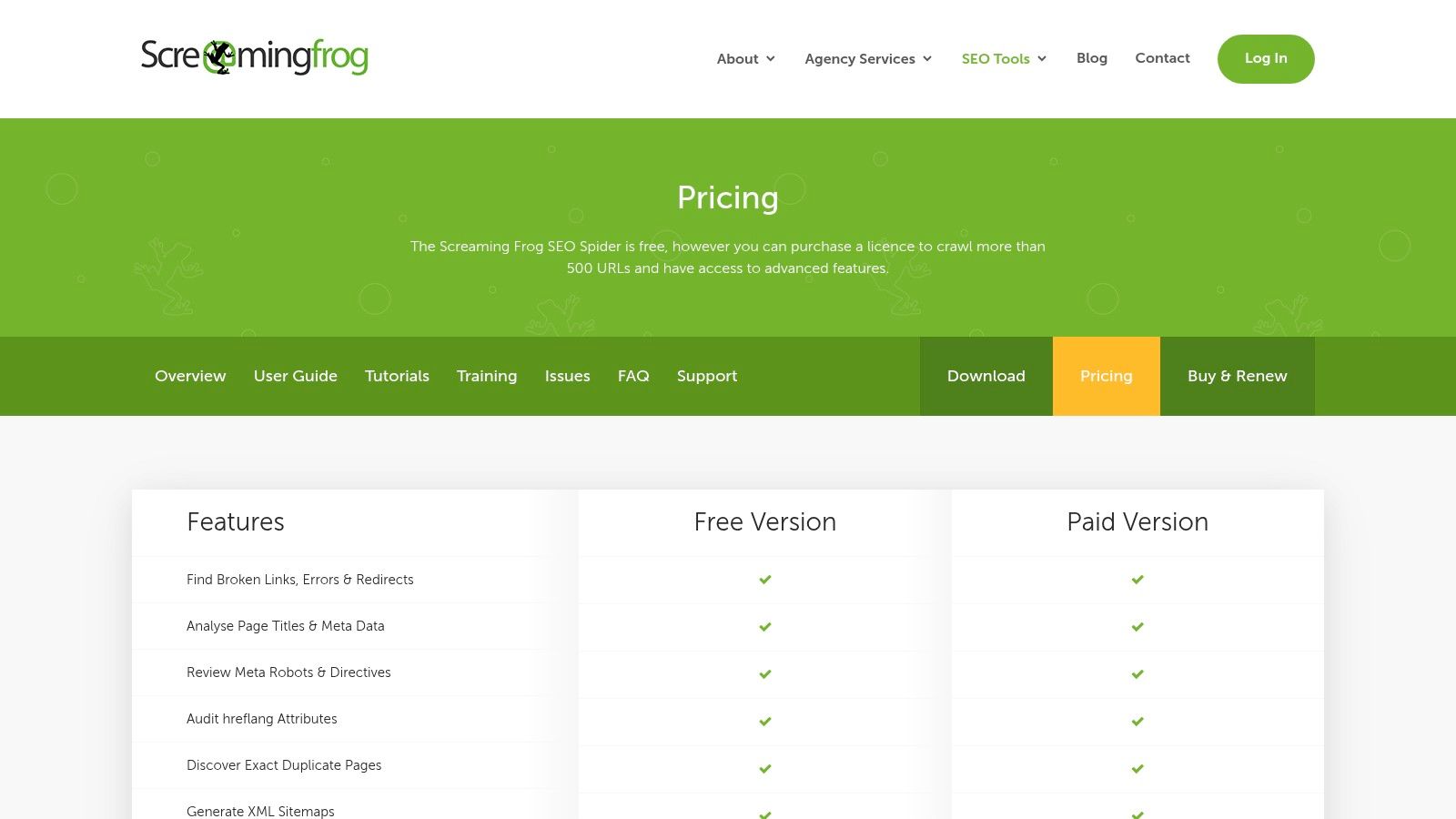
- Pricing: Screaming Frog offers a generous free version that allows you to crawl up to 500 URLs, which is perfect for small websites or spot-checking. The paid license is £259 per year (approximately $325), removing the crawl limit and unlocking advanced features like scheduling, API integrations, and JavaScript rendering.
Screaming Frog is not for those seeking a one-click PDF. It’s a specialist's tool that empowers you to perform the deepest possible technical audit. The trade-off for its manual reporting process is access to an unmatched level of data integrity and customization, making it an essential part of any serious SEO professional's toolkit.
Website: https://www.screamingfrog.co.uk/seo-spider/pricing/
6. Etsy: Budget-Friendly, Customizable Report Templates
For freelancers, startups, or agencies looking for a fast and highly affordable way to produce a visually appealing report, Etsy has emerged as a surprising yet valuable resource. It offers a marketplace of downloadable seo audit report sample templates that provide a professional framework without the high cost of dedicated software. This approach is ideal for those who already have the audit data but need a polished and brandable way to present it.
Etsy's strength lies in its variety and accessibility. Sellers on the platform offer a wide range of pre-designed templates in multiple formats like Canva, Google Sheets, and editable PDFs. This allows you to find a design that fits your brand aesthetic and a format that aligns with your existing workflow, all for a one-time, low-cost purchase. You can quickly populate these templates with your findings from tools like Google Analytics or a site crawler to create a deliverable in a fraction of the time.
Strategic Breakdown and Key Features
The primary advantage of using an Etsy template is the immediate access to a well-structured document that you can make your own. Many templates come with pre-written sections for technical SEO, on-page analysis, backlink profiles, and competitor reviews. This structure serves as a useful checklist, ensuring you cover all critical areas of an audit.
The most popular templates are often built in Canva, which makes customization incredibly straightforward. You can drag and drop your logo, change color schemes to match client branding, and easily insert screenshots or charts to visualize your data. Unlike a rigid software export, this gives you full creative control over the final narrative and presentation. Seller ratings and reviews also provide a layer of quality control, helping you choose a proven and effective template.
Actionable Takeaways & Pricing
- Tip for Freelancers: Purchase a versatile Canva template and create several branded versions for different client types. This allows you to offer a customized look and feel for each project with minimal recurring effort.
- For Small Agencies: Combine a comprehensive Google Sheets template from Etsy for your raw data collection with a sleek Canva template for the client-facing summary. This creates an efficient two-part workflow for internal analysis and external reporting.
- Pricing: This is Etsy's biggest draw. Most high-quality templates are available for a one-time fee, typically ranging from $2 to $25. This provides a professional seo audit report sample foundation without any recurring subscription costs, making it a perfect solution for those on a tight budget.
Etsy is not an audit tool; it's a design and structure resource. By separating the data-gathering process from the presentation, it empowers SEOs to create fully customized, professional-grade reports at an unbeatable price point. For those who prioritize presentation and branding, it's an excellent way to elevate a standard data dump into a compelling client deliverable.
Website: https://www.etsy.com/market/seo_audit_template
7. Fiverr: A Marketplace for Real-World Audit Samples
Fiverr offers a unique and practical approach to obtaining an seo audit report sample by connecting you with a global marketplace of freelancers who create them for a living. Instead of a template or software-generated output, you can commission a real, customized audit for a relatively low cost, providing an authentic example of a client deliverable. This is an invaluable resource for understanding how experienced practitioners structure, analyze, and present their findings.
The platform’s strength lies in its transparency and variety. Most freelancer "gigs" for SEO audits include portfolio samples directly on their page, allowing you to review different report styles and formats before ever making a purchase. You can find everything from highly technical, data-heavy exports to visually polished, executive-friendly presentations.

Strategic Breakdown and Key Features
Fiverr’s value isn't a tool but a service-based ecosystem. You can filter sellers by their rating, level (e.g., Top Rated Seller), and specific expertise, such as technical SEO, on-page analysis, or backlink auditing. Gig pages clearly outline the scope of the audit, the specific deliverables (often a branded PDF), turnaround time, and any included extras like action plans or competitor analysis.
This direct access to freelancers allows you to see how different professionals translate raw data from tools like Semrush or Ahrefs into a compelling narrative. Many top-tier sellers offer white-label reports, which are perfect for agencies looking to see how they can structure their own branded deliverables. The Q&A and review sections on each gig page also provide insight into the quality and communication style of the provider, helping you vet potential partners.
Actionable Takeaways & Pricing
- Tip for Agencies: Purchase a few audits from different Top Rated Sellers to compare their report structures, language, and presentation styles. This can inspire improvements in your own client-facing templates.
- For In-house Teams: Use a low-cost Fiverr audit as a quick, third-party "second opinion" on your website's health before committing to a larger agency or more expensive software subscription.
- Pricing: The cost is extremely variable. Basic audits from new sellers might start as low as $10-$20, but these are often just simple tool exports. For a comprehensive, professionally formatted seo audit report sample from a vetted expert, expect to pay between $100 and $500+. The key is to vet sellers carefully by reading reviews and examining their portfolio samples.
Ultimately, Fiverr serves as a living library of SEO audit reports. It provides a fast and budget-friendly way to see how professionals in the field are currently packaging and delivering their work, offering tangible examples that go beyond generic templates and provide real-world context for your own reporting efforts.
Website: https://www.fiverr.com/khushbomarketer/audit-your-website-with-full-pdf-report
Top 7 SEO Audit Report Samples Compared
| Tool | Implementation complexity | Resource requirements | Expected outcomes | Ideal use cases | Key advantages |
|---|---|---|---|---|---|
| Semrush | Low–Medium — integrated crawl + reporting workflow | Paid subscription; My Reports add-on per report; integrations (GA/GSC) | Actionable crawl data plus white‑label, scheduled PDF reports | Agencies needing branded, scheduled client reports and combined data | End-to-end crawl→insight→client-ready PDF; fine-grained branding; AI summaries |
| Ahrefs | Medium — robust technical crawler, manual PDF export via Print to PDF | Paid plans with large monthly crawl credits; free via Ahrefs Webmaster Tools for verified sites | Deep technical crawl data and clean shareable PDF overviews | Technical audits for larger sites or producing concise sample audits | Strong crawling depth and high crawl limits; granular exports |
| SEOptimer | Low — template-driven, fast report generation | Affordable plans; templates; free trial; embedding options | Quick branded, white‑label PDF audits and prospecting reports | Freelancers/agencies needing rapid sample audits and lead‑gen embeds | Very fast to produce client-ready audits; competitive pricing; multilingual |
| WooRank | Low — one-click review creation and PDF download | Pro/Premium tier for PDF downloads; LeadGen add-ons | Straightforward client-friendly PDF review reports | Outreach, stakeholder sharing, simple sample reports | Simple review→PDF workflow; lower setup overhead than enterprise suites |
| Screaming Frog (SEO Spider) | High — desktop crawler requiring exports and custom formatting | Free up to 500 URLs; paid license for larger sites; some API integrations | Extensive raw technical crawl exports for custom, formatted reports | Technical SEO practitioners and in-depth site audits needing raw data | Industry-trusted depth; powerful checks and integrations; great value for power users |
| Etsy (SEO audit templates) | Very low — download and edit templates | Low one-time cost per template (~$2–$25); manual data insertion | Presentable, editable report layouts that require real data | Budget-conscious teams needing starter templates or sample layouts | Fast, low-cost templates in multiple formats (Canva, Sheets, PDF) |
| Fiverr | Low–Medium — outsource to freelancers (varies by gig) | Variable cost per gig; requires vetting seller reviews/portfolio | Customized one-off PDF audits delivered by a freelancer | Quick custom audits without internal resources or for learning from examples | Flexible pricing and scope; fast turnaround; human-generated reports |
How to Choose an SEO Report Generator
Most buyers over-index on the number of checks a tool runs. In practice, five criteria decide whether a generator fits your workflow:
- Crawl depth and limits: A 50-page brochure site can be audited by any tool. A 100,000-URL ecommerce site needs high crawl credits (Ahrefs, Semrush higher tiers) or an unlimited desktop crawler (Screaming Frog paid). Check whether JavaScript rendering is included, since many modern sites hide content behind client-side scripts.
- Data sources: A crawl alone shows technical health. A useful website SEO audit report also pulls Search Console clicks and impressions, analytics traffic, rankings, and backlinks so you can tie issues to lost traffic.
- Output format: Decide whether you need a scheduled branded PDF (Semrush, SEOptimer), a live dashboard (Looker Studio via Screaming Frog), or raw CSV/XLSX for developers (Ahrefs, Screaming Frog).
- White-labeling and lead gen: Agencies selling audits should weigh custom branding, client logins, and embeddable audit widgets. In-house teams rarely need these and can save money on lower tiers.
- Total cost: Factor in add-ons. A $29/month white-label tool may cost less than a $140/month suite, but if you also pay for a separate rank tracker and backlink tool, the suite can work out cheaper.
What a Client-Ready SEO Audit Report Should Include
Whichever generator you use, an automated export is raw material, not the finished report. A strong SEO site audit report typically follows this structure:
- Executive summary (1 page): Overall health, the three to five issues with the largest traffic or revenue impact, and the recommended next 90 days.
- Indexation and crawlability: Index coverage from Search Console, robots.txt rules, XML sitemap validity, canonical tags, redirect chains, and 4xx/5xx errors.
- On-page SEO: Missing, duplicate, or truncated title tags and meta descriptions, heading structure, thin or duplicate content, and internal linking gaps.
- Performance and UX: Core Web Vitals (LCP, INP, CLS) from field data, mobile usability, and page weight.
- Rankings and visibility: Current keyword positions, movement since the last audit, and pages ranking on page two that are close to breaking through. A dedicated keyword tracking tool gives more reliable position data than most audit crawlers.
- Backlink profile: Referring domains, lost links, toxic patterns, and gaps against competitors.
- AI search visibility: Increasingly, stakeholders ask whether their brand appears in AI Overviews and LLM answers. Include structured data coverage and whether key pages are accessible to AI crawlers.
- Prioritized action plan: Every issue mapped to impact, effort, owner, and deadline.
If you want a quick starting point before investing in a paid suite, the free AI SEO audit tool from Sight AI checks a page for on-page and AI-readiness issues you can drop straight into sections 3 and 7.
From Data to Decisions: Building Your Perfect SEO Audit Report
We've explored a diverse landscape of tools and templates, from the all-in-one powerhouse platforms of Semrush and Ahrefs to the specialized technical depth of Screaming Frog and the accessible, client-friendly interfaces of SEOptimer and WooRank. Each seo audit report sample we analyzed offers a unique lens through which to view a website's performance, highlighting a critical truth: the best report is not one-size-fits-all. It's a carefully crafted document that translates complex data into a clear, compelling, and actionable strategic roadmap.
The journey from a spreadsheet of raw crawl data to a prioritized list of recommendations is where the real value of an SEO professional lies. The core purpose of any audit is to drive meaningful change that leads to improved visibility, traffic, and conversions. Whether you're presenting to a C-suite executive who needs a high-level summary or a development team that requires granular technical specifics, your report must be tailored to its audience.
Synthesizing Your Findings into a Cohesive Strategy
The most effective SEO audits don't just list problems; they weave them into a narrative. A high bounce rate (identified by your analytics) might connect to slow page speed (flagged by Semrush or WooRank), which is caused by uncompressed images (discovered by Screaming Frog). Your report should connect these dots, telling a story that makes the "why" behind your recommendations crystal clear.
Remember to frame your findings around business objectives. Instead of just stating "There are 50 broken internal links," explain the impact: "Fixing these 50 broken links will improve user experience and reclaim lost 'link equity,' potentially boosting the ranking of key service pages by an estimated 5-10%." This approach transforms technical jargon into tangible business outcomes.
Key Takeaways and Actionable Next Steps
As you move forward, keep these core principles in mind to elevate your reporting process:
- Prioritization is Paramount: Not all issues are created equal. Use a framework like an impact/effort matrix to prioritize your recommendations. Quick wins that deliver high impact build momentum and trust, while larger, more resource-intensive tasks can be slated for future quarters.
- Audience Dictates Format: An executive summary with key performance indicators and estimated ROI is perfect for stakeholders. A detailed, tabbed spreadsheet with technical specifications is what your development team needs. As we saw with the customizable templates, adapting your delivery is non-negotiable.
- Data is Your Foundation: A strong report is built on accurate, comprehensive data. This includes not just your own site's metrics but also a clear understanding of the competitive landscape. To build a truly impactful report, gathering comprehensive data is crucial, and utilizing effective SEO competitor analysis software can uncover significant opportunities your direct audit might miss.
- The Audit is Just the Beginning: The report is a starting point, not a final destination. Your role is to guide the implementation of your recommendations, track their impact, and continuously iterate. An SEO audit is a recurring health check, not a one-time fix.
Choosing the right tool ultimately depends on your specific context. Are you a freelancer needing to generate professional-looking reports quickly? SEOptimer might be your best bet. Are you an in-house SEO at a large enterprise tackling a complex site migration? Screaming Frog is an indispensable part of your toolkit.
By internalizing the strategies from each seo audit report sample and selecting the right tools for your workflow, you can move beyond simply identifying problems. You can become a strategic partner who turns data into decisions, insights into impact, and audits into a powerful engine for sustainable organic growth.
Frequently asked questions
What is an SEO report generator?
An SEO report generator is software that crawls a website, pulls data from sources like Google Search Console and analytics, and compiles the findings into a shareable report, usually a PDF, dashboard, or spreadsheet. Tools range from instant one-page audits (SEOptimer, WooRank) to full suites with scheduled, white-label reporting (Semrush). The output still needs human prioritization to become a useful action plan.
Is there a free SEO audit report generator?
Yes. Screaming Frog's free version crawls up to 500 URLs, Ahrefs Webmaster Tools runs a full Site Audit on sites you verify, and Semrush's free account audits up to 100 pages. Google Search Console and PageSpeed Insights cover indexing and Core Web Vitals at no cost. Free options lack white-labeling and scheduling, so agencies usually upgrade once they report for multiple clients.
What should an SEO audit report include?
At minimum: an executive summary, indexation and crawlability findings, on-page issues, Core Web Vitals, rankings, backlinks, and a prioritized action plan with owners and deadlines. See the section "What a Client-Ready SEO Audit Report Should Include" above for the full eight-part structure.
What is the best SEO audit tool?
For most agencies, Semrush is the best overall SEO audit tool because it combines crawling, rankings, backlinks, and branded reporting in one place. Technical SEOs auditing large or JavaScript-heavy sites often prefer Screaming Frog or Ahrefs for crawl depth. For fast prospecting reports at a low price, SEOptimer is the most cost-effective choice.
How often should you run an SEO audit?
Run a full technical audit quarterly for most sites and monthly for large or frequently updated sites such as ecommerce stores and publishers. Also audit immediately after a migration, redesign, CMS change, or a major Google core update. Between full audits, scheduled crawls and weekly rank tracking catch new errors before they affect traffic.
Ready to turn your audit findings into an automated growth engine? IndexPilot takes your SEO strategy from report to reality by handling everything from AI-driven keyword discovery and content creation to optimization and publishing. Stop manually implementing recommendations and start building a compounding content asset with IndexPilot.