Choosing a Content Management System isn't just an IT decision anymore—it’s a core part of your entire SEO and AI game plan. When you start comparing content management systems, you'll quickly realize it's a critical choice: you either pick a platform that fuels your growth or one that throws up technical roadblocks at every turn. This guide will help you build a high-performance publishing engine that's ready for the AI-driven world of search.
Why Your CMS Choice Is a Critical SEO Decision

Back in the day, a CMS was just a simple tool for putting words on a webpage. Today, it’s the engine that powers your entire digital presence. A slow, clunky system can completely undermine your best SEO efforts, while a modern, agile platform can give you a serious competitive edge. For growth teams, the right CMS has a direct line to everything from organic traffic to conversion rates.
The market is absolutely dominated by a few key players, with WordPress as the undisputed giant. It commands a staggering 62.8% market share among all CMS platforms, running 43.2% of all websites on the internet. To put that in perspective, the runner-up, Shopify, holds just 6.1% of the market.
Core Comparison Criteria for Modern Teams
A modern comparison of content management systems has to go way beyond basic feature checklists. The old way of evaluating them often misses the things that actually drive performance. To make a smart decision, we’ll evaluate each platform based on the criteria that truly matter for today’s SEO and AI challenges:
- Technical SEO Performance: How well does the CMS handle the fundamentals like site speed, Core Web Vitals, and crawlability right out of the box?
- AI Integration Readiness: Can the platform easily connect with AI content automation tools like Sight AI to help you scale content production?
- Content Workflow Velocity: Does the system actually help your team create, approve, and publish content quickly, or does it slow you down?
- Scalability and Flexibility: Will the CMS grow with your business, or are you going to hit a ceiling that forces a painful and expensive migration?
- Long-Term Cost of Ownership: What are the hidden costs of maintenance, plugins, and developer support that will pop up over time?
Your CMS is the bedrock of your technical SEO. It dictates your site's speed, architecture, and ability to be indexed—factors that Google weighs heavily. A poor choice here means you're starting your SEO race with a handicap.
For a deeper dive into making your platform search-engine friendly, it's worth exploring effective SEO strategies for B2B websites. The right platform ensures these strategies can be put into action without any friction.
Ultimately, how quickly your content gets discovered is a direct result of your CMS's capabilities. If you're curious, you can learn more in our guide on how content indexing speed impacts SEO to really understand this connection.
Comparing Traditional and Headless CMS Architectures
To really nail your content strategy, you have to understand the bedrock it's built on: your content management system. The choice between a traditional and a headless CMS isn't just a technical detail for developers—it's a massive strategic decision that shapes your site's speed, flexibility, and ability to grow.
Think of it like choosing between a fully furnished, all-inclusive apartment and a custom-built home. Both get you a place to live, but the experience and potential are worlds apart.
The All-in-One Approach: Traditional CMS
A traditional CMS, which you'll often hear called a monolithic system, is that all-inclusive apartment. It packages everything together in one tight bundle. The back-end, where you write and manage content (the "body"), is permanently fused to the front-end, the actual website your audience sees (the "head").
Classic examples like WordPress and Drupal perfected this model. The big draw here is simplicity. Content teams get a familiar WYSIWYG editor they know and love, and marketers can add powerful SEO plugins with just a few clicks. It all just works, right out of the box.
The Headless Revolution: Decoupling Content from Presentation
Now, picture that custom-built home. A headless CMS severs the link between your content repository (the body) and any single design or display (the head). It holds your content as pure, raw data and delivers it through an API to wherever you need it to go.
This means your developers can build a blazing-fast, completely custom front-end using modern frameworks like React or Vue.js. They just pull in the content they need, when they need it. The back-end is purely for content management, giving your front-end team total creative freedom over the user experience.
A headless architecture turns your content into a portable asset. You can write something once in the CMS and then push it to a website, an iOS app, a digital kiosk, and even a chatbot—all at the same time, with perfect consistency.
This is the entire premise behind omnichannel marketing. Your content can show up anywhere, perfectly formatted for the channel. Pioneers in this space, like Contentful and Strapi, empower teams to build incredibly unique, high-performance digital experiences.
Key Differences for SEO and Marketing Teams
So, what does this all mean for your day-to-day SEO and marketing work? The trade-offs are significant. One isn't universally "better," but they're built for very different scenarios. You can see how this decision fits into the bigger picture in our guide on choosing a content management platform that truly supports your growth.
Here’s a quick rundown of what you need to consider:
- Speed and Performance: Headless architectures have a massive advantage here. Because the front-end is separate, developers can create incredibly lightweight, fast-loading sites that crush Core Web Vitals—a huge ranking factor. Traditional systems, often bogged down by heavy plugins and themes, can really struggle to keep up.
- User-Friendliness and Plugins: This is where traditional systems shine. Platforms like WordPress are famously easy for non-technical marketers to use. Their massive plugin ecosystems give you powerful SEO, analytics, and form-building tools without ever touching a line of code. Getting similar functionality in a headless setup requires developer time.
- Flexibility and Scalability: Headless offers a whole different level of flexibility. Your content isn't trapped in a single website template, so you can easily push it to new channels as they pop up. Traditional systems are more rigid and can feel constraining when you want to launch a new app or other digital initiative.
An In-Depth CMS Platform Analysis for SEO and AI
Picking a content management system is a balancing act. You're constantly weighing ease of use against raw performance and flexibility. To cut through the noise, we're going to break down four major players—WordPress, Drupal, Contentful, and Strapi—specifically for teams focused on SEO and AI-driven growth. Forget the surface-level feature lists; this is about how each platform holds up in the real world.
We'll be looking at the criteria that actually move the needle: Core Web Vitals optimization, granular control over schema markup, and how easily they integrate with AI tools. The goal here is a clear, structured breakdown showing where each CMS shines and where it might hold your team back from advanced technical SEO and high-velocity content production.
This diagram nails the fundamental difference between old-school, monolithic systems and the modern, decoupled headless architecture that's gaining so much traction.
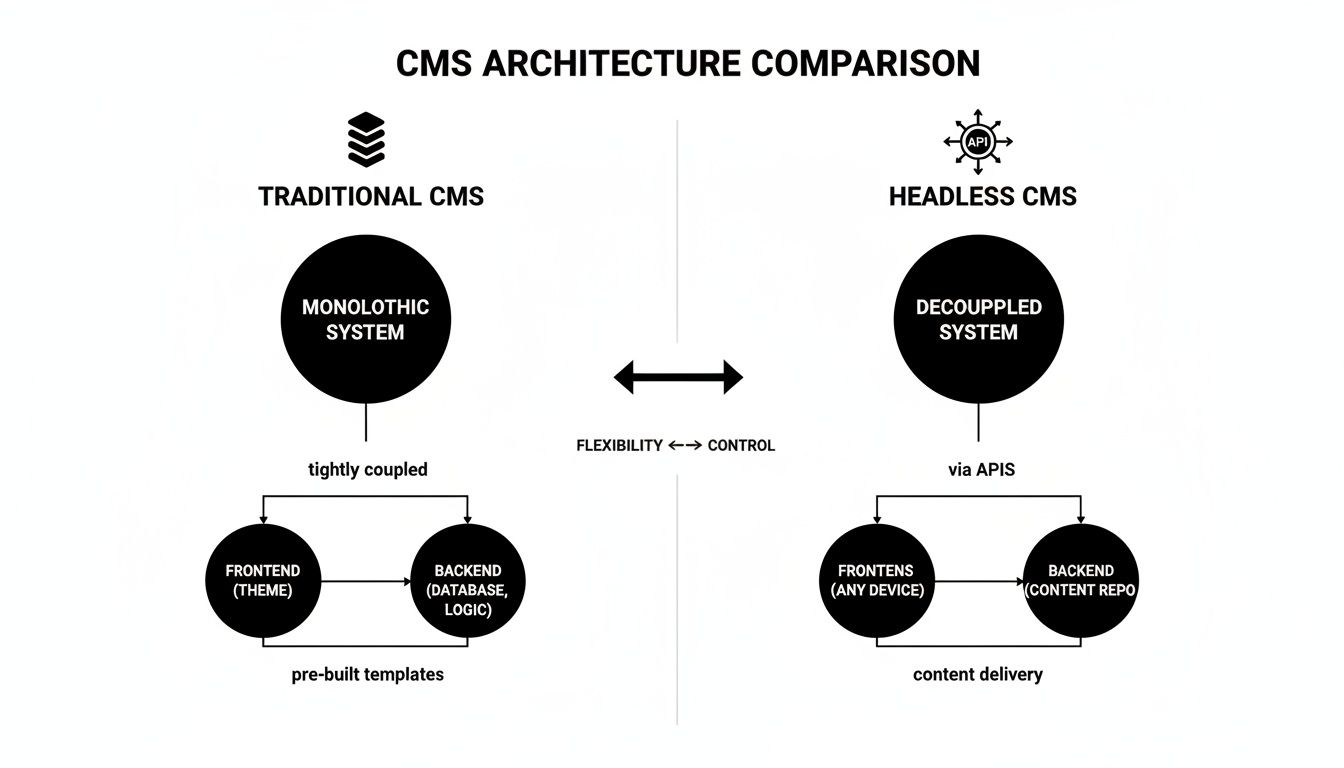
You can see how a traditional CMS like WordPress bundles everything together, while a headless CMS separates the content back-end from the front-end presentation layer. This is the core concept you need to grasp to understand the performance and scalability trade-offs we're about to dive into.
To give you a clearer picture, let's put these platforms head-to-head. The table below offers a side-by-side look at how each CMS stacks up against the evaluation criteria that matter most to modern SEO and growth teams.
CMS Feature Comparison for SEO and Growth
| Evaluation Criteria | WordPress | Drupal | Contentful (Headless) | Strapi (Headless) |
|---|---|---|---|---|
| SEO Friendliness | High (with plugins like Yoast/Rank Math) | High (powerful native features) | Dependent on front-end implementation | Dependent on front-end implementation |
| Performance (Core Web Vitals) | Fair (requires heavy optimization) | Good (can be very fast if configured well) | Excellent (built for speed with modern frameworks) | Excellent (custom front-ends are inherently fast) |
| AI Integration | Good (REST API allows for integration) | Very Good (robust APIs and custom modules) | Excellent (API-first design is ideal) | Excellent (API-first, open-source flexibility) |
| Ease of Use (for Marketers) | Excellent (very intuitive for non-technical users) | Fair (steep learning curve, needs developers) | Good (content modeling requires a learning curve) | Good (customizable admin panel is a plus) |
| Flexibility & Scalability | Good (vast plugin ecosystem) | Excellent (handles complex data and high traffic) | Excellent (omnichannel content delivery) | Excellent (total control over infrastructure) |
| Development Resources | Low to Medium | High (requires specialized Drupal developers) | High (requires skilled front-end developers) | High (requires front-end and back-end expertise) |
This comparison highlights a clear divide: traditional systems offer convenience and a massive ecosystem, while headless platforms deliver unparalleled performance and flexibility at the cost of requiring more development resources. Your "best" choice really depends on your team's skills, budget, and strategic priorities.
WordPress: The Ubiquitous Market Leader
It's impossible to talk about CMS platforms without starting with WordPress. It’s the undisputed king, powering an incredible 43% of all websites. Its success is built on one thing: accessibility. The massive plugin ecosystem makes it unbelievably versatile, especially for users who aren't developers.
For SEO, most people lean heavily on plugins like Yoast SEO or Rank Math. These tools are fantastic for giving marketers an intuitive way to manage on-page basics like titles, meta descriptions, and XML sitemaps. But this plugin-centric model is a double-edged sword.
While you can find a plugin for almost anything, this convenience often comes at a cost. Piling on third-party extensions is a classic recipe for code bloat, sluggish page loads, and even security holes—all things that can tank your SEO performance. Nailing your Core Web Vitals scores usually means a lot of extra work: think caching plugins, image compression tools, and sometimes custom development to strip out bloated theme code.
From an AI perspective, WordPress is definitely workable. Its REST API is solid enough for platforms like Sight AI to push generated content straight into the editor, which is a huge time-saver for publishing workflows. Still, the performance drag of a monolithic system can become a bottleneck if you're trying to scale up content operations at a very high velocity.
Situational Recommendation: WordPress is a fantastic fit for small-to-medium businesses, bloggers, and marketing teams who need to get a content-heavy site online quickly and value ease of use over bleeding-edge performance. If you don't have a dedicated dev team, it's hard to beat.
Drupal: The Enterprise-Grade Powerhouse
Drupal is another open-source, traditional CMS, but it's playing a different game than WordPress. It's known for its ironclad security, impressive scalability, and incredibly granular user permissions. This makes it a go-to for government sites, universities, and large enterprises with seriously complex content needs.
When it comes to technical SEO, Drupal has more muscle right out of the box. Its built-in capabilities for managing taxonomies, creating clean URL structures, and handling multilingual content are natively superior to what WordPress offers. The catch? You need technical chops to make it sing.
Setting up Drupal isn't as simple as clicking "install plugin." The learning curve is steep, and marketing teams will absolutely need developer support for the initial build and ongoing maintenance. That investment, however, buys you rock-solid performance and stability. A properly configured Drupal site can handle massive traffic spikes and complex data without the performance issues you often see in a WordPress site bogged down by dozens of plugins.
For AI integrations, Drupal’s architecture is surprisingly flexible. Its powerful APIs make it a strong contender for programmatic SEO and automated content pipelines. Teams can build custom modules to connect with AI content platforms, creating a super-efficient publishing engine that’s perfectly tailored to their workflow.
Contentful: The Headless CMS Pioneer
Contentful is one of the big names that pushed the headless architecture into the mainstream. It completely separates your content repository from the front-end presentation layer. This means content is delivered via APIs to literally any channel you can think of—a website, a mobile app, even an IoT device—giving you unmatched flexibility and speed.
For SEO, the number one advantage of a headless CMS like Contentful is performance. Because your developers are free to build the front-end with lightweight, modern frameworks like Next.js or Gatsby, the resulting sites are blazing fast. This gives you a massive head start on hitting excellent Core Web Vitals scores, which is a huge ranking factor.
Of course, that flexibility comes with a major trade-off: SEO isn't built-in. There's no "Yoast for Contentful." Your developers have to code all the SEO best practices—schema markup, sitemap generation, meta tags, hreflang—directly into the front-end application. This demands a technically skilled team and tight collaboration between marketers and developers.
"With a headless CMS, you are not inheriting a theme's SEO limitations. You have complete control to implement a perfect technical SEO foundation, but that control comes with the responsibility of building it from scratch."
Where Contentful really pulls ahead is AI integration. Its API-first design is a natural fit for connecting with generative AI tools and content automation platforms. You can build a workflow where AI generates articles that are programmatically fed into Contentful, ready for distribution across all your channels at once. For teams focused on scaling content, this is a game-changer. If this approach interests you, exploring the best AI content platforms can offer some valuable context.
Strapi: The Open-Source Headless Alternative
Strapi is another top-tier headless CMS, but it comes with a crucial difference: it’s open-source and self-hosted. This gives your organization complete control over its data and infrastructure—a non-negotiable for businesses with strict security or compliance mandates.
Just like Contentful, Strapi delivers exceptional performance and flexibility. Your developers get total freedom to build a custom, lightning-fast front-end that provides a fantastic user experience. And, similarly, the responsibility for implementing all the SEO features falls squarely on the development team.
Strapi's main selling point is its deep customizability. Because it's open-source, developers can dig into the core system, create their own plugins, and tailor the admin panel to perfectly match the content team's workflow. You just can't get that level of control with a proprietary, SaaS platform like Contentful.
When it comes to AI and content automation, Strapi is every bit as capable as Contentful. Its well-documented API makes it easy to integrate with any external service, enabling sophisticated workflows for programmatic content creation. The ability to self-host also means you can co-locate your CMS infrastructure with other services, which can reduce API latency and speed things up even more.
Situational Recommendation: Headless systems like Contentful or Strapi are the right call for performance-obsessed brands, e-commerce stores, and companies with omnichannel ambitions. If site speed is your top priority and you have the development muscle to build and maintain a custom front-end, this is the way to go.
Matching the Right CMS to Your Business Needs
There’s no such thing as the “best” content management system. The best CMS is the one that fits your business, and what works wonders for a lean startup could absolutely cripple a large enterprise. This is where we move past feature lists and dive into real-world scenarios.
We’re going to look at four common business archetypes to show how specific goals, team structures, and technical resources should guide your CMS choice. By matching the platform to the problem, you can make a confident decision that actually helps you grow instead of getting in the way.
The Fast-Moving Startup
Startups live and die by one thing: speed. You need to launch fast, test an idea, and pivot based on what the market tells you. Your team is probably small, with marketing generalists wearing a dozen hats and very little, if any, dedicated developer time.
For this scenario, WordPress is almost always the right call. Its famous five-minute installation and endless library of themes and plugins let you get a minimum viable website live in days, not weeks. Marketers can manage everything on their own—from publishing content to installing SEO tools like Rank Math—without ever touching a line of code.
Sure, it might not have the raw performance of a headless setup. But the velocity it gives you in the early days is priceless. The goal is to get content out there and see what sticks, and WordPress clears nearly all technical hurdles out of the way.
The Performance-Obsessed E-commerce Brand
If you’re running an e-commerce business, site speed isn’t a vanity metric; it’s cash. A tiny 100-millisecond delay in load time can slash conversion rates by a staggering 7%. These brands are obsessed with Core Web Vitals and creating a frictionless path to checkout on every device.
This is where a headless CMS like Contentful or Strapi shines. Decoupling the front-end gives your developers the freedom to build a ridiculously fast, custom storefront with modern frameworks like Next.js. You get total control over every pixel and every millisecond, achieving a level of performance that a traditional, plugin-heavy WordPress or Drupal site can only dream of.
This image from Contentful's homepage nails the core value of headless: it turns your content into a centralized hub that can feed any digital channel. Content becomes a flexible asset you can push to a website, a mobile app, or any other touchpoint, all with perfect consistency and speed.
A concise guide on how to choose an ecommerce platform can also provide some great perspective as you weigh your options.
The Large Enterprise Demanding Security and Scale
Enterprises aren’t just running a website; they’re managing a complex digital ecosystem. They have non-negotiable requirements for security, granular user permissions, and massive scalability. Their CMS has to plug into other critical systems like CRMs and ERPs, and content workflows often involve reviews from legal, compliance, and regional teams.
Drupal was built from the ground up for this exact environment. Its out-of-the-box features for user roles, security protocols, and multilingual content management are leagues ahead of what WordPress offers without significant (and often clunky) customization. Drupal’s architecture is engineered to reliably handle huge traffic spikes and complex data models. For a deeper dive, check out our guide on enterprise content management solutions.
While it definitely requires specialized developers, Drupal provides a secure, scalable foundation that big organizations can bet on. Its real power is serving as the stable, central hub for a global content operation.
The Content-Heavy Publisher
Think media outlets, major review sites, or large-scale affiliate operations. These publishers live and die by two things: editorial velocity and user experience. They need to empower a big team of writers and editors to publish tons of content efficiently while delivering a fast, clean reading experience that keeps people on the page.
This use case really comes down to two distinct paths:
- A highly optimized WordPress setup: For teams who love the familiar, intuitive WordPress editor, a well-managed installation can still work. This requires a disciplined development team to keep the platform lean, fast, and secure.
- A headless CMS: For publishers who put performance above all else, headless is the way to go. It enables a beautifully designed, lightning-fast front-end that keeps readers engaged and ad revenue flowing.
The final call often hinges on the organization’s technical maturity. You have to ask: do the performance gains from going headless justify moving your editorial team away from the WordPress environment they know and love?
Leveraging AI to Automate Content Production
The future of content marketing is tied directly to automation, and your choice of CMS is what will either hold you back or propel you forward. A well-chosen CMS architecture acts as an amplifier for AI content platforms, turning your website from a static brochure into a content engine that practically populates itself.
This is where the rubber meets the road on all the architectural differences we’ve been discussing.
Modern, API-first systems—especially headless CMSs—were built for this new era. They’re designed for seamless integration with tools like Sight AI that automate the entire content lifecycle. We're talking about much more than just generating articles; this is about orchestrating keyword research, programmatic internal linking, and direct publishing, all through APIs.
The API-First Advantage in AI Workflows
An API-first design is the absolute bedrock of a high-velocity content strategy. Trying to bolt AI services onto traditional, monolithic systems often means wrestling with clunky plugins or custom workarounds that constantly break. Headless platforms, on the other hand, are designed from the ground up to communicate with other applications. It's in their DNA.
This architectural choice has a massive impact on your ability to scale. An API-driven workflow allows a platform like Sight AI to push a fully optimized, 2,500-word article directly into your CMS—complete with images, meta tags, and internal links—without a single manual copy-paste.
This is how you achieve a level of content velocity that was unthinkable a few years ago, scaling organic traffic without needing to hire an army of writers. A flexible CMS lets you build a system that consistently outpaces competitors stuck in slow, manual workflows. For a deeper dive into this approach, check out our guide on how to scale SEO content production.
The real win from integrating AI with a modern CMS is shifting your team’s focus from production to strategy. When the content machine runs itself, your experts can spend their time on high-value work like performance analysis, competitive deep dives, and big-picture planning.
Building a True Content Engine
A true content engine is more than just a publishing tool. It’s a connected ecosystem where every component works together to drive organic growth, and your CMS is the central hub holding it all together.
Imagine this automated workflow, which is only really possible with a flexible, API-driven CMS:
- Keyword Identification: An AI platform spots a cluster of low-competition, high-intent keywords.
- Automated Generation: It then researches, outlines, and writes a comprehensive article to target that exact cluster.
- Direct Publishing: The finished piece is pushed straight into your CMS via an API call, ready to go as a draft or be published instantly.
- Programmatic Linking: The system then scans your existing content and automatically adds internal links to the new article, building topical authority on the fly.
- Accelerated Indexing: Finally, your CMS can fire off an API call to services like IndexNow, telling search engines about your new content the moment it's live.
This entire process can happen with almost no human intervention. A small team can execute a content strategy at a scale that once required massive budgets and departments. This level of automation is the ultimate competitive advantage, and it all starts with picking the right platform.
Answering Your Toughest CMS Questions
Picking a content management system can feel like a high-stakes decision, especially when you're weighing so many technical details. Let's clear up some of the most common questions that SEO managers and growth teams run into when comparing their options.
Which CMS Is Best for SEO Right Out of the Box?
Honestly, there’s no single "best" CMS for SEO—the right answer really hinges on your team's technical firepower.
For teams without a developer on standby, a traditional CMS like WordPress usually has the upper hand right out of the gate. You can install a powerhouse plugin like Yoast SEO or Rank Math and immediately start managing crucial on-page elements like meta titles, sitemaps, and schema markup, all without touching a line of code.
But if you're chasing peak performance, a headless CMS like Contentful or Strapi offers the potential for much better SEO results, especially when it comes to site speed and Core Web Vitals. Since the front-end is completely custom, developers can build incredibly lean, fast experiences that search engines absolutely favor. The catch? Every single SEO feature has to be manually built into the front-end, which requires a solid chunk of development expertise.
Can I Just Switch My CMS Later if I Change My Mind?
Technically, yes, you can migrate from one CMS to another. But this is a massive, resource-draining project that you really don't want to underestimate. A CMS migration is so much more than a simple content copy-paste; it’s a delicate operation to protect your hard-earned SEO equity.
Here's what you're up against:
- URL Redirects: You'll need to create a bulletproof 301 redirect map. This is non-negotiable for telling users and search crawlers where the new pages live and preserving your link authority.
- Content Mapping: Every single piece of content has to be meticulously mapped from the old CMS to its new location. If pages get lost in the shuffle, so does your traffic.
- Technical SEO Audits: You need to run audits before and after the migration to catch and squash any issues with crawling, indexing, or on-page fundamentals.
A botched CMS migration can be an absolute disaster for your organic traffic. I've seen companies take months, sometimes even years, to recover. It’s a major undertaking that demands a dedicated team and a flawless strategy.
What's the Real Cost of a "Free" Open-Source CMS Like WordPress?
While it’s true that open-source platforms like WordPress, Drupal, and Strapi are free to download, the total cost of ownership is anything but. That "free" price tag only covers the software license—you're on the hook for everything else.
Here’s a quick rundown of where your money will actually go:
- Hosting: You need a server to run your site, and costs can climb depending on how much traffic you get and the performance you need.
- Premium Themes & Plugins: Sure, there are freebies, but specialized tools for e-commerce, advanced SEO, or robust security can easily run you hundreds of dollars a year.
- Development & Maintenance: Unless you have developers in-house, you’ll be paying for initial setup, customization, and crucial ongoing maintenance like security patches and bug fixes.
- Security: Keeping your site safe from attacks is a constant job. This often means paying for security plugins and maybe even a web application firewall (WAF).
This is the complete opposite of a SaaS (Software as a Service) CMS, where your subscription fee typically bundles hosting, support, and maintenance into one predictable monthly cost.
How Does My CMS Choice Affect AI Content Automation?
Your CMS architecture is the single biggest factor determining how easily you can use AI for content automation. An API-first CMS—especially a headless one—is practically built for this. Its native API is designed for other platforms, like Sight AI, to seamlessly push fully formatted articles directly into your content library, images, internal links, and all.
This kind of setup creates a high-speed publishing workflow that’s almost impossible to replicate with older, monolithic systems. Traditional platforms like WordPress can connect with AI tools through their REST API, but they weren't designed for that type of interaction. You can often end up with clunky workarounds or performance issues.
Ready to turn AI insights into scalable organic growth? Sight AI integrates directly with your CMS to automate content creation, from research and writing to direct publishing and accelerated indexing. Discover how our platform can help you build a true content engine and dominate search. Learn more about how Sight AI can revolutionize your content strategy.


